Do You Need a License to Use Embroidery Software?
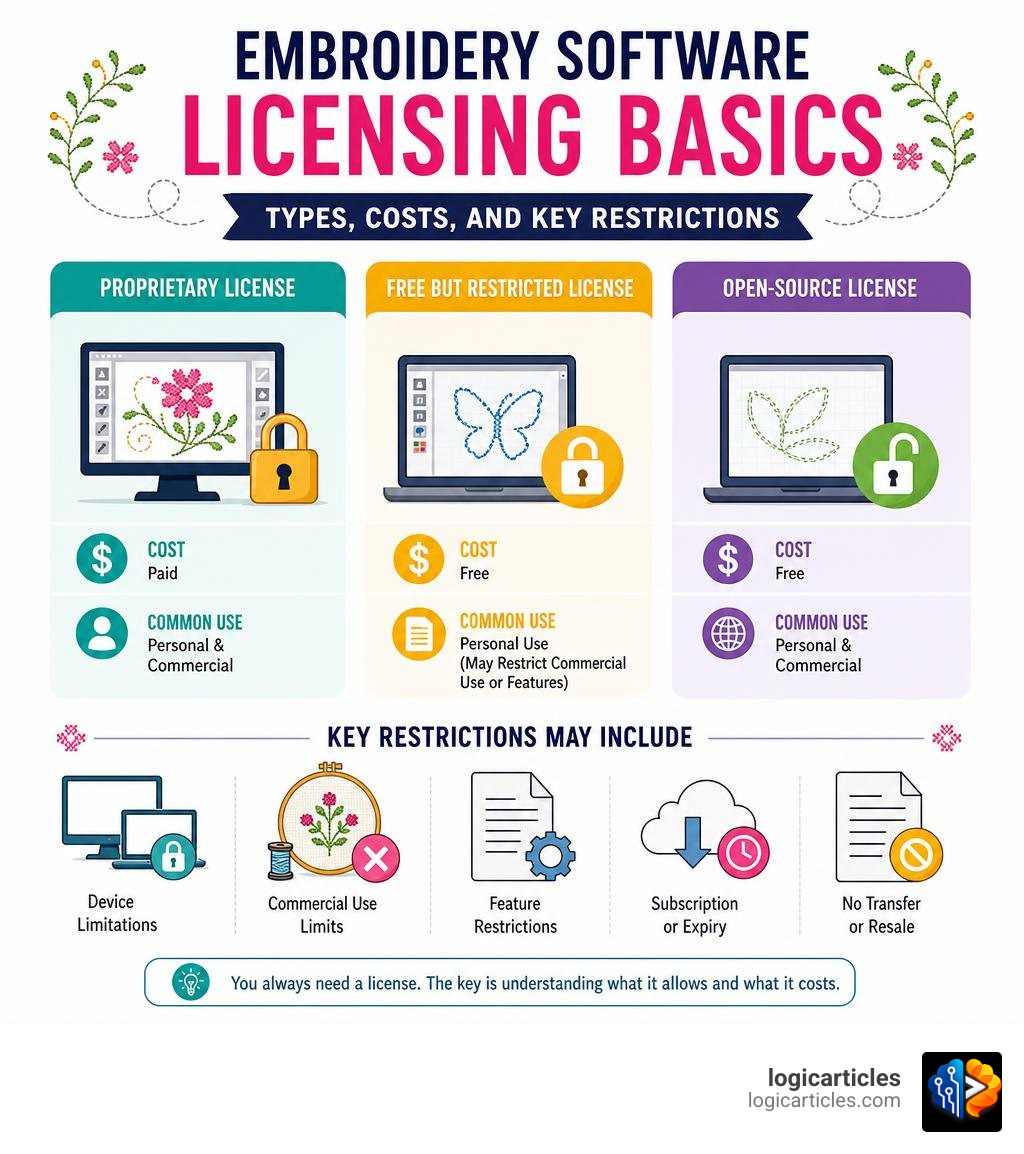
Do you need a license to use embroidery software? The short answer is: yes, in almost every case.
Here is a quick breakdown:
- Paid proprietary software (like Hatch, Wilcom, or BERNINA) requires you to purchase and accept an End User License Agreement (EULA) before use.
- Free but restricted software (like SewArt or Embrilliance Express) comes with its own license terms that may limit commercial use or features.
- Open-source software (like Ink/Stitch) is free and licensed under open terms — but it still has a license. It just does not cost money.
So the question is not really whether you need a license — you always do. The real questions are: what kind of license, what it allows, and what it costs.
Most people assume that buying embroidery software is like buying a toaster — pay once, use however you like. But software works differently. When you pay for embroidery software, you are not owning it. You are buying the right to use it under specific rules.
Those rules vary a lot. Some licenses let you install on multiple computers. Others lock you to one device. Some allow commercial sales of finished embroidered goods. Others restrict you to personal use only.
Getting this wrong can lead to real problems — from losing access to your software to facing legal liability.
Do I Need a License to Use Embroidery Software?
When we step into digital embroidery, we often focus on the fun parts: choosing thread colors, watching the needle fly across the fabric, and seeing our creative visions come to life. However, behind every beautiful stitch-out is a complex program that translates digital artwork into precise machine commands.
To use this program, we must have a valid license.
In the software industry, there is a massive legal difference between “owning” a piece of software and “licensing” it. When we buy a physical embroidery machine, we own that physical object. We can modify it, sell it, or paint it bright pink if we want to. But when we acquire embroidery software, we do not own the code. Instead, the developer grants us a non-exclusive, limited license to run their program on our computers.
This licensing requirement applies across the board, but it looks very different depending on the type of software we choose:
Proprietary Embroidery Software
High-end suites from major developers require a paid license to run. These programs are often highly sophisticated, representing decades of development. Because they serve a highly specialized, niche market rather than a massive consumer audience, developers must charge premium prices to sustain their businesses. This is why professional suites can range from $1,000 to over $4,000.
To protect their intellectual property, these developers use strict licensing agreements enforced by digital activation keys, user accounts, or physical security USB dongles. If you are looking for beginner-friendly paid options that won’t overwhelm you, we break down the best choices in our guide to the Easiest Embroidery Software to Use in 2026 Top Beginner-Friendly Picks.
Free and Open-Source Software
If you do not have thousands of dollars to spend, you might turn to open-source alternatives. The most famous of these is Ink/Stitch, which operates as an extension of the vector graphics editor Inkscape.
Does open-source software require a license? Yes! However, instead of a restrictive proprietary license, it is protected under open-source agreements like the GNU General Public License (GPLv3). This license permits you to download, modify, and use the software completely free of charge, even for commercial projects.
Other creative open-source libraries, such as the PEmbroider library developed for artists and educators, utilize unique dual-licensing models. For instance, you can review the LICENSE for PEmbroider, which combines the GPLv3 with ethical terms like the Anti-Capitalist Software License. This specific ethical license allows individuals, non-profits, and worker cooperatives to use the tool for free, but restricts commercial exploitation by large corporate entities.
Understanding Embroidery Software License Terms and EULAs
Before we can even open a newly installed embroidery program, we are usually met with a giant wall of text and a little box that says, “I accept the terms of the agreement.” This is the End User License Agreement (EULA).

While most of us are tempted to click “Agree” as fast as humanly possible, understanding these terms is crucial—especially if we run an embroidery business. The EULA is a legally binding contract that outlines exactly what we can and cannot do with the software and the designs included within it.
To understand the legal landscape, we have to look at how federal courts view digital embroidery. There is a fascinating intersection here between copyright law and contract law:
- The Copyright Law Perspective: Historically, some federal courts have ruled that certain storage media containing embroidery data (like older memory cards) contain machine instructions rather than interactive, creative computer programs. Under rulings like the 8th Circuit’s 2006 Action Tapes case, raw data files that simply tell a machine where to drop a needle may not be protected by federal software copyright laws in the same way interactive programs are. Furthermore, under standard copyright principles, once we buy a pattern, the finished physical item we stitch out is considered a “utilitarian object.” Copyright law generally does not prevent us from selling physical garments made from a pattern. You can read more about these fascinating legal distinctions in this detailed resource on Copyright Law – Embroidery Designs.
- The Contract Law Perspective: Even if copyright law gives us the right to sell physical items made from a pattern, a click-through EULA is a private contract. When we click “I agree” during installation, we contractually bind ourselves to the developer’s terms. If those terms say, “You cannot sell physical items made with our built-in designs,” we are contractually obligated to obey that restriction, regardless of what general copyright law says.
A great example of this is the BERNINA V9 EULA. This agreement grants us the right to install the software and use its powerful digitizing tools. It also grants us commercial rights to use the built-in embroidery designs and integrated fonts on physical fabrics for sale or advertising.
However, it strictly prohibits us from selling or distributing the raw digital design files themselves in their original form. If we want to sell digital files created using the software, they must be significantly and obviously modified from the original built-in assets.
Perpetual vs. Subscription: How Licensing Models Affect Your Rights
The way we pay for and access our embroidery software has shifted dramatically over the last few years. Traditionally, embroidery software was sold under a perpetual licensing model. We paid a large upfront fee, received a physical box with a CD-ROM and a physical USB security dongle, and owned the right to use that specific version of the software forever.
Today, many developers are moving toward subscription licensing models or “Digital Editions” that eliminate physical dongles entirely. While this makes accessing the software easier, it introduces new requirements for internet connectivity and license validation.
Let’s look at how these two models compare in practice:
Perpetual Licenses (The Traditional Route)
With a perpetual license, we pay once and can use the software indefinitely. However, modern perpetual licenses are rarely completely offline. For example, Hatch Embroidery 4 offers a perpetual purchase, but it requires an active internet connection for initial activation, registration, software updates, and even for saving designs.
While we can use Hatch 4 offline, we must reconnect to the internet at least once every 30 days to validate our license. If we stay offline longer than 30 days, we lose the ability to use key features or save our work until we reconnect.
Subscription Licenses (The Modern Route)
Subscription models allow us to pay a lower monthly or annual fee to access the software. The benefit is that we get free, immediate updates to the newest versions without paying upgrade fees. The downside is that if we stop paying, we lose access to the software entirely.
Furthermore, subscription models require frequent “phone-home” internet checks to ensure our subscription is active. For instance, Wilcom’s EmbroideryStudio Digital Edition allows offline use for up to 20 days without an internet connection. After 20 days, the software requires online license verification, or it will temporarily lock us out.
To help you visualize these differences, we have mapped out how these licensing models affect your daily use:

| Feature | Perpetual License | Subscription License |
|---|---|---|
| Upfront Cost | High (often $1,000 to $4,000+) | Low (monthly or annual fee) |
| Software Ownership | Right to use that version indefinitely | Temporary access; software stops working if subscription ends |
| Upgrades to New Versions | Often require an additional upgrade fee | Included for free as long as subscription is active |
| Offline Usage Window | Typically 30 days (e.g., Hatch 4) before validation is required | Typically 20 days (e.g., Wilcom Digital Edition) |
| Internet Dependency | Mandatory for activation and periodic validation | Mandatory for frequent subscription checks and updates |
Frequently Asked Questions About Embroidery Software Licensing
Navigating the legalities of software compliance can feel like walking through a minefield of jargon. To make things simple, we have compiled and answered the most common questions embroiderers ask about keeping their software use fully legal and compliant.
Do I need a license to use embroidery software for commercial sales?
Yes, but the type of license you need depends entirely on whether you are selling physical embroidered items or digital design files.
If you are digitizing your own completely unique designs from scratch using software like Ink/Stitch or a paid digitizer, you own the copyright to your creations. You can sell those digital files or stitch them onto physical shirts, hats, and bags to sell at craft fairs without needing any extra commercial license.
However, if you are using built-in designs, pre-made templates, or digital fonts that came with your software, you must consult the EULA. Most professional software packages clear their built-in designs for physical commercial use, but they strictly forbid you from reselling the raw digital files.
Font licensing is particularly strict. When we use pre-digitized embroidery fonts, our rights are often tiered based on our production volume. For example, under a standard Embroidery License – Font Kong, the usage rights are clearly defined by business size:
- Personal License: Covers unlimited personal projects only (no commercial sales allowed).
- Small Business License: Covers 1 to 100 commercial physical copies.
- Medium Business License: Covers 100 to 1,000 commercial physical copies.
- Corporate License: Required for commercial production exceeding 10,000 pieces.
Additionally, most font licenses restrict the installation of the font files to one workstation and one embroidery machine at a time.
Do I need a license to use embroidery software on multiple computers?
You do not necessarily need to buy multiple separate licenses, but you must adhere to your software’s specific multi-device policy.
Different brands handle this in very different ways:
- Wilcom EmbroideryStudio Digital Edition: Allows you to install the software on up to three devices. However, only one device can be actively used at any given time. This applies to both perpetual and subscription license holders.
- Embrilliance Platform: Offers an incredibly user-friendly licensing model. A single Embrilliance license allows you to install the software on as many computers as you personally own. Even better, it features native cross-platform compatibility, meaning you can run your single license on both a Windows desktop at home and a MacBook on the go without paying extra fees. If you are trying to figure out which module fits your workflow, take a look at our guide on Which Embrilliance Software Do I Need?.
Always check your software’s EULA to see if they allow concurrent usage (running the program on two computers at the same time) or if they limit active use to one machine at a time.
Can I transfer or resell my embroidery software license?
This depends entirely on the software brand’s specific transfer policy.
Historically, many software companies prohibited the transfer of licenses to prevent second-hand markets from competing with their new sales. However, some customer-first brands make this process incredibly simple and free.
For example, if you decide to upgrade your setup or sell your embroidery business, you can easily transfer your Embrilliance titles to a new owner. According to the FAQ – Embrilliance Embroidery Software, the process is straightforward:
- Contact the software support team and provide the serial numbers you wish to transfer.
- Support will deactivate your original serial numbers to ensure they can no longer be used on your devices.
- Support will then generate and issue a brand-new set of serial numbers to the new owner completely free of charge.
When buying second-hand software on platforms like eBay, we must be incredibly careful. If a listing claims to sell high-end embroidery software for a fraction of the retail price and states “dongle not required” or “no activation key needed,” this is a massive red flag. These are almost always pirated, cracked copies of the software.
Using unlicensed or pirated software is not only illegal—carrying severe civil and criminal penalties under international copyright treaties—but it also exposes your computer to dangerous malware and viruses. Always purchase your software directly from the developer or an authorized dealer to ensure you get a legitimate, supported license.
Conclusion
At the end of the day, securing the correct license for your embroidery software is about more than just staying on the right side of the law. It is about protecting your creative business, ensuring your software remains stable and updated, and giving yourself peace of mind while you work.
Whether you choose a free, open-source tool like Ink/Stitch, a flexible and modular system like Embrilliance, or a high-end professional suite like Wilcom or Hatch, taking the time to understand your license terms will save you from software lockouts and legal headaches down the road.
If you want to keep exploring how different tools can elevate your crafting projects, dive into our curated guides in the logicarticles Best Software Category to find the perfect digital tools for your creative journey!