What Logos Bible Software Actually Is (And Why 6 Million People Use It)

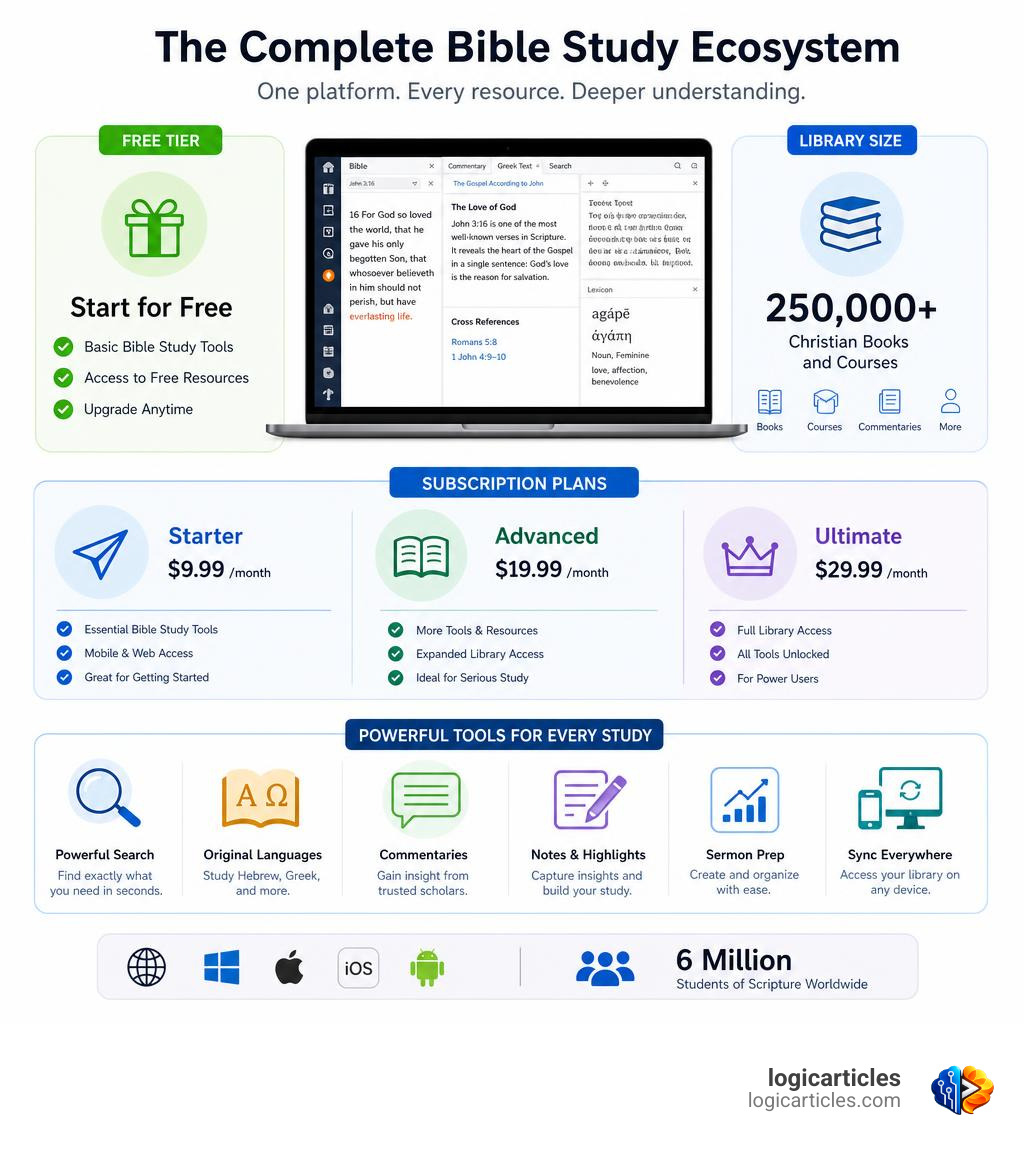
Logos Bible Software is the world’s most widely used digital Bible study platform, combining a massive library of over 250,000 Christian books with powerful research tools — all in one searchable app.
Quick answer for busy readers:
- What it is: A digital Bible study platform with tools for search, original language study, sermon prep, and academic research
- Who it’s for: Pastors, seminary students, small group leaders, and everyday Bible readers
- Cost: Free to start; paid plans from $9.99/month
- Library size: 250,000+ Christian books and courses
- Users: 6 million students of Scripture worldwide
- Platforms: Web, Windows, macOS, iOS, Android
- Ratings: 4.9/5 on iOS (163K ratings), 4.8/5 on Google Play (54.7K reviews)
Studying the Bible well takes time, good resources, and the right tools. Most people don’t have all three.
That’s the gap Logos fills. Instead of hunting through a shelf of commentaries or switching between a dozen browser tabs, Logos puts your entire theological library in one place — fully searchable in seconds.
One longtime user put it simply: it’s like having a 24/7 Bible research assistant available for as little as 27 cents a day.
Whether you’re leading a small group on Sunday or writing a seminary paper at midnight, Logos is built to meet you where you are.
What is Logos Bible Software and Who Is It For?
To understand The World’s Most Powerful Bible Study Platform, we have to look at how Bible study has changed over the last three decades. For over 30 years, Logos has been building a bridge between deep theological scholarship and modern technology. Today, it serves over 6 million students of Scripture, with more than 750,000 active Christians using the platform every single month to dig deeper into the Word.
But Logos isn’t just a digital book reader. It is a highly integrated ecosystem where every word, cross-reference, historical event, and theological concept is linked to everything else. If you are tired of flipping through physical paper commentaries or copying and pasting footnotes manually, Logos offers a unified digital workspace designed to make your study efficient and profound.
Core Differences in the Logos Bible Software Experience
When you use the Logos Bible Study Platform, you immediately notice how different it is from standard reading applications.
- The Connected Library: In a typical e-reader, your books are isolated files. In Logos, your books talk to each other. If you are reading a verse in the Bible, your commentaries, dictionaries, and maps automatically scroll along with you, offering instant context.
- The Reverse Interlinear: This feature aligns the English translation directly with the original Greek or Hebrew text. You do not need a degree in classical languages to see the original word behind your translation, how it was used elsewhere, and what it means.
- Blazing Search Speed: Searching a physical library of 500 books for a specific phrase could take weeks. Logos searches thousands of volumes, articles, and footnotes in a fraction of a second.
Target Audience: From Everyday Readers to Seminary Students
We often get asked: “Is Logos too advanced for me?” The short answer is no. While the software is powerful enough for doctoral research, its tiered design makes it accessible to anyone who wants to grow.
- Pastors & Preachers: Perfect for sermon preparation, building outlines, finding illustrations, and managing a weekly preaching calendar.
- Seminary Students: An essential tool for writing academic papers, translating original languages, and automatically generating citations in standard academic formats.
- Small Group & Ministry Leaders: Ideal for quickly compiling discussion guides, verifying historical context, and preparing lesson plans.
- Everyday Bible Readers: Great for anyone who wants to move past surface-level reading and understand the cultural, historical, and literary depth of the Bible.
Key Features and Original Language Tools
What makes Logos Bible Software stand out are the specialized tools designed to handle the heavy lifting of biblical research. Instead of spending hours organizing your notes or formatting citations, you can focus on the text itself.
Advanced Greek and Hebrew Study Tools
You don’t need to be an expert in ancient languages to benefit from Logos’s original language features. The software democratizes Greek and Hebrew study through several intuitive tools:
- Word Study Guides: With a single click on any English word, Logos generates a comprehensive report showing the original Greek or Hebrew lemma, its pronunciation, its translation variations across different Bible versions, and visual charts of its usage.
- Interactive Pronunciation: Hear how the original words sound.
- Morphological Searching: For advanced users, Logos allows you to search for specific grammatical structures (such as finding every aorist active indicative verb in the Gospel of John).
AI-Powered Smart Search and Sermon Assistant
As of May 2026, Logos has fully integrated responsible AI features designed to assist, not replace, your study process.
- Smart Search: This allows you to search your library using natural, conversational language. You can ask questions like, “What does the Bible say about the Trinity?” or “Where does Jesus talk about anxiety?” even if those exact words do not appear in the text. Smart Search will scour your books and present cited answers in seconds.
- Sermon Assistant: This tool helps pastors outline sermons, brainstorm creative illustrations, and generate thought-provoking small group discussion questions based on the biblical text they are studying.
- Bible Study Builder: Simplify the process of creating custom reading templates or study workflows tailored to your personal learning style.
Library Content and Educational Resources
Beyond the software features, Logos acts as a portal to a massive repository of Christian literature. With over 250,000 books and courses available, you can build a library that matches your theological background and interests.
This includes academic resources, historical commentaries, dictionaries, and university-level courses. For instance, members can access structured educational programs, such as the popular lectures by Dr. Creasy, which have earned over 15,000 5-star reviews on Audible. These courses provide a systematic, verse-by-verse walk through the entire Bible, making academic-level education accessible right from your living room.
Subscription Plans, Pricing, and the Free Version
Logos has transitioned to a highly flexible and affordable subscription model, making it easier than ever to get started without a massive upfront financial investment.
Comparing Premium, Pro, and Max Tiers
The subscription plans are structured into three main tiers: Premium, Pro, and Max. Each tier is designed to meet different study needs.
| Feature / Benefit | Premium Tier | Pro Tier | Max Tier |
|---|---|---|---|
| Best For | Everyday Readers & Small Group Leaders | Pastors & Seminary Students | Scholars, Researchers & Advanced Preachers |
| Monthly Price | $9.99/mo (or $8.33/mo billed annually) | $14.99/mo (or $12.50/mo billed annually) | $19.99/mo (or $16.67/mo billed annually) |
| Included Books | Up to 100+ foundational resources | Up to 300+ resources, commentaries | Up to 500+ premium theological volumes |
| Smart Search | Yes | Yes (Advanced) | Yes (Full Capability) |
| Original Languages | Basic word study tools | Full Greek/Hebrew datasets | Advanced linguistics & theological analysis |
| Sermon Builder | Basic templates | Full Sermon Assistant | Full Sermon Assistant + Advanced media |
| Annual Reward | No | 5% annual store coupon | 5% annual store coupon |
The Free Edition of Logos Bible Software
If you are not ready to commit to a monthly subscription, there is a robust, completely free version of Logos. This is not just a trial; it is a permanent free edition that gives you the core tools needed to start studying.
By signing up or using Logos Biblia, you get access to over 40 free Bibles and books. This includes the popular ESV (English Standard Version) translation, the Lexham Study Bible, and the massive Lexham Bible Dictionary — a resource that would span over 4,000 pages if printed in physical form. It is an incredible value for anyone wanting to test the waters of digital Bible study.
Ownership, Pricing, and the Legacy Fallback License
One of the biggest concerns with modern software subscriptions is: “What happens if I stop paying?” Logos has addressed this with a user-friendly policy called the Legacy Fallback License.
If you subscribe to a Premium, Pro, or Max plan for 24 consecutive months and then decide to cancel, you do not lose everything. Logos automatically grants you a Legacy Fallback License. This allows you to keep all the offline, local features of the software that you enjoyed during your subscription (excluding AI-assisted and cloud-only tools).
Furthermore, any books or libraries you purchase individually are yours to keep forever. You can buy a commentary set, cancel your monthly subscription, and still access your purchased books on any device.
Ready to find the plan that fits your study routine? You can explore the options and configure your account directly on the Subscribe to Logos page.
Frequently Asked Questions about Logos
Is there a completely free version of Logos?
Yes! The free edition of Logos comes with over 40 free resources, including the ESV Bible, the Lexham Study Bible, and the 4,000-page Lexham Bible Dictionary. You can use these resources forever without ever entering a credit card.
What happens to my books if I cancel my subscription?
Any books or libraries you purchase individually are yours forever. If you cancel your monthly subscription, you will only lose access to the specific catalog of books that were temporarily loaned to you as part of that subscription tier. If you subscribe for 24 consecutive months, you will also receive a Legacy Fallback License to keep your software’s offline features active.
What are the system requirements for Logos?
Logos can run directly inside your web browser, making it highly accessible. For the fully featured Windows and macOS desktop apps, you will need a modern operating system and at least 30 GB of free storage space to house your digital library.
If you plan to study on the go, you can find answers to mobile-specific questions on the Logos Mobile FAQ. If you run into technical issues during setup, you can consult the guide on Error messages when updating or installing Logos or troubleshoot network issues using the Unable to Connect to Logos.com – Logos Help Center support page.
Conclusion
At logicarticles, we love looking at how digital tools can simplify complex processes. Studying ancient texts like the Bible is no easy task, but the right technology makes it incredibly rewarding.
Logos Bible Software successfully turns what used to be hours of administrative desk work into a streamlined, joyful process of discovery. Whether you are using the free version to prepare your next small group lesson or utilizing the Max subscription to write an academic thesis, Logos provides the structure, speed, and depth you need.
If you are interested in how modern technology and machine learning are changing the way we learn, write, and study, check out our other guides in our logicarticles AI Tools Category.