What Practice Management Software Is the Best in 2026? Here’s the Short Answer

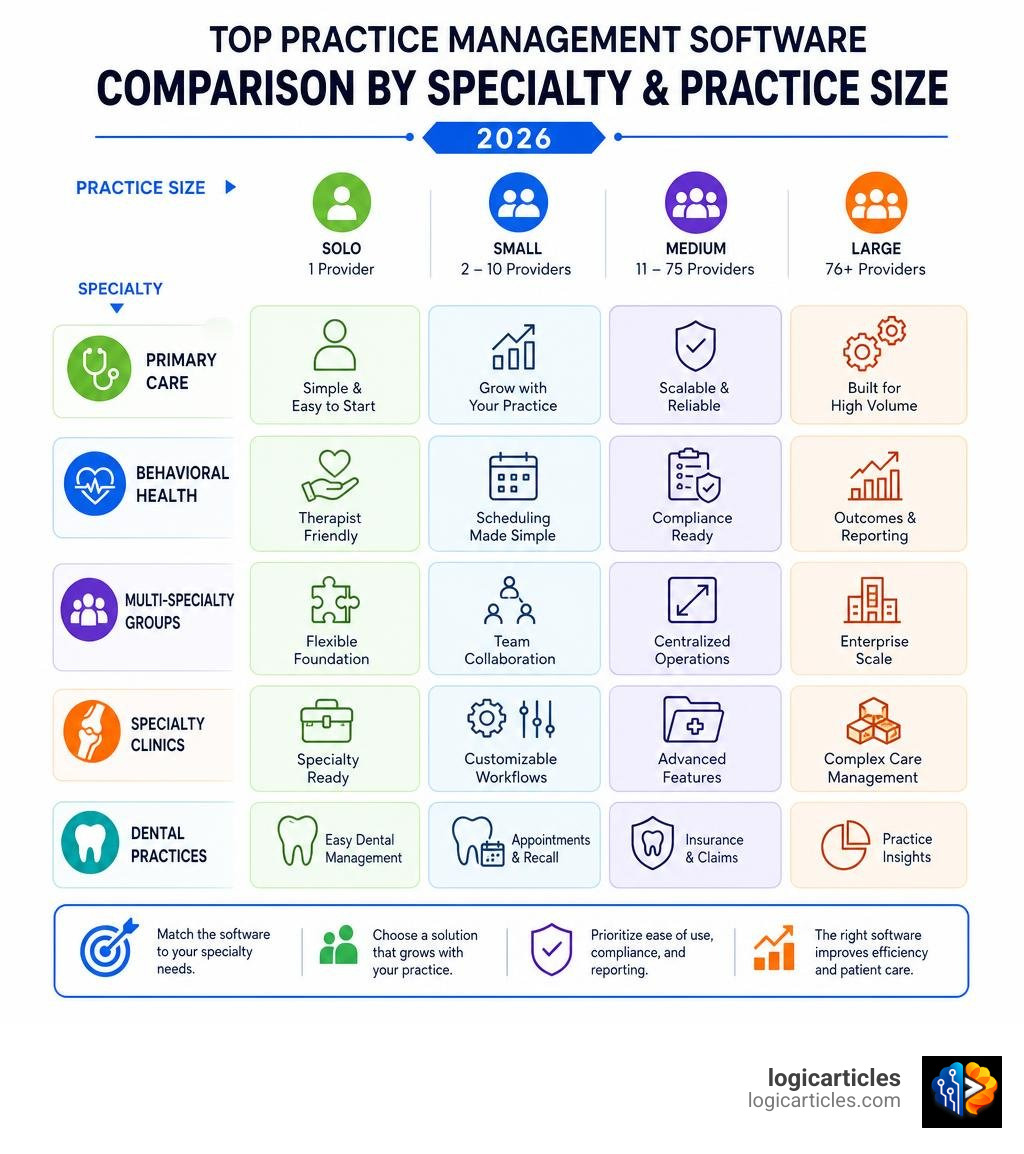
What practice management software is the best depends on your practice type, size, and specialty — but here are the top-rated options based on independent research, user reviews, and industry rankings:
| Practice Type | Best-Fit Software | Why |
|---|---|---|
| Solo behavioral health / wellness | SimplePractice or Practice Better | Simple, affordable, strong client portals |
| Independent practices (11-75 physicians) | athenahealth | 4x Best in KLAS winner for this segment |
| Complex ambulatory / multi-specialty groups | NextGen Healthcare | #1 Black Book ranking, 9 years running |
| High-volume primary care | eClinicalWorks | Serves 130,000+ providers, deep billing tools |
| Growth-focused independent practices | Tebra | Strong patient acquisition and billing features |
| Inventory-heavy or specialty clinics | CureMD or AdvancedMD | Modular, configurable, built for complexity |
No single platform wins for everyone. A tool that earns a 4.6-star rating from solo therapists may completely fail a 20-provider cardiology group — and vice versa.
Running a medical practice has never been more administratively demanding. A 2024 survey found that 77% of physicians say a significant portion of their time goes to non-reimbursable tasks. For primary care doctors, that number climbs to 85%.
Meanwhile, the average initial claim denial rate hit 11.81% in 2024 — a 2.4% increase from the year before. Every denied claim means more staff hours, more follow-up, and less revenue.
Practice management software exists to fix exactly these problems. It handles the business side of healthcare: scheduling, billing, insurance verification, and reporting. But choosing the wrong platform can make things worse, not better.
This guide cuts through the noise so you can find the right fit for your practice.
Understanding Practice Management Software vs. EHR
Before diving into vendor comparisons, we need to clear up a very common point of confusion: the difference between Practice Management Software (PMS) and an Electronic Health Record (EHR).
While they frequently live inside the same program suite, they serve two entirely different sides of your business.
- The EHR is clinical. It is designed for doctors, nurses, and clinicians. It houses patient medical histories, SOAP notes, lab results, clinical charting, and e-prescribing tools. If you are documenting a treatment plan or tracking clinical safety issues (similar to how you would log operational events using the Best Incident Management Software for Healthcare 2026), you are working inside the EHR.
- The PMS is operational and financial. It is designed for front-desk receptionists, office managers, and billing specialists. It manages patient registration, appointment scheduling, insurance eligibility checks, and billing claims.
Think of the PMS as the business engine and the EHR as the clinical workstation. When these two systems do not talk to each other, administrative chaos follows. Front-desk staff have to double-enter demographic data, billing teams struggle to find clinical codes to back up claims, and patients get frustrated by fragmented communication.
Key Differences in Database Architecture
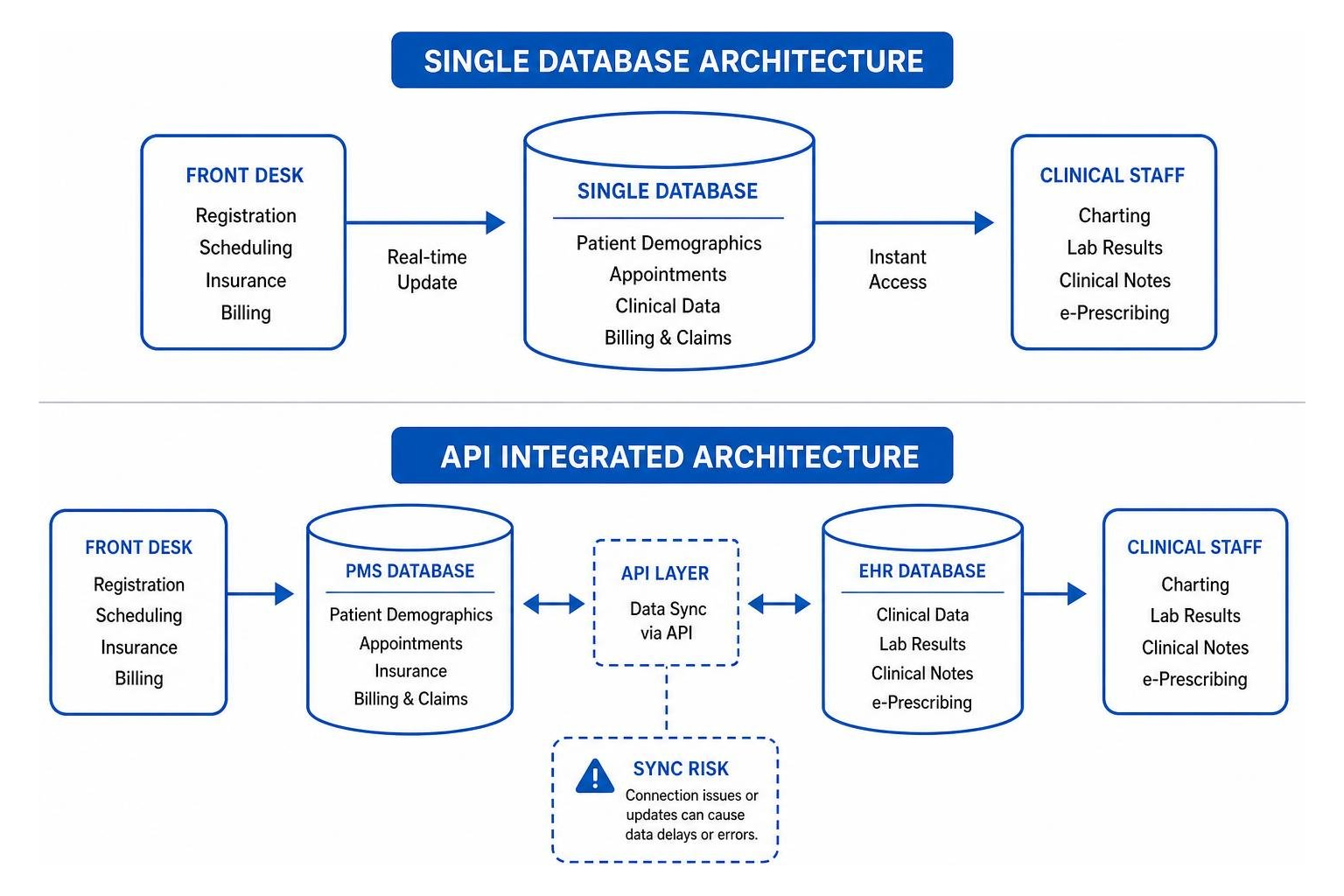
When you look for a unified system, you will generally run into two types of software design:
- Single-Database Architecture: This is where the EHR and PMS are built from the ground up as a single product sharing one database. When a patient changes their phone number at the front desk, it instantly updates in the clinician’s charting view. There is zero lag and no risk of synchronization errors.
- API-Integrated Architecture: This is where a vendor connects a separate EHR and a separate PMS using an Application Programming Interface (API). While this lets you use “best-of-breed” tools for each job, it introduces a synchronization risk. If the API connection drops or an update breaks the bridge, your scheduling and clinical data can fall out of sync, leading to billing errors or missed appointments.
Core Features of Modern Practice Management Systems
The best practice management systems act as a virtual workspace that coordinates the entire patient journey. Here are the core features to look for:
- Patient Registration & Demographics: Capturing high-quality patient data right at the start. Many systems now offer digital intake forms that patients can fill out on their phones before their visit, eliminating manual clipboard data entry.
- Real-Time Insurance Verification: Checking a patient’s insurance eligibility and copay responsibility before they even sit down in the waiting room. This is a game-changer for reducing downstream claim denials.
- Point-of-Care Collections: Giving front-desk staff the exact financial responsibility details so they can collect copays and outstanding balances during check-in or check-out.
- Robust Reporting and Dashboards: Giving you clear visibility into operational metrics like appointment volume, accounts receivable (A/R) days, and claim denial trends.
What Practice Management Software Is the Best for Your Specialty?
The perfect software for a physical therapy clinic will look incredibly clunky to a child psychologist. When asking what practice management software is the best, your specialty is the single most important filter.
For example, general practitioners need systems that seamlessly link scheduling, documentation, and care coordination to manage daily patient workflows efficiently.
Let’s look at how needs diverge across different specialty setups.
Evaluating What Practice Management Software Is the Best for Solo Practitioners
If you are a solo mental health therapist, dietitian, or wellness coach, you are likely your own receptionist, biller, and clinician. You do not need enterprise-level reporting or complex multi-location routing. You need simplicity, automation, and affordability.
For solo behavioral health and wellness professionals, platforms like SimplePractice and Practice Better are the gold standards:
- SimplePractice (trusted by over 185,000 practitioners with a 4.6/5 rating on Capterra) excels at paperless intake, automated appointment reminders, and incredibly simple insurance filing. It is built to let solo therapists run an entire practice from their phone.
- Practice Better (trusted by over 50,000 practitioners with a 4.7 rating on G2) is highly tailored to holistic health practitioners, nutritionists, and coaches. It stands out by integrating unique client accountability features, such as meal planning, lifestyle journals, and group programs, directly alongside standard scheduling and charting.
These platforms automate the tedious back-and-forth emails of scheduling, allowing clients to self-book through secure portals and pay online instantly.
Determining What Practice Management Software Is the Best for Large Ambulatory Groups
For large, multi-specialty ambulatory groups, solo-practitioner tools simply do not have the depth required to handle complex billing and multi-site coordination. These organizations need enterprise-grade scalability, deep financial controls, and highly customizable clinical templates.
Two giants dominate this space in 2026:
- athenahealth: A powerhouse for independent practices with 11 to 75+ physicians. The platform recently secured five 2026 Best in KLAS awards, including its third consecutive win for Overall Independent Physician Practice Suite. You can read more about this industry sweep in the athenahealth Best in KLAS awards report. athenahealth is highly regarded for its AI-native workflows and automated revenue cycle management that takes the pain out of claim denials.
- NextGen Healthcare: If your organization manages complex ambulatory workflows across multiple regional clinics, NextGen is incredibly tough to beat. Their practice management solutions were ranked #1 by Black Book Market Research for the 9th consecutive year in 2026. Learn more about their ranking criteria in the NextGen Healthcare Black Book ranking announcement. NextGen focuses heavily on documentation consistency, regulatory audit readiness, and seamless multi-site scheduling.
How to Assess Your Practice Needs and Budget
Choosing a practice management platform is a major financial and operational commitment. Before you begin talking to sales representatives, we recommend conducting a thorough internal audit of your practice’s current bottlenecks.
Start by asking yourself:
- What is our current claim denial rate? (If it is above 5%, you need a system with excellent built-in billing rules and clearinghouse integration).
- How many providers will we have in three years? (Ensure the pricing model scales affordably as you grow).
- Do we want to keep our current clinical EHR, or are we looking for a fully unified EHR/PMS suite?
Hidden Costs and Pricing Models
Software pricing is rarely as simple as the monthly sticker price. While solo practitioner tools often charge a straightforward subscription (ranging from $49 to $99+ per month), enterprise platforms use complex, custom-quote models.
Here is a quick look at how pricing models and implementation timelines scale:
| Platform Class | Pricing Model | Average Implementation Time | Key Hidden Costs |
|---|---|---|---|
| Solo / Small Practice (e.g., SimplePractice, Practice Better) | Flat monthly subscription per user | 4 to 8 weeks | Payment processing fees, premium add-ons (like AI scribes) |
| Mid-Sized Practice (e.g., Tebra, AdvancedMD) | Per-provider monthly subscription or % of collections | 3 to 6 months | Data migration fees, clearinghouse costs, customized template setup |
| Enterprise / Multi-Site (e.g., athenahealth, NextGen) | Custom tier pricing or percentage of monthly revenue | 6 to 12+ months | Comprehensive staff training, workflow customization, legacy data archiving |
We have seen a five-provider practice choose a software advertised at $100 per provider/month, only to find their actual year-one cost exceeded $15,000 due to hidden setup, data migration, and mandatory training fees. Always ask for a written breakdown of the total cost of ownership for year one.
Critical Questions to Ask During Vendor Demos
When you book a vendor demo, do not just let the representative show you a polished, pre-recorded walkthrough. Ask them to show you how the software handles your specific daily headaches.
Here are four critical questions to ask:
- “Can we see a live demonstration of how our specific specialty templates look and function?” (If they say you have to build templates yourself from scratch, prepare for a long implementation process).
- “What are your support SLA (Service Level Agreement) response times?” (You do not want to be stuck in an automated chat queue when your billing system goes down on a Monday morning).
- “What is your data portability policy if we decide to leave your platform in three years?” (Ensure you can export your patient records and billing history without paying exorbitant “data extraction” fees).
- “How does your platform handle data security and HIPAA compliance?” (Look for SOC 2 certification, end-to-end encryption, and robust role-based user permissions).
Overcoming Implementation and Workflow Challenges
Transitioning to a new practice management platform is notorious for causing temporary operational friction. Staff members are used to their old habits, and learning a new interface can slow down daily patient check-ins.
To prevent bottlenecks, we recommend involving your administrative and billing teams early in the selection process. When staff feel like they have a voice in choosing the tool, resistance drops dramatically. Additionally, ensure you build out clear staff schedules that allocate dedicated training time, rather than expecting employees to learn the new system on the fly during busy clinic hours. You can coordinate these training shifts effectively using the Best Employee Scheduling Software for Multi-Site 2026.
Minimizing Claim Denials with Automated Billing
The fastest way to get a return on your software investment is by cleaning up your billing cycle. Modern practice management tools use automated “claims scrubbing” and billing rules engines to catch coding mistakes before they are sent to payers.
A prime example is the Medical Practice Management Software | Veradigm suite. Veradigm features an advanced System Rule Manager and the award-winning Payerpath clearinghouse, helping practices achieve an impressive 98% first-pass clean claims rate. By finding and correcting coding errors in real-time based on specific payer rules, systems like this drastically reduce outstanding accounts receivable (A/R) days and prevent costly billing denials.
Leveraging AI and Automation in Practice Operations
In 2026, artificial intelligence is no longer a futuristic concept — it is actively running the front and back offices of highly efficient practices.
- Predictive AI Scheduling: Modern systems use machine learning to analyze historical patient patterns, predicting who is most likely to cancel or show up late. It then optimizes the daily schedule automatically to maximize provider time without double-booking.
- AI Medical Scribes: Tools like OmniMD’s AI Scribe or SimplePractice’s AI Note Taker listen to patient encounters and draft highly accurate clinical notes in real-time, saving doctors hours of typing at the end of the day.
This wave of practice automation is not unique to medicine. Across professional services, businesses are using tailored practice management tools to eliminate administrative work. For example, law firms use Clio Manage – Run Your Entire Practice Smoothly | Clio to automate client intake, court deadlines, and trust accounting. Meanwhile, accounting firms rely on Practice Management Software for Accounting Firms | Karbon to coordinate client communication, track budgets, and automate low-value admin tasks, saving employees an average of 18.5 hours per week.
Frequently Asked Questions About Practice Management Software
What is the difference between a PMS and an EHR?
A Practice Management System (PMS) manages the administrative and financial side of a practice (scheduling, registration, insurance checks, billing). An Electronic Health Record (EHR) manages the clinical side (charting, prescriptions, medical history, lab results).
How long does it take to implement a new practice management system?
Implementation timelines depend heavily on practice size. Solo practices can get up and running in 4 to 8 weeks. Mid-sized independent clinics typically take 3 to 6 months, while large enterprise health systems can require 6 to 12+ months to safely migrate legacy data and fully train staff.
Is cloud-based practice management software secure?
Yes, reputable cloud-based platforms are highly secure and often far safer than maintaining physical servers in a local office. Leading vendors use enterprise-grade data encryption, maintain strict HIPAA compliance, and hold SOC 2 security certifications to ensure patient data remains completely private.
Conclusion
Finding what practice management software is the best is not about chasing the platform with the most features or the highest aggregate star rating. It is about aligning your clinic’s daily operational bottlenecks with a software’s core strengths.
Whether you are a solo therapist looking to automate your intake with SimplePractice, a growing independent clinic leveraging athenahealth’s award-winning billing engine, or a multi-site ambulatory group scaling with NextGen Healthcare, the right tool will drastically reduce your administrative burden. By freeing your staff from tedious manual tasks, you can focus on what truly matters: delivering exceptional patient care.
Ready to explore more tools to optimize your business operations? Check out our complete reviews of the top business and operational tools in the logicarticles Best Software Categories.