Why Choosing the Right Ticketing Software Can Make or Break Your Support Operations
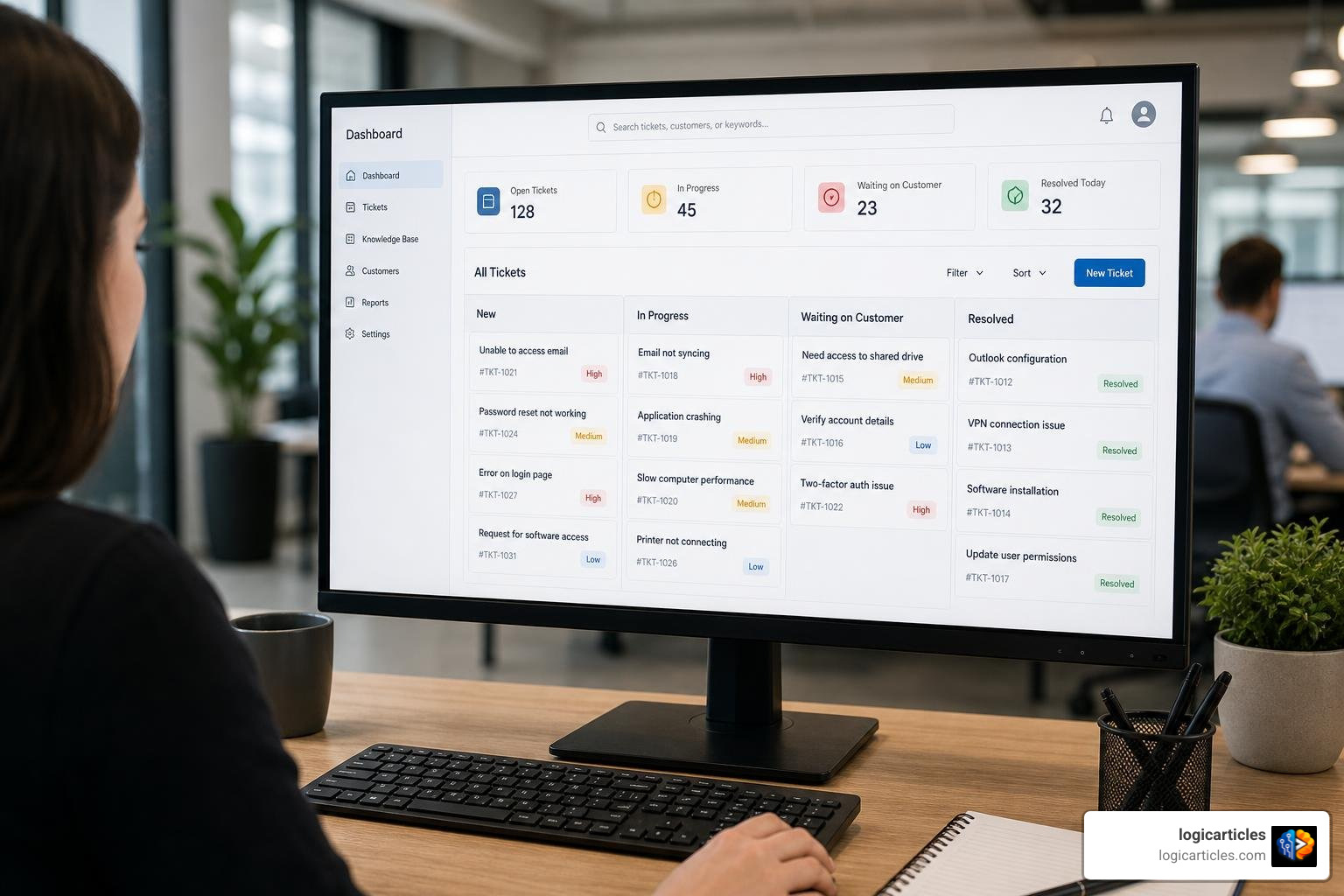
Which ticketing software is best? — here’s a quick answer before we dive deep:
| Use Case | Best Pick |
|---|---|
| Enterprise IT (ITSM) | Jira Service Management or ServiceNow |
| Large-scale customer support | Zendesk |
| SMB customer support | Freshdesk |
| Budget-conscious teams | Zoho Desk or Zammad |
| Free/open-source | osTicket or Spiceworks |
| AI-first resolution | Kayako |
| DevOps-aligned teams | Jira Service Management |
The right answer depends on your team size, use case, and budget. For most mid-to-large organizations (think 3,000 employees), Jira Service Management or Zendesk are the strongest all-around options — but the total cost of ownership matters far more than the list price.
Every support request is an opportunity. Handle it fast, and you build trust. Let it fall through the cracks, and you lose a customer — or frustrate an employee.
As organizations grow, managing requests through email threads and shared inboxes stops working. Things get missed. Context gets lost. Teams burn out.
That’s where ticketing software comes in. It gives every request a home — a tracked, assigned, prioritized record that moves through a defined process until it’s resolved.
But here’s the problem: there are dozens of platforms, each claiming to be the best. Some are built for IT teams. Others for customer-facing support. Some do both — sort of. Prices range from completely free to well over $150 per user per month, and the real cost often only becomes clear after you’ve signed the contract.
Choosing the wrong platform can cost far more than money. It can trigger agent revolts, SLA failures, and painful migrations six months later.
This guide cuts through the noise. We compare the top ticketing systems across pricing, AI features, omnichannel support, and scalability — so you can make a confident, well-informed decision.
Project Management vs. Ticketing Systems: Can One Tool Do Both?
When organizations reach a certain scale, a common debate arises: Do we really need two different tools for project management and help desk ticketing?
It is incredibly tempting to seek an all-in-one platform to simplify the software stack, reduce licensing overhead, and keep all data in one place. However, project management and support ticketing are fundamentally distinct disciplines.
Project management is proactive, milestone-driven, and structured around long-term goals, software development sprints, or complex task tracking. Ticketing, on the other hand, is reactive, incident-driven, and governed by strict Service Level Agreements (SLAs).
To see how specialized systems compare on the productivity side, you can read our breakdown of the Best Task Management Software In 2026 Tested.
Defining the Core Differences
To understand why combining these workflows is so difficult, we must look at how each system handles data and team focus:
- Incident Management vs. Project Planning: A help desk ticket represents a problem that needs immediate resolution (e.g., “The payment gateway is throwing 500 errors”). A project task represents a planned increment of work (e.g., “Refactor the database schema for the 2027 upgrade”).
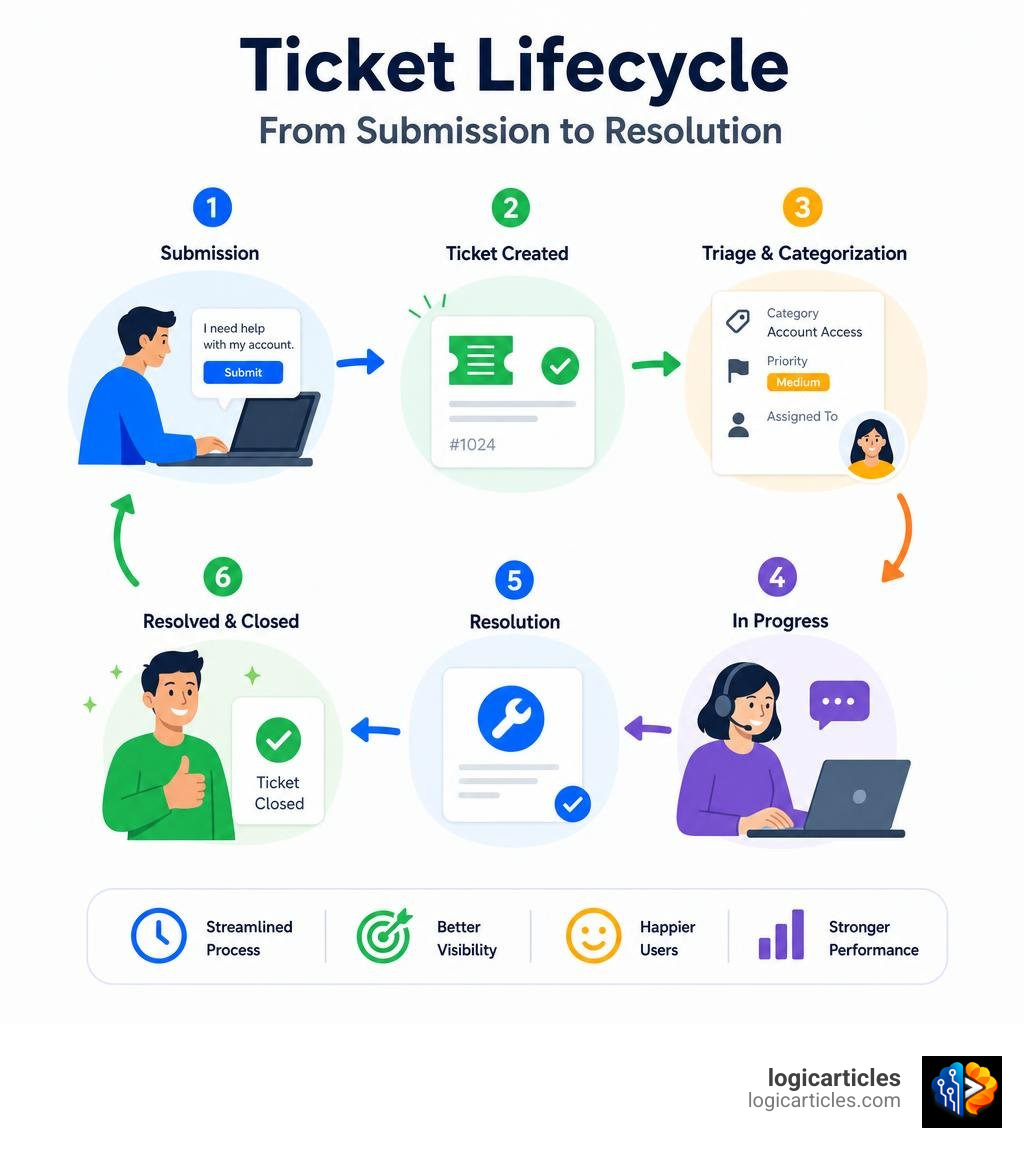
- Workflow Alignment: Ticketing workflows are linear and rapid (New to Assigned to In Progress to Resolved). Project management workflows often involve complex dependencies, resource allocation, and multi-stage agile boards.
- SLA Priority vs. Resource Capacity: Ticketing systems prioritize based on urgency and SLA timers. Project tools prioritize based on strategic roadmaps and team capacity.
While systems like Jira bridge this gap by offering Jira Software (for project planning) alongside Jira Service Management (for IT support), they remain two distinct modules sharing a common database. Trying to force a pure project tool like Trello or MS Planner to act as a high-volume help desk—or using a basic ticketing system to manage a complex migration project—almost always leads to operational chaos.
Licensing and Cost Efficiency for 3,000 Employees
For an organization with 3,000 employees, licensing models are where the financial rubber meets the road. If you choose a platform that charges a flat fee for every single user who interacts with the system, your budget will vanish overnight.
Efficient systems bypass this by separating agents (the specialists resolving the issues) from requesters (the employees or customers submitting the tickets).
For example, Jira Service Management allows your 3,000 employees to submit unlimited tickets through a self-service portal for free. You only pay for the actual IT service agents managing the queue. This licensing structure offers massive cost optimization while preserving complete stakeholder visibility through high-level dashboards.
Which Ticketing Software Is Best for IT vs. Customer Support?
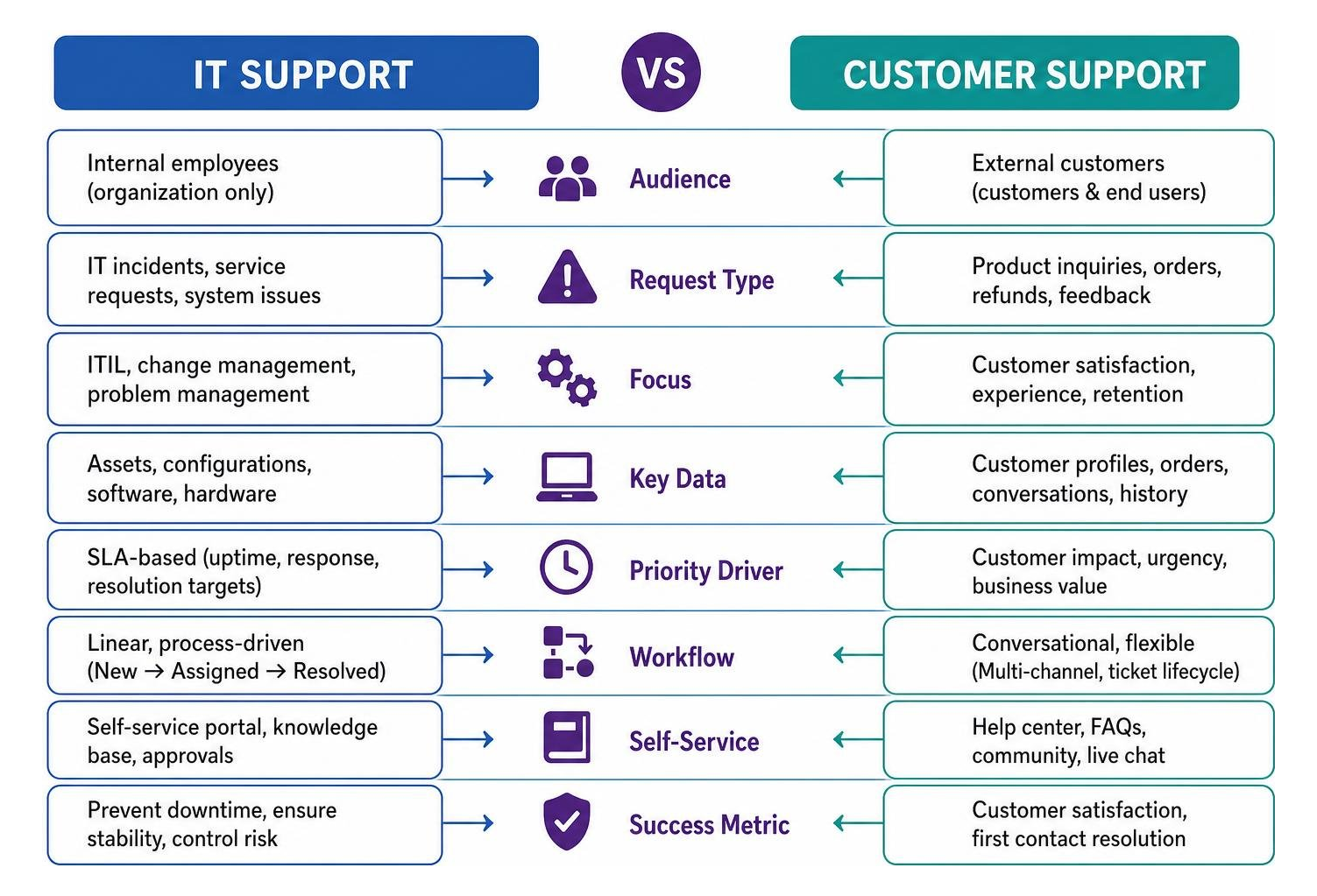
The features that make a ticketing system great for internal IT support are often completely different from what a customer-facing support team needs. Understanding this distinction is crucial when deciding Which ticketing software is best? for your specific department.
If your primary focus is keeping internal infrastructure running smoothly, you may also want to explore our guide on the Best Software Maintenance Services 2026 Costs Types Slas Best Providers.
Key Features for IT Support Teams
Internal IT support teams live and breathe ITIL (Information Technology Infrastructure Library) frameworks. They need tools designed for stability, risk mitigation, and technical troubleshooting:
- Asset Management: The ability to see exactly which laptop, server, or software license is associated with a ticket.
- Change Enablement: Built-in approval workflows to ensure system changes (like a major server migration) don’t bring down the company network.
- Incident & Problem Management: Grouping individual incidents (e.g., five users reporting “Wi-Fi is down”) into a single master problem ticket to address the root cause.
- Deep Integrations: Native links to monitoring tools, developer code repositories, and identity management systems (like Active Directory).
For these reasons, Jira Service Management and ServiceNow are the undisputed heavyweights of the IT service management (ITSM) arena.
Key Features for Customer-Facing Support Teams
Customer experience (CX) teams have an entirely different set of priorities. They care about customer satisfaction (CSAT), speed, and building brand loyalty:
- Omnichannel Unification: Seamlessly merging email, live chat, phone, and social media messages into a single conversation.
- Conversational Interface: The support experience should feel like a personal email or chat, not a rigid IT ticket. Tools like Help Scout excel at this.
- Customer Distress Index: Advanced reporting that flags accounts with declining sentiment or repeated issues, helping to prevent customer churn.
- Gamification: Built-in mechanics (like those found in Freshdesk) that turn ticket resolution into friendly competition, keeping agent engagement high in repetitive environments.
Key Features to Evaluate for Large-Scale Organizations
When evaluating software for a 3,000-employee company, basic features take a back seat to enterprise-grade scalability, robust automation, and bulletproof security.
To ensure your agents can resolve issues without searching through disconnected files, a centralized knowledge base is essential. Take a look at our analysis of the Best Knowledge Base Software In 2026 to see how to pair the two effectively.

Determining Which Ticketing Software Is Best for Omnichannel Support
At scale, customers and employees expect to reach you on their preferred channels without starting the conversation over when they switch. The best ticketing software must offer a truly unified agent workspace.
In a unified workspace, if a user starts an inquiry via live chat, follows up via email, and calls the support line, the agent sees all of this context in a single, chronological timeline. Zendesk remains the gold standard for omnichannel cohesion, though it requires significant administrative setup to unlock its full potential.
The Role of AI in Deflecting and Resolving Tickets
In 2026, AI is no longer just a buzzword that routes tickets based on keywords. Modern AI engines actively deflect tickets, draft highly contextual responses, and summarize long, messy conversation threads.
When looking at AI capabilities, we must separate basic routing from true resolution:
- Ticket Deflection: Intelligent bots suggest relevant articles as the user types their request, resolving the issue before a ticket is ever submitted.
- AI Copilots: Real-time translation, tone adjustments, and automatic conversation summaries keep agents from switching tabs and speed up first-contact resolution.
- Outcome-Based Resolution: Platforms like Kayako offer pre-trained AI agents designed to resolve complex, multi-step customer issues end-to-end without requiring human intervention.
Comparing Pricing, TCO, and Open-Source Alternatives
To understand the real financial impact of your choice, you must look past the initial sticker price. The total cost of ownership (TCO) over a 12-to-36-month period includes licensing, mandatory add-ons, implementation, and administrative overhead.
| Platform | Starting Price (Per Agent/Mo) | Best For | Key Trade-off / Hidden Cost |
|---|---|---|---|
| Zendesk | $19 – $115 | Enterprise CX | AI add-ons, telephony, and custom reporting scale costs quickly. |
| Jira Service Management | $22.05 (Annual) | ITSM & DevOps | Steep learning curve; requires dedicated admin resources. |
| ServiceNow | ~$100 – $150 (Est.) | Large Enterprise | High implementation fees and custom-only pricing. |
| Freshdesk | $15 (Free tier available) | SMB to Mid-Market | Mobile app can feel sluggish; advanced features require premium tiers. |
| Zoho Desk | $14 (Free tier available) | Budget Teams | User interface can feel dated compared to modern alternatives. |
| Zammad | Free (Self-Hosted) | Cost-Conscious | Requires internal IT resources for hosting and maintenance. |
| osTicket | Free (Open-Source) | Basic IT Support | No native cloud hosting; requires technical setup. |
Deciding Which Ticketing Software Is Best for Budget-Conscious Enterprises
If you operate a 20-agent customer support team on Zendesk Suite Professional ($115/agent/month), your base licensing cost is $27,600 per year. However, once you add AI copilot features, integrated telephony, workforce management (WFM), and advanced analytics, that cost routinely climbs to $50,000–$80,000 per year.
For budget-conscious teams, alternative pricing models can yield massive savings. For instance, Kayako offers a $1-per-ticket model with expert implementation included, which dramatically lowers the 36-month TCO by eliminating the ballooning costs of unused agent seats.
Can Free or Open-Source Tools Scale to 3,000 Employees?
Yes, but only if you have the internal technical infrastructure to support them. Open-source ticketing systems like Zammad and osTicket offer complete data sovereignty, zero licensing costs, and unlimited tickets.
For highly regulated industries, self-hosted open-source software is incredibly attractive because it ensures customer data never leaves your private servers. However, you must factor in the cost of your internal IT engineering hours. If your team spends dozens of hours patching servers, managing backups, and building custom API integrations, a “free” tool can quickly become more expensive than a paid SaaS solution.
(Note: If you run a highly specific business model like a theater, event venue, or booking platform, general help desks won’t fit your transactional needs. In those cases, you should evaluate specialized vertical software designed specifically for event management, box office operations, and transactional ticket bookings.)
Implementation Challenges and How to Avoid Them
Deploying a company-wide ticketing system is as much a human challenge as it is a technical one. Without careful planning, you run the risk of low adoption, messy data, and frustrated teams.
Overcoming User Adoption Resistance
An agent revolt can kill a software deployment faster than any technical bug. If your support team finds the new tool clunky, overly complex, or slow, they will find workarounds—like going back to personal emails or direct chat messages.
To prevent this:
- Involve Agents Early: Don’t let executive leadership choose a tool in a vacuum. Let your front-line agents run real workloads through a free trial.
- Leverage Gamification: Use points, badges, and leaderboards to make the transition fun and reward quick resolution times.
- Provide Intuitive Interfaces: Choose clean, modern layouts that require minimal training.
Preventing Schema Drift and Integration Failures
As your ticketing platform shares data with your CRM, internal databases, and communication tools, the underlying data models must remain perfectly synchronized.
If your CRM defines a customer account differently than your ticketing system, you will experience schema drift. This leads to broken automations, missing customer profiles, and inaccurate reporting.
Always map your data schema early, validate API rate limits, and ensure your webhooks are configured to trigger updates immediately after key events (like ticket closure or customer sentiment changes).
Frequently Asked Questions About Ticketing Systems
Can a ticketing system integrate with our existing CRM?
Yes. Most modern ticketing platforms offer native integrations with popular CRMs. This allows your agents to view a customer’s entire purchase history, subscription status, and account health directly inside the ticket view without switching tabs.
How long does it typically take to deploy enterprise ticketing software?
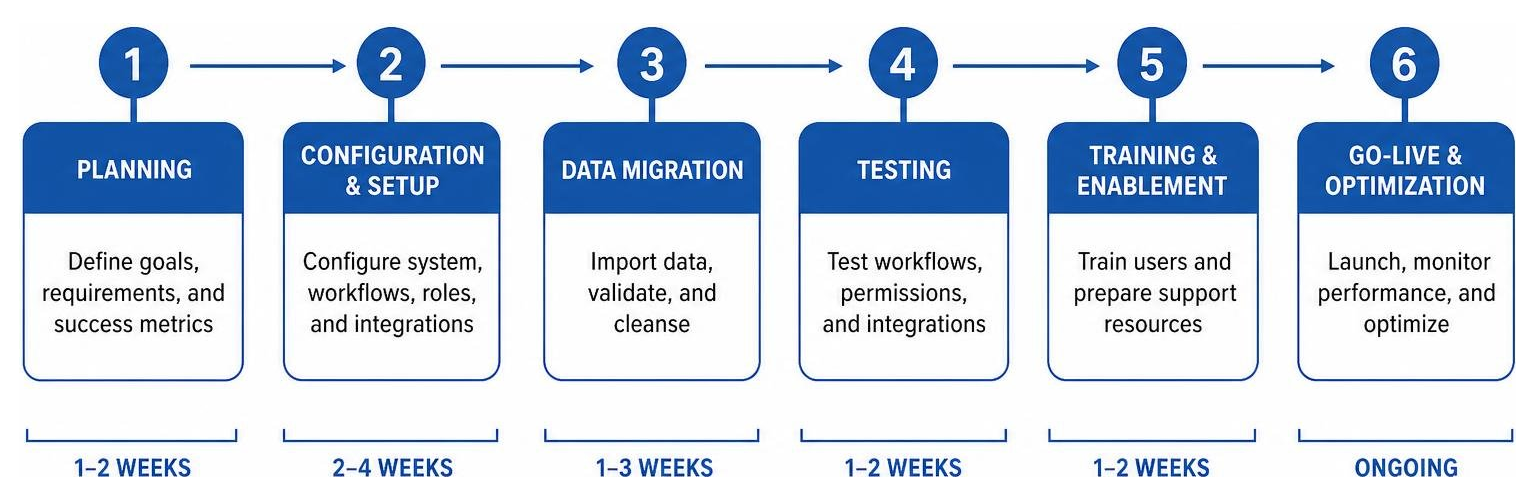
A basic setup can be completed in a few days. However, for a 3,000-employee enterprise requiring custom API integrations, single sign-on (SSO), data migration, and advanced routing rules, a realistic deployment timeline spans 4 to 12 weeks.
What is the difference between cloud-hosted and self-hosted ticketing systems?
Cloud-hosted (SaaS) systems are managed entirely by the vendor, offering instant updates, high uptime, and zero maintenance. Self-hosted (on-premise) systems require your own servers, giving you complete control over your security compliance and data sovereignty at the cost of manual maintenance.
Conclusion
Determining Which ticketing software is best? comes down to identifying your primary operational bottleneck. If you are aligning IT with software development, Jira Service Management is hard to beat. If you are scaling an omnichannel customer support team, Zendesk and Freshdesk offer the most robust feature sets.
Whatever you choose, remember to calculate the total cost of ownership over a 36-month window and run trial workloads with your actual team before signing an enterprise contract.
Ready to explore more enterprise software comparisons? Explore our curated software categories to find the perfect tools to power your business operations.