You Don’t Need to Pay $250 to Write a Professional Screenplay
The best free script writing software in 2026 is more capable than most writers realize. You can format, export, and submit professional-quality screenplays without spending a single dollar.
Here are the top free options at a glance:
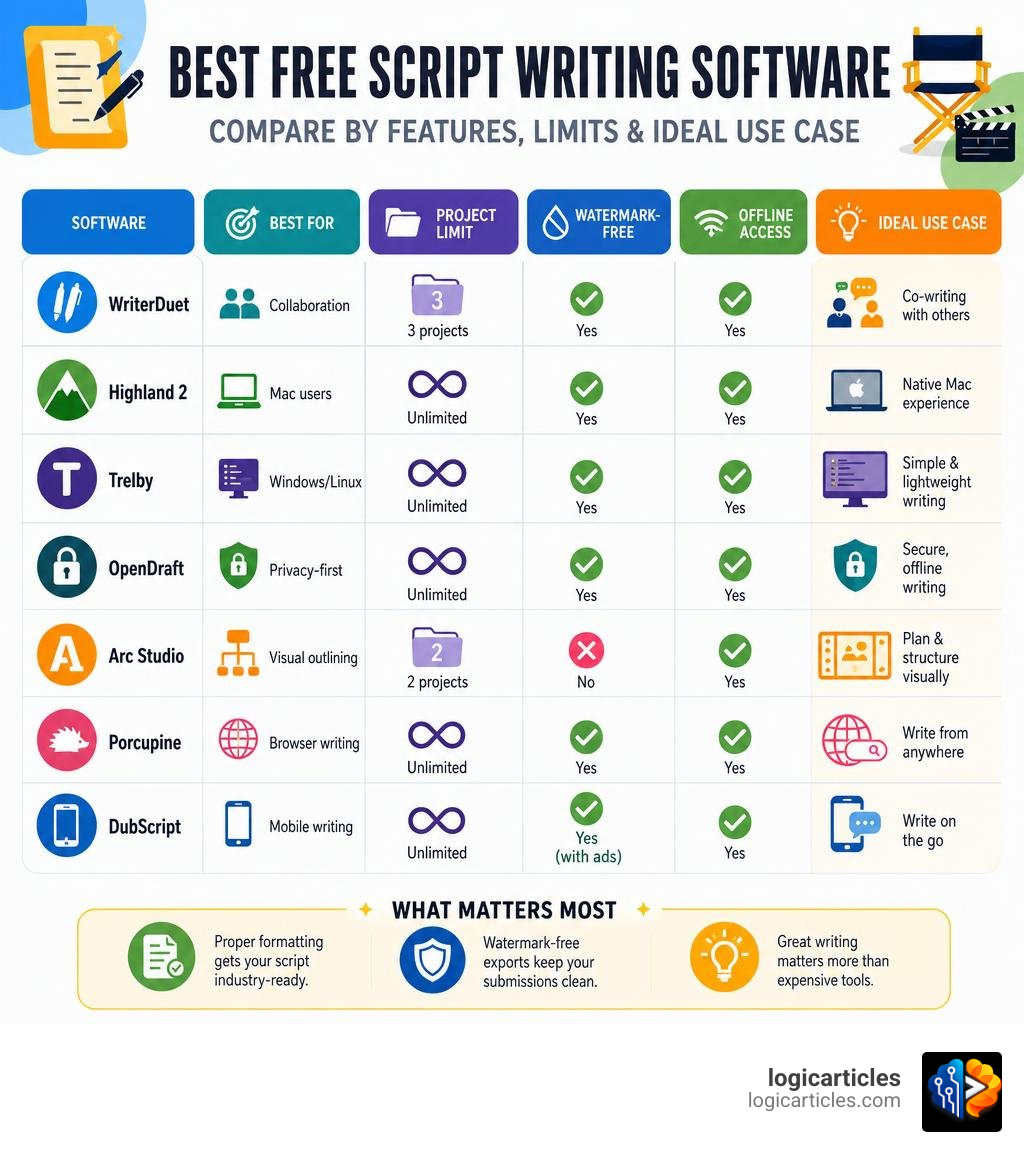
| Software | Best For | Project Limit | Watermark-Free | Offline |
|---|---|---|---|---|
| WriterDuet | Collaboration | 3 projects | Yes | Yes |
| Highland 2 | Mac users | Unlimited | Yes | Yes |
| Trelby | Windows/Linux | Unlimited | Yes | Yes |
| OpenDraft | Privacy-first | Unlimited | Yes | Yes |
| Arc Studio | Visual outlining | 2 projects | No | Yes |
| Porcupine | Browser writing | Unlimited | Yes | Yes |
| DubScript | Mobile writing | Unlimited | Yes (with ads) | Yes |
The truth is, software doesn’t make a screenplay professional — your writing does. Final Draft is used in 95% of Hollywood productions, but that’s because of production workflow needs, not because it makes scripts better. Multiple Oscar-nominated scripts have been written on free or cheap tools.
What actually matters is getting the formatting right and keeping watermarks off your submissions. Both are completely achievable with free software.
This guide breaks down exactly which free tools are worth your time, what their real limitations are, and how working writers use them strategically at different stages of their careers.
What Makes Screenwriting Software Professional-Grade?
When we talk about professional-grade screenwriting software, we are not talking about flashy artificial intelligence or bloated feature sets. In the film and television industry, “professional” translates to predictability, compliance, and reliability.
If you are transitioning from other creative disciplines—perhaps using the Best Free Drawing Software In 2026 7 Top Tools Artists Love to storyboard your scenes—you already know that having the right tool for the job saves hours of manual labor. For screenwriters, the right tool is one that handles the rigid, non-negotiable rules of screenplay layout automatically so you can focus entirely on your story.
Industry-Standard Formatting and Submission Success
The industry standard for screenplays is incredibly strict. A single page of a screenplay translates roughly to one minute of screen time, but this formula only works if your margins, line spacing, and fonts are mathematically precise.
A professional-grade tool must automatically manage:
- Margins: 1.5 inches for the left margin (to allow for binding), 1.0 inch for the right, and 1.0 inch for the top and bottom.
- Font: Exactly 12-point Courier Prime (or Courier). Standard sans-serif or proportional fonts are an immediate red flag for readers.
- Punctuation and Elements: Clean transitions, properly aligned character names, parentheticals, and dialogue blocks.
- Pagination: Smart page breaks that do not leave orphan character names at the bottom of a page.
When we submit a script to a producer, manager, or competition, we are being judged on our professionalism before they read a single line of dialogue. If your script layout looks amateurish, the reader will assume the writing is amateurish too.
The Danger of Watermarks on Spec Scripts
We cannot emphasize this enough: never submit a script with a software watermark.
Some “free” screenwriting tools let you write your entire screenplay for free but slap a giant “Created with [Software Name]” logo across the center or bottom of every exported PDF page. To an agency reader or competition judge, a watermark screams, “I am an amateur who isn’t committed enough to secure a clean PDF.”
It immediately breaks the immersion of your story and can get your script tossed straight into the rejection pile. When hunting for the best free script writing software, your absolute baseline requirement must be the ability to export a clean, watermark-free PDF.
Best Free Script Writing Software Options in 2026
Fortunately, the landscape of free writing software has evolved dramatically. Today, writers have access to powerful open-source, offline, and minimalist tools that don’t cost a dime and never impose watermarks on your hard work.
Many of these modern tools rely on the Fountain format—a plain-text markup language designed specifically for screenwriters. Writing in Fountain means your scripts are future-proof; they are stored as simple text files that can be opened in any text editor on Earth, ensuring you never suffer from corporate cloud lock-in.
Open-Source Champions: Trelby and OpenDraft
If you want absolute freedom with zero paywalls, zero project limits, and total privacy, open-source software is the way to go.
First, there is Trelby. We often describe Trelby as the reliable “Honda Civic” of screenwriting software. It is fast, lightweight, and works seamlessly across Windows and Linux platforms. Trelby enforces correct script formatting and pagination automatically, features an incredibly helpful character name database containing over 200,000 names, and includes a built-in PDF generator with customizable watermarks. It is completely free under the GPL license.
For writers seeking a more modern, collaborative, and visually rich open-source experience, OpenDraft is a revelation. Built as a privacy-first, zero-tracking alternative to commercial giants, OpenDraft runs 100% offline on your machine while still offering advanced features like drag-and-drop index cards, beat boards, and version history.
You can explore the development and download the software via GitHub OpenDraft v0.16.0 or check out the stable GitHub OpenDraft v0.13.7 release. Because it uses Tauri 2 and a Rust-based desktop framework, it is blazing fast on Mac, Windows, and Linux alike.
Browser-Based and Minimalist Tools
For writers who prefer a zero-install workflow that works on any machine with an internet browser, several minimalist options stand out.
Porcupine is a beautiful, free web app designed to let you write anywhere. It saves your files locally in your browser as portable Fountain files, meaning you don’t even need to create an account to start writing. It works fully offline and exports clean, industry-standard PDFs instantly.
Another fantastic web-based tool is OpenWrite. Running entirely as a single HTML file with zero external dependencies, OpenWrite can be run locally or accessed online. It features an automatic formatting engine, smart autocomplete, and a built-in “Script Doctor” that flags common formatting errors in real time.
Comparing Freemium Giants: WriterDuet vs. Arc Studio
If you want the polished user experience of premium software but aren’t ready to pay, the two freemium giants—WriterDuet and Arc Studio—offer highly competitive free tiers.

Feature Limits and Collaboration Capabilities
WriterDuet is used by over 2 million screenwriters, TV shows, and major blockbusters. Its free version is incredibly generous: it allows you to work on up to three complete projects with absolutely no page limits, no watermarks, and full export capabilities.
WriterDuet is the undisputed king of real-time collaboration. Even on the free tier, you can co-write with a partner in real time, see their cursor move, and use built-in text chat to brainstorm.
Arc Studio, on the other hand, is designed as a distraction-free, modern alternative to legacy software. The average time for an experienced screenwriter to go from skeptical to sold on Arc Studio is just 7.8 minutes because its keyboard shortcuts feel identical to Final Draft.
However, its free tier is more restrictive, limiting you to two projects and applying watermarks to PDF exports on its basic free plan. Where Arc Studio shines is its digital whiteboard, which features beat-cards and drag-and-drop story structuring tools that make planning your script incredibly intuitive.
Choosing the Best Free Script Writing Software for Your Workflow
Your choice between these two depends entirely on your personal workflow:
- Choose WriterDuet if you write with a partner, need to export watermark-free PDFs directly, or want to work on up to three scripts simultaneously.
- Choose Arc Studio if you are a solo writer who prioritizes visual outlining and story-mapping, and you don’t mind exporting your work to a Fountain file first to generate a watermark-free PDF elsewhere.
For writers on the go, you might also consider DubScript, a mobile-first Android app that allows unlimited scripts with no page limits (supported by occasional ads). If you are also managing visual assets or marketing materials for your indie film on a Mac, pairing your screenwriting tool with the Best Free Image Editing Software For Mac In 2026 can help you build a professional pitch deck without spending a dime.
Strategic Workflows and Frequently Asked Questions
Many working writers use a hybrid system to maximize the value of free tools. For example, you might use the visual beat-board of Arc Studio or the lightweight interface of Porcupine during the early development phase, then move your script to WriterDuet for real-time collaboration, and finally export to a plain-text Fountain file to keep your work future-proof.
If your creative interests extend into animation or indie game design, you can easily import these formatted scripts into the Best 3D Animation Software to begin pre-visualization and storyboarding.
Why the Best Free Script Writing Software is Perfect for Beginners
If you are just starting out, we strongly advise against buying expensive software. Writing your first screenplay is a commitment check.
Using the best free script writing software allows you to learn the rules of screenplay formatting, develop your unique voice, and finish at least two or three complete scripts without any financial risk. If you find yourself still writing consistently after a year, then you can consider investing in premium tools.
Key Indicators That It Is Time to Upgrade
You should only upgrade to a paid subscription when you hit these specific bottlenecks:
- Project Limits: You have outgrown your 2-to-3 project limits on freemium tools and need a unified dashboard for your entire portfolio.
- Active Production: Your script has been optioned, and you must generate daily shooting scripts, scene numbers, and colored revision pages for a production crew.
- Advanced Offline Sync: You need seamless, unlimited offline-to-cloud synchronization across multiple desktop and mobile devices.
FAQ: Can I write offline and export to Final Draft format for free?
Yes! Almost all of the tools mentioned in this guide—including WriterDuet, OpenDraft, Trelby, and Highland 2—support importing and exporting .fdx (Final Draft) files. This means you can write your script entirely offline for free, and if a producer asks for a Final Draft file, you can export it instantly without ever buying the software.
FAQ: Do professional Hollywood writers use free software?
Absolutely. Many professional writers use free or open-source software, particularly during the early drafting and development phases. John August, an established Hollywood screenwriter, actively developed Highland 2 to provide a cleaner, faster writing environment.
While Final Draft remains dominant in production offices for scheduling and budgeting purposes, the initial writing of spec scripts is frequently done on whatever tool the writer finds most comfortable.
FAQ: What is the top free option for Mac users?
For Mac users, Highland 2 is widely considered the gold standard. It is completely free, features zero paywalls, has no script limits, and exports clean, watermark-free PDFs. Highland 2 is built entirely around the plain-text Fountain format, offering a beautifully minimalist, distraction-free writing environment that Mac enthusiasts love.
Conclusion
Writing a professional screenplay in 2026 does not require a massive financial investment. By leveraging the best free script writing software—whether you choose the collaborative power of WriterDuet, the open-source privacy of OpenDraft and Trelby, or the minimalist beauty of Porcupine—you can deliver industry-standard, watermark-free scripts that let your storytelling shine.
Your script is your intellectual property. Don’t let expensive paywalls or restrictive software hold your stories back. Pick a free tool, master its shortcuts, and start writing your masterpiece today.
Ready to discover more excellent tools to supercharge your creative workflow? Explore more software guides on logicarticles to find the best free resources for your next big project!