Why Project Management CRM Software Is the Missing Link in Your Business

Project management CRM software combines two critical business functions — managing customer relationships and delivering project work — into a single connected platform.
If you’re evaluating your options, here’s a quick breakdown:
| What It Does | Why It Matters |
|---|---|
| Connects your sales pipeline to project delivery | No context lost when a deal closes |
| Keeps client data, tasks, and timelines in one place | Eliminates double data entry and app switching |
| Automates the handoff from sales to delivery teams | Faster starts, fewer missed requirements |
| Tracks project progress alongside customer history | Full visibility for everyone on the team |
| Integrates AI for risk alerts and workflow automation | Catch problems before they become crises |
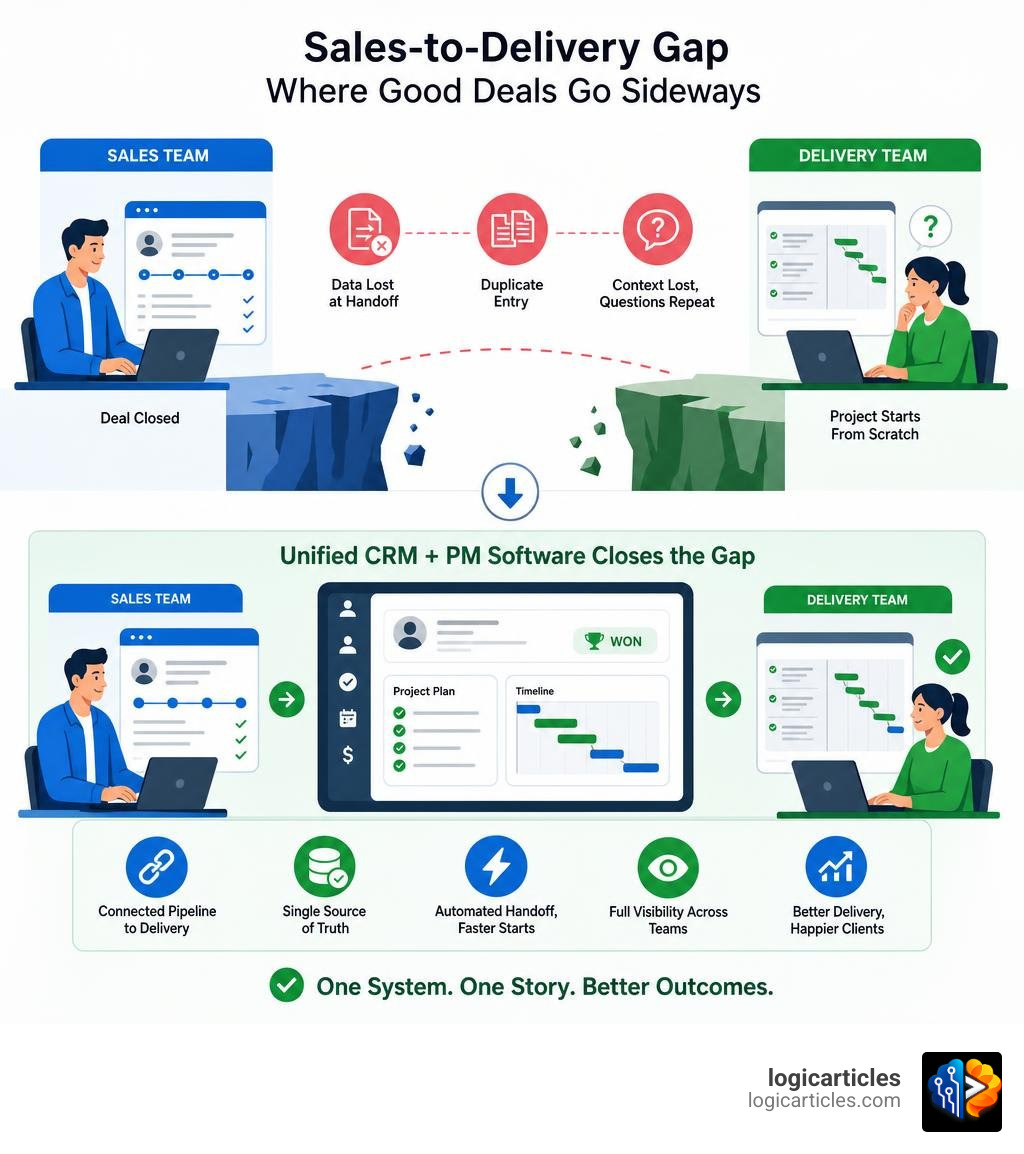
The average company uses over 900 apps. Most teams close deals in one tool and deliver work in another — and that gap is where good deals go sideways. Delivery teams ask clients the same questions sales already answered. Project scope gets misread. Timelines slip.
The result? Frustrated clients, lost revenue, and a delivery team starting from scratch every time.
A unified CRM and project management platform fixes this by keeping everything — from the first sales call to the final invoice — in one connected system.
Understanding CRM Project Management vs. Traditional Tools
To understand why a combined system is such a game-changer, we have to look at how traditional tools isolate teams. In most companies, the sales department lives in the CRM, while the delivery or project team lives in a standalone project management tool. This creates operational silos, meaning data must be manually passed back and forth like a game of telephone.

What is CRM Project Management?
CRM project management is the practice of using a unified system to plan, execute, and track client projects alongside their contact records, sales histories, and communications. Instead of treating “sales” and “delivery” as separate phases, this approach views them as a single, continuous customer lifecycle.
By housing your customer database and your operational workflows in one system, you gain unparalleled efficiency. Account managers can check the status of active projects without leaving the client’s profile, and project managers can view the original sales notes, emails, and signed proposals without asking the sales rep. For a deeper look at managing these relationships, check out our guide on Client Management Apps.
Native Tools vs. Fragile Integrations
Many businesses try to solve the silo problem by using API connectors or third-party middleware to link their separate CRM and project management tools. While this sounds good on paper, these integrations are often fragile by design. They require ongoing IT maintenance, suffer from data lag, and easily break whenever one of the platforms pushes an update.
When you use a native solution, you get a true two-way sync that never breaks. Changes made to a client profile instantly reflect across active projects, and updates on project milestones are visible to the sales team in real time. If your team operates heavily within a Microsoft ecosystem, utilizing native modules like Project Management in Microsoft 365 | So365 can provide a highly reliable, single source of truth without the headache of custom-built integrations.
The Strategic Value of Unifying Sales and Delivery
When sales and delivery teams don’t talk, your bottom line suffers. Bringing them together inside a single project management crm software platform ensures that your business can scale smoothly without sacrificing the quality of your customer service.

Why Your Business Needs Project Management CRM Software
The transition from a “Closed-Won” deal to an active project is historically where client onboarding experiences fall apart. In a traditional setup, the moment a contract is signed, the project goes dark for the client while the internal delivery team scrambles to understand what was promised.
With a unified platform, the closed deal automatically triggers the creation of a new project. Sales notes, technical requirements, and timeline expectations carry over instantly. This level of automation is crucial for modern businesses looking to scale quickly. If you are currently building out your operational toolkit, explore our curated list of the Best Startup Growth Tools For 2026.
Platforms built from the ground up to connect these stages, such as CRM and Project Management Software — All-in-One Platform | Corcava , ensure that your customer data flows seamlessly into active delivery workflows.
Preventing Scope Creep and Boosting Satisfaction
Scope creep is the silent killer of project profitability. It happens when clients request additional work that wasn’t in the original contract, and the delivery team—unaware of the exact contract terms—agrees to do it.
A project management CRM prevents this by linking the active project directly to the original contract and proposal. When a client asks for a modification, the project manager can easily reference the original scope of work. Furthermore, features like client portals allow you to share project progress, timelines, and milestones transparently. This builds trust and keeps communication centralized, preventing misunderstandings. For example, using tools like Project Management Software | Pipedrive allows teams to keep their project delivery tightly aligned with the closed sales opportunity, protecting margins and boosting client satisfaction.
Essential Capabilities and Modern Innovations
As we navigate 2026, the feature sets of project management crm software have evolved significantly. It is no longer just about tracking tasks; it is about automating entire business processes from pipeline to payout.
Key Features of Project Management CRM Software
A robust project management CRM should offer a balance of sales tracking and project execution features. Here are the must-have capabilities to look for:
- Interactive Kanban Boards & Gantt Charts: To visualize both your sales pipeline and your project schedules.
- Built-In Time Tracking: To track billable hours directly against specific tasks, projects, and clients.
- Automated Invoicing: To convert tracked time and completed milestones into professional invoices with a single click.
- Centralized Client Timelines: A chronological feed of every email, call, file, and task associated with a client.
Having these tools integrated means that your financial data matches your operational data. For teams trying to decide on their core tracking setups, reviewing the Best Task Management Software In 2026 Tested can help clarify which visualization styles work best for your team. You can also explore comprehensive business suites like BiZflow – Complete Business Suite to see how these features look when fully unified.
How AI is Transforming Project Delivery in 2026
In 2026, artificial intelligence is doing far more than just drafting emails. Today, 82% of respondents are using AI to boost productivity and work more efficiently. Within a project management CRM, AI agents can autonomously analyze historical data to predict project delays, identify resource bottlenecks before they happen, and even auto-generate project briefs from sales call transcripts.
AI-driven risk identification can alert a manager if a project is burning through its budget too quickly relative to its milestone completion rate. Platforms like Agiled – All In One Business Management Platform leverage these context-aware AI capabilities to help service businesses automate their daily busywork, draft proposals, and optimize resource scheduling dynamically.
Choosing the Right Project Management CRM Software
Selecting the right software requires a clear understanding of your business model, your team’s technical capabilities, and the true cost of ownership.
Evaluating Platform Types and TCO
Not all project management CRMs are built the same way. Generally, they fall into three categories:
| Platform Type | Best For | Pros | Cons |
|---|---|---|---|
| All-in-One Business Suites | Agencies, consultants, and professional services | Covers CRM, PM, billing, and HR in one place | Can have a steeper learning curve |
| CRM-First Tools with PM Add-ons | Sales-heavy organizations with simple delivery needs | Strong sales pipelines and contact tracking | Project management features may be basic |
| PM-First Tools with CRM Features | Project-heavy teams with lightweight sales cycles | Exceptional task tracking and resource planning | Sales pipeline and lead tracking can feel limited |
When calculating the Total Cost of Ownership (TCO), look beyond the basic per-seat monthly price. Factor in implementation costs, data migration fees, training time, and any premium add-ons required. To balance these costs with your wider operational budget, it is helpful to look at the Best Cfo Software Tools For Small Business as well as the Best Hr Software For Small Businesses to ensure your overall tech stack remains lean and cost-effective.
A Step-by-Step Selection Framework
To avoid choosing a tool that your team ultimately abandons, follow this structured four-step selection process:
- Map Your Workflows: Document exactly how a lead moves from first contact to signed contract, and then how that contract translates into active project tasks.
- Run a Pilot Test: Select a small, cross-functional group of sales reps and project managers to test your top two software candidates for two weeks.
- Plan Data Migration: Choose a system that allows clean CSV imports or has built-in migration assistants to prevent data loss.
- Phased Training & Rollout: Roll the system out in phases, starting with basic contact management before introducing advanced automation and AI features.
For teams looking for a structured, step-by-step transition from closed deals to delivered projects, evaluating the native capabilities detailed in Project Management in Pipeline CRM | From Closed-Won to Delivered can provide an excellent roadmap for designing your own post-sale workflows.
Frequently Asked Questions about CRM Project Management
Can a CRM fully replace a dedicated project management tool?
It depends on your business complexity. For professional service firms, agencies, and consultants, a unified CRM with robust project management capabilities can easily replace standalone systems. However, if your team manages highly complex, enterprise-level engineering or construction projects that require deep dependency mapping and specialized resource forecasting, you may still need a dedicated PM tool. For the vast majority of SMBs, consolidating into a single platform eliminates unnecessary software costs and improves operational speed.
How does client communication work in an integrated system?
Most modern project management CRM systems offer secure client portals or guest access features. This allows you to invite your clients into a branded workspace where they can view project timelines, complete assigned tasks (like providing feedback or assets), sign contracts, and pay invoices. This eliminates endless email threads and keeps all client communication documented right next to the project files.
Is it difficult to migrate data to a unified platform?
Migrating your data does not have to be a nightmare if you prepare properly. Most platforms support standard CSV imports for contacts, deals, and tasks. The key to a successful migration is data cleansing—deleting duplicate contacts and archiving closed projects before you make the move. A phased rollout strategy, where you migrate one department or team at a time, also minimizes operational disruption.
Consolidating Your Operations for Future Growth
Consolidating your sales pipeline and project delivery into a single project management crm software platform is one of the most effective ways to drive operational efficiency. By eliminating fragile integrations, reducing the need for double data entry, and utilizing modern AI capabilities, your business can deliver higher-quality work while maintaining healthier margins.
As we look toward the future of digital work, the businesses that can adapt, simplify their tech stacks, and maintain a seamless customer experience will be the ones that succeed. If you are ready to streamline your operations and explore the top tools available today, head over to logicarticles to Explore the Best Software Solutions and find the perfect fit for your team.