What You Need to Know Before You Remove or Update Your Zaubee Business Listing

If you need to remove or update your Zaubee business listing, here is the fastest way to do it:
- Go to zaubee.com and search for your business name.
- Email business@zaubee.com with your business details and clearly state whether you want to update or remove your listing.
- Use the subject line: “Listing Update/Removal Request – [Your Business Name]”
- Allow 3 to 10 business days for Zaubee to process your request.
- If you receive no response, escalate using GDPR or CCPA data deletion rights.
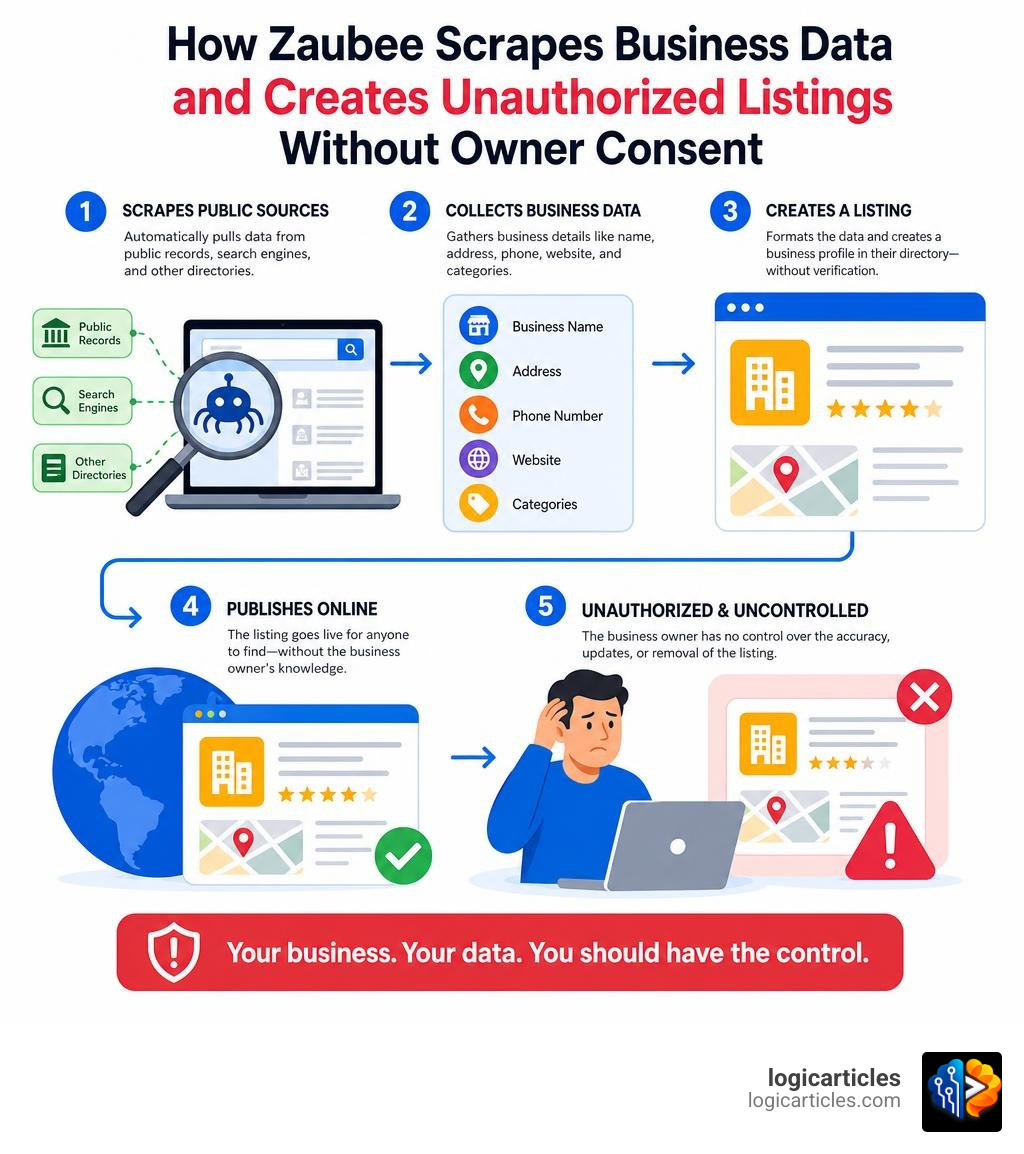
Zaubee is a global online business directory that lists businesses, restaurants, hotels, and points of interest — often without the owner ever signing up. It scrapes data automatically from public records, search engines, and other directories. The result? Thousands of business owners discover their name, address, and phone number published online with information they never submitted and cannot easily correct.
One business owner sent 12 written removal requests to Zaubee with no response. Another found their home address listed as a commercial business location. These are not rare cases.
With a Trustpilot score of just 2.1 out of 5 — where 84% of reviewers gave it one star — Zaubee has a well-documented pattern of creating unauthorized listings and making removal difficult.
This guide walks you through exactly what to do, step by step.
Why You Must Remove or Update Your Zaubee Business Listing
Leaving an unverified, inaccurate directory listing active on the internet is a silent killer for your local search rankings and your brand’s credibility. When automated scrapers pull your data, they do not care about accuracy. They package whatever historical records they can find and publish them. For a business owner in June 2026, this presents several critical risks.
The Threat to Your Local SEO and NAP Consistency
Search engines like Google rely on a concept known as “entity confidence.” To rank your business in the local Map Pack, Google cross-references your Name, Address, and Phone number (NAP) across hundreds of websites. If your Google Business Profile has your current address, but an unclaimed Zaubee listing displays an address you moved out of three years ago, search engines get confused.
Conflicting NAP signals lower Google’s confidence in your business data. When confidence drops, your local search rankings follow. In our analysis of directory ecosystems at Zaubee Local Seo, we found that inaccurate secondary citations can actively pull down the ranking power of your primary listings.
Brand Reputation and Customer Confusion
Imagine a potential customer searching for your business hours or phone number. They land on your Zaubee profile, which might feature incorrect phone numbers, mismatched photos, or even show your business as permanently closed.
Even worse, some business owners have reported that their personal residential addresses were scraped and published as commercial storefronts. This creates major privacy and physical safety concerns. If you want to know whether the platform is safe to engage with, our deep dive on Zaubee Legit outlines the exact operational risks of leaving your data in their hands.

The Data Broker Connection
Zaubee is classified as a data broker by privacy advocacy groups like Optery. It operates similarly to other scrapers, harvesting data to generate traffic and ad revenue. Reviewers have also linked Zaubee to Nicelocal, another business directory with a notoriously low Trustpilot score of 1.6 out of 5 (where 70% of reviews are 1-star ratings). Users frequently complain that both directories scrape data without consent and then ignore customer service emails.
To understand how this platform stacks up against industry standards, read our comparison of Zaubee Vs Legitimate Business Directories. While major players offer automated dashboards, Zaubee relies entirely on manual management. We also break down the search dynamics between these platforms in Zaubee vs Google: Which Wins for Local SEO in 2026?.
Step-by-Step Guide to Update Your Listing
Unlike modern search platforms that offer API integrations and instant verification, Zaubee has no automated sync network. If you use local listing distribution tools, they will not be able to push updates directly to your Zaubee profile. You must manage this directory manually.
Below is a comparison of how listing updates are handled on Zaubee versus standard search engines:
| Feature | Zaubee Listing Management | Google Business Profile |
|---|---|---|
| Update Method | Manual email request to support | Direct self-serve dashboard |
| API Syncing | Not supported | Fully supported (Yext, Uberall, etc.) |
| Processing Time | 3 to 10 business days | Near-instant to 24 hours |
| Verification | Manual domain email check | Phone, email, or video verification |
| Control Level | Low (requires support intervention) | High (complete owner control) |
If you decide to keep your profile active for citation diversity, you should first read about how to Claim Your Zaubee Listing securely. If you do not have a listing yet but want to establish one under your own terms, follow our guide on how to use the Zaubee Add Business In 2026 process.
How to Find and Audit Your Listing
Before you can request an update or removal, you must find the exact URL of your listing.
- Go to your preferred search engine and type:
site:zaubee.com "Your Business Name" + "Your City" - Alternatively, visit zaubee.com directly and use their internal search bar.
- Open your listing and document every single error. Check the spelling of your business name, look closely at the phone number, verify the map pin coordinates, and check if the photos actually belong to your business.
Preparing Your Information to Remove or Update Your Zaubee Business Listing
When dealing with manual support teams, you must make their job as easy as possible. If you send a vague email, it will likely be ignored. Prepare a plain text document containing the following verified details:
- The exact Zaubee Listing URL (e.g.,
https://zaubee.com/biz/your-business-id) - Official Business Name
- Correct Physical Address (or a request to hide it if you are a service-area business)
- Correct Phone Number (use your primary local number, not a toll-free number or personal cell phone)
- Official Website URL
- Exact Map Coordinates (latitude and longitude, which you can copy from Google Maps)
- High-Resolution Logo (square format is best)
Tip: Always send this request from an email address associated with your business domain (e.g., info@yourbusiness.com). Support teams are far more likely to process requests that come from official domains rather than generic Gmail or Yahoo accounts.
Contacting Support to Remove or Update Your Zaubee Business Listing
Once your information is ready, you must submit your request via email. Since Zaubee’s web contact forms are frequently reported as broken or unresponsive, direct email is your best path forward.
Send your email to business@zaubee.com.
Email Template for Listing Update:
Subject: Listing Update Request – [Your Business Name]
Dear Zaubee Support,
I am writing to request an update to our business listing on Zaubee. Below are the details of our current listing and the correct information that needs to be updated:
- Current Zaubee Listing URL: [Insert your Zaubee listing URL here]
- Official Business Name: [Your Business Name]
- Correct Physical Address: [Your Correct Address]
- Correct Phone Number: [Your Correct Phone Number]
- Official Website URL: [Your Website URL]
- Exact Map Coordinates: [Latitude, Longitude]
Please update our listing with this correct information as soon as possible.
Thank you,
[Your Name]
[Your Title]
[Your Business Name]
Email Template for Listing Removal:
Subject: Listing Removal Request – [Your Business Name]
Dear Zaubee Support,
I am the authorized representative of [Your Business Name]. I am writing to formally request the complete removal of our business listing from Zaubee.com.
We did not authorize the creation of this listing, and it currently displays inaccurate information that is causing confusion for our customers.
- Listing URL to Remove: [Insert your Zaubee listing URL here]
- Business Name: [Your Business Name]
- Listed Address: [Address shown on the listing]
- Listed Phone Number: [Phone number shown on the listing]
Please confirm once this listing has been permanently removed from your directory.
Thank you,
[Your Name]
[Your Title]
[Your Business Name]
According to platform data, it typically takes 3 to 10 business days for their support team to review and process manual requests. If you want a structured, independent guide on dealing with these types of listings, check out the Remove Yourself from Zaubee – Free Opt-Out Guide | Optery.
What to Do If Zaubee Ignores Your Requests
It is a frustrating reality: many business owners report that their emails to Zaubee go completely unanswered. If you find yourself ignored after two weeks, do not give up. You have several escalation paths to force their hand.

1. Assert Your Legal Privacy Rights (GDPR & CCPA)
If your business listing contains personal information — such as a residential address, personal cell phone number, or your full name — you have legal leverage. Under data privacy frameworks like the General Data Protection Regulation (GDPR) for European residents, and the California Consumer Privacy Act (CCPA) for California residents, data brokers are legally required to delete your personal data upon request.
Send a follow-up email to business@zaubee.com with the subject line: “FORMAL CCPA/GDPR DATA DELETION REQUEST – [Your Business Name]”. State clearly that the listing contains your personal personal data (like a home address) and that failure to remove it violates your privacy rights under these frameworks.
2. File Public Complaints
Directories that harvest data without consent hate public scrutiny because it threatens their search engine visibility. If your emails are ignored, file formal complaints on consumer protection websites.
You can document your experience on the Zaubee.com Reviews | File a Complaint portal. If you are trying to pull down an outdated listing for a company that is no longer in operation, read how other owners successfully escalated their cases on Zaubee.com — Removal of listing. Closed business.
3. Request Google De-indexing
If a directory refuses to remove a listing that exposes sensitive, private personal information (like your home address or private phone number), you can bypass them entirely. You can submit a “Remove Select Personally Identifiable Info” request directly to Google. If Google approves your request, they will remove the Zaubee URL from their search results, making the inaccurate profile virtually invisible to the public.
Frequently Asked Questions about Zaubee Listings
Is Zaubee a legitimate business directory?
Yes, Zaubee is an active online directory operated by Zaubee Internet Private Limited, an India-based company incorporated in 2018. However, while it is a real website that processes over 15,000 TB of traffic per month and draws roughly 114,000 daily visitors, its reputation among business owners is poor. It has a Trustpilot score of 2.1 out of 5, with 84% of reviews being 1-star ratings due to unauthorized data scraping and difficult removal processes.
How long does it take for Zaubee to process changes?
On average, it takes between 3 to 10 business days for their manual support team to process an email update or removal request. If your listing is not updated or removed after 14 business days, send a polite follow-up email or escalate using privacy opt-out demands.
What is Zaubee Com Clear Skin?
“Zaubee Com Clear Skin” is a highly searched terms on the web. It is a search trend where users look for legitimate skincare clinics, acne treatments, and clear skin providers listed on the Zaubee directory. If you are a skincare professional, having accurate listings for these terms is highly valuable. You can read our analysis of this trend and how to optimize your business for it in our guide on Zaubee Com Clear Skin.
Conclusion
Proactive directory management is not just about building new citations; it is about protecting your brand from bad data. Whether you choose to clean up your profile or opt out of the directory entirely, taking control of your digital footprint is essential for maintaining local search authority.
If you are looking for advanced software to help automate your daily operations, audit your online presence, or find better marketing tools, explore our curated resources on the logicarticles AI Tools Directory to find the perfect solutions for your business.