When EPA Employees Call Software Issues Into Question, Here’s What’s Really Happening
EPA employees call software issues one of their biggest day-to-day frustrations — and the problems go far deeper than a frozen screen or a slow login.
Here’s a quick summary of the core issues EPA staff are facing right now:
| Issue | What’s Happening |
|---|---|
| Emergency call software | E911 geolocation fails; shows “unable to connect” errors |
| Field operations | Inspectors lost number-masking capability after desk phone removal |
| Legacy system gaps | Outdated systems like HCL Notes replaced mid-workflow |
| Vulnerability backlogs | 20,000+ critical vulnerabilities identified across EPA networks |
| IT ticketing | ServiceNow used agency-wide but support delays persist |
The EPA replaced traditional desk phones with laptop-based calling software across its offices. The goal was to modernize. But the transition created real problems for employees on the ground.
The most alarming example? A medical emergency at EPA’s San Francisco office where 9-1-1 responders could not locate the caller because the new E911 software failed to transmit location data. The union representing EPA workers warned that the software “doesn’t really work, apparently” — and that employees were simply told to close the error popup and move on.
This isn’t just one office having a bad day. It reflects a broader pattern of software transitions happening faster than the support systems can keep up.
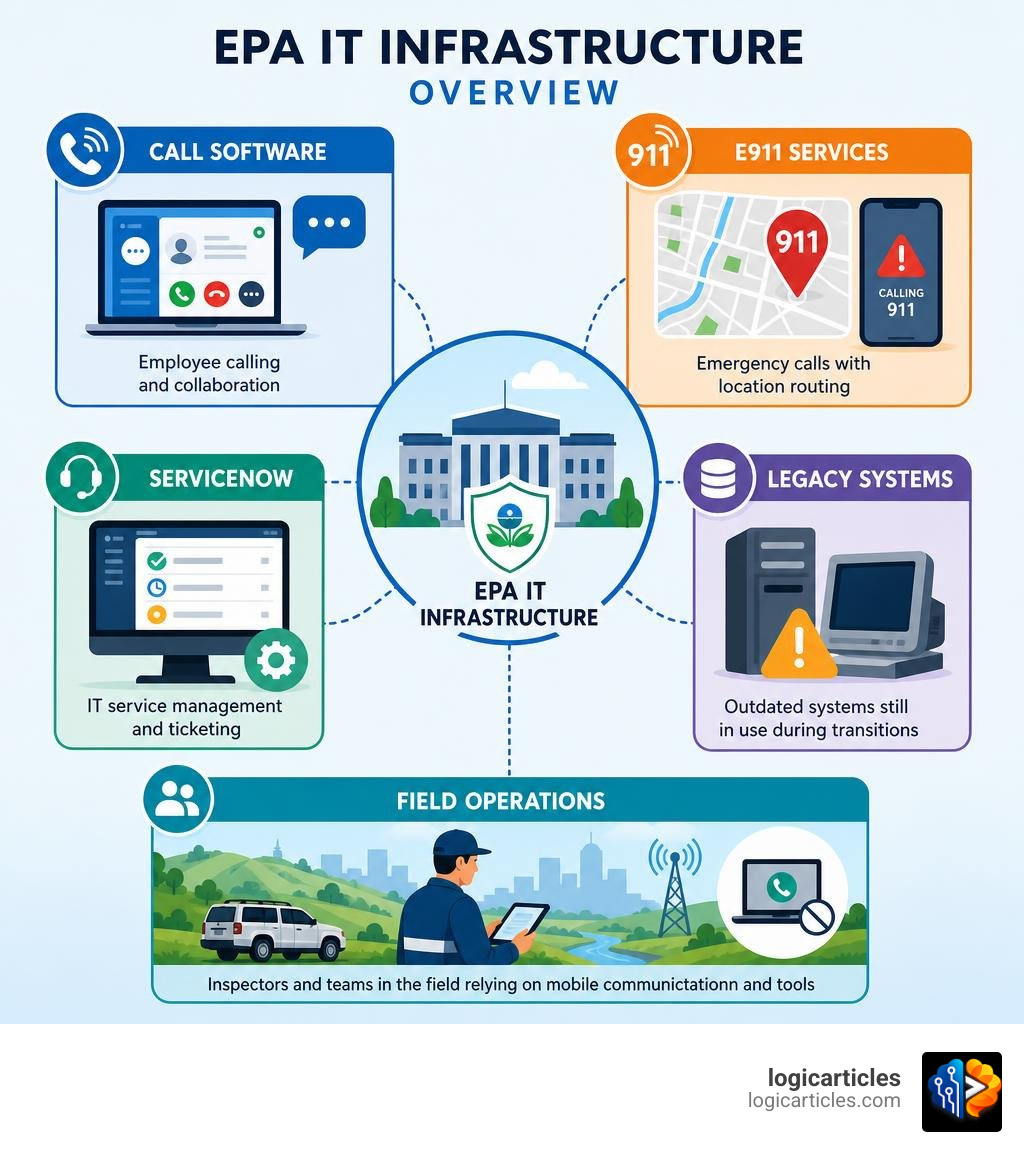
Understanding the EPA Employees Call Software Issues
To understand why epa employees call software issues a critical threat to their daily operations, we have to look closely at the shift to Genesys Cloud CX. This platform was introduced to provide enterprise-grade communication, interactive voice response (IVR), and automated call distribution (ACD) to the EPA Enterprise IT Service Desk.
However, when the agency cut physical desk phones to run all calling services through employee laptops, they also integrated Enhanced 911 (E911) capabilities. This software is supposed to route emergency calls to the nearest Public Safety Answering Point while pinpointing the exact physical location of the caller.
Unfortunately, the rollout has been plagued by connection errors. According to reports highlighted in Union: EPA’s new call software sparks safety fears , employees have repeatedly received “unable to connect” popups. This has raised serious workplace safety concerns, especially regarding potential active shooter scenarios or medical emergencies where every second counts.
The entire phone transition was managed under a massive AT&T contract integrating software solutions like 911 Secure and Avaya. Yet, when these systems fail, employees find themselves stranded with laggy systems. If your laptop is struggling to handle these heavy enterprise communication suites alongside your daily tasks, you might want to read our guide on Is Your Laptop Running Slow? to rule out local hardware bottlenecks.
How EPA Employees Call Software Issues Impact Field Operations
The software transition has had an unexpected, negative ripple effect on the agency’s field operations. Historically, environmental inspectors could use their desk phone infrastructure to make outbound calls while masking their personal phone numbers. This was a crucial security measure when contacting regulated commercial facilities or chemical plants.
With physical desk phones gone and the new softphone platform showing configuration issues, field workers have lost this masking capability. Many inspectors have been forced to use their personal cell phone numbers to coordinate inspections, creating communication barriers and exposing their private information. When epa employees call software issues a threat to their field effectiveness, they are talking about real-world scenarios where their privacy is compromised just to get their job done.
Technical Root Causes Behind EPA Employees Call Software Issues
Why is this transition so rocky? The technical root causes often tie back to complex network settings, local firewall rules, and the way the softphone platform interacts with virtual local area networks (VLANs).
When the E911 software cannot communicate with the agency’s network positioning systems, it defaults to an “unable to connect” state. Rather than diagnosing the root network conflict, some local managers reportedly instructed employees to simply click “x” on the error box to bypass the warning. This does nothing to resolve the underlying connectivity issue. If you are experiencing similar problems with your own system updates failing, check out our troubleshooting steps for when An Error Occurred While Checking for a Software Update.
Enterprise IT Service Desk and Ticket Prioritization
When things go wrong, EPA employees, contractors, and grantees turn to the Enterprise IT Service Desk. The backbone of this support system is ServiceNow, which is covered under an official Privacy Impact Assessment (PIA) for agency-wide IT service automation and shared support services.
For specific divisions, the OARMLAN-OAM GSS (OAS Service Desk) plays a major role. It supports Office of Acquisition Management (OAM) users by providing access to office automation software and collecting detailed helpdesk tickets.
[Employee/Contractor]
  |
  v (Submits Ticket)
[ServiceNow Portal] ------> [OAS Service Desk / OARMLAN-OAM GSS]
  |
  +--> Low Priority (Routine software updates, minor bugs)
  +--> Medium Priority (Number masking issues, non-critical database lag)
  +--> High Priority (E911 failures, critical system outages)
The incident management process prioritizes tickets based on urgency and operational impact. However, with thousands of employees submitting requests, the queue can get incredibly backed up. To understand how professional organizations structure these service level agreements (SLAs) and manage ticket backlogs, we can look at the industry standards discussed in our review of the Best Software Maintenance Services 2026 Costs Types SLAs Best Providers.
Privacy, Security, and Network Infrastructure Challenges
Software issues at the EPA aren’t limited to phone calls. The agency faces massive hurdles in securing its wider network infrastructure. A prime example is the SCORPIOS (Superfund Cost Recovery Package Imaging and On-Line System) system, which is used to track costs for hazardous waste cleanups.
An Office of Inspector General (OIG) audit revealed that the SCORPIOS system had outdated operating system documentation dating back to 2002, creating massive risks for Personally Identifiable Information (PII) protection. The OIG estimated that a future breach of SCORPIOS could cost the agency over $11 million based on the volume of sensitive records stored on its regional servers.
Furthermore, network vulnerability testing has historically been incomplete. In Region 8, a formal evaluation revealed that the local area network (LAN) was split into 35 virtual LANs, but the agency’s security scans completely missed one of these segments. Unidentified wireless access points on laboratory equipment further compromised the network’s isolation.
For a complete breakdown of these systemic issues, you can read the official report on how the EPA Needs to Improve Processes for Securing Region 8’s Local Area Network .
To make matters more complex, these local networks must integrate with enterprise security tools like the Enterprise Physical Access Control System (ePACS) and the Personnel Security System. When security updates are not synchronized across these systems, software conflicts occur, locking employees out of critical applications. Managing these massive, interconnected layers of software requires robust Software Stack Management in 2026 to avoid catastrophic downtime.
Legacy Transitions and Critical System Vulnerabilities
Modernizing a federal agency means moving away from legacy systems, but doing so often exposes critical vulnerabilities. The EPA’s transition to Microsoft 365 (M365) and the decommissioning of HCL Notes (formerly Lotus Notes) was a massive undertaking that disrupted long-established workflows.
While M365 brought improved cloud collaboration, the legacy data systems left behind have struggled. The most severe example of this is the Air and Radiation Division’s ARaDS (Air and Radiation Data System), which monitors radiation level fluctuations.
According to watchdog reports, the EPA failed to address more than 20,000 critical vulnerabilities across its networks due to severe resource constraints. You can read the details of these findings in Deficiencies in EPA’s radiation data system pose ‘significant risk to public health,’ watchdog says | FedScoop .
Because the radiation monitoring software is isolated on standalone networks, it requires manual patching. Manufacturers of nuclear counting instruments rarely update their software, leaving the EPA with unsupported, vulnerable systems. The agency’s struggle to balance security patching with daily operations is documented in Resource constraints led to EPA’s failure to address critical vulnerabilities in air and radiation data – Nextgov/FCW .
These unpatched vulnerabilities and heavy, outdated databases don’t just pose a security risk — they slow down employee machines to a crawl. If you are experiencing similar system sluggishness on your own devices, check out our guide on How to Fix Slow Startup on Windows.
One Simple Way to Troubleshoot EPA Software Issues
When epa employees call software issues into the helpdesk, they are often met with complex, multi-step troubleshooting guides that lead nowhere. But there is one simple way to troubleshoot these issues before escalating them: Define the problem and verify the data foundation first.
As Carter Farmer, Chief Information Officer at the EPA, pointed out, rushing to throw advanced technology like AI at a broken system doesn’t work. The technology must follow a clearly defined problem. You can listen to his full perspective on AI Isn’t the Answer to Everything: Fixing the Problem Before the Tech .
At the EPA, different offices often use the exact same data points but define them differently. This lack of consistency is what causes integrations (like E911 and Genesys Cloud CX) to break. By utilizing the ServiceNow self-help portal to verify local network configurations and ensuring data definitions align across systems, employees can resolve many “connection” errors on their own.
When self-help isn’t enough, understanding the escalation path is key:
| Troubleshooting Step | Self-Help Option | Service Desk Escalation |
|---|---|---|
| E911 Connectivity | Keep the application open; verify local Wi-Fi connection. | Submit a high-priority ticket via ServiceNow if “unable to connect” persists. |
| M365 Access | Clear browser cache; verify credentials on the web portal. | Contact the OAS Service Desk for account synchronization. |
| Field Number Masking | Check softphone settings for outbound caller ID configuration. | Escalate through the EPA Acquisition System (EAS) vendor support. |
Frequently Asked Questions about EPA IT Systems
How do EPA employees escalate critical software issues?
For critical software issues that impact emergency response, enforcement systems, or grants management, employees must bypass standard ticket queues. They do this by flagging the ticket as “Work Stoppage” within the ServiceNow portal or contacting their regional IT Liaison to initiate an immediate escalation to senior operations managers.
What role do contractors play in resolving EPA software bugs?
Contractors and external vendors are heavily involved in maintaining the EPA’s software ecosystem. Under the EPA Acquisition System (EAS), third-party vendors are bound by strict Service Level Agreements (SLAs). If a major bug is identified in a platform like Genesys or ServiceNow, the EAS management team coordinates directly with the vendor’s engineering team to deploy patches.
How did the M365 transition affect daily EPA operations?
Decommissioning HCL Notes in favor of M365 vastly improved document collaboration and email security. However, the transition was rocky for employees who relied on legacy custom databases built within HCL Notes. It required massive data migration projects and extensive user retraining to get staff comfortable with cloud-based workflows.
Conclusion
At us, we believe that IT modernization is an ongoing journey rather than a fixed destination. The software challenges faced by EPA employees highlight the delicate balance between upgrading systems and maintaining workplace safety, security, and operational efficiency. By focusing on clear problem definitions and robust data foundations, organizations can prevent these technical hiccups from becoming widespread disruptions.
For more insights into top-tier software tools and how to manage your technology stack, explore our resources on the Best Software.