Why Customer Support Knowledge Base Software Is Now a Business Essential

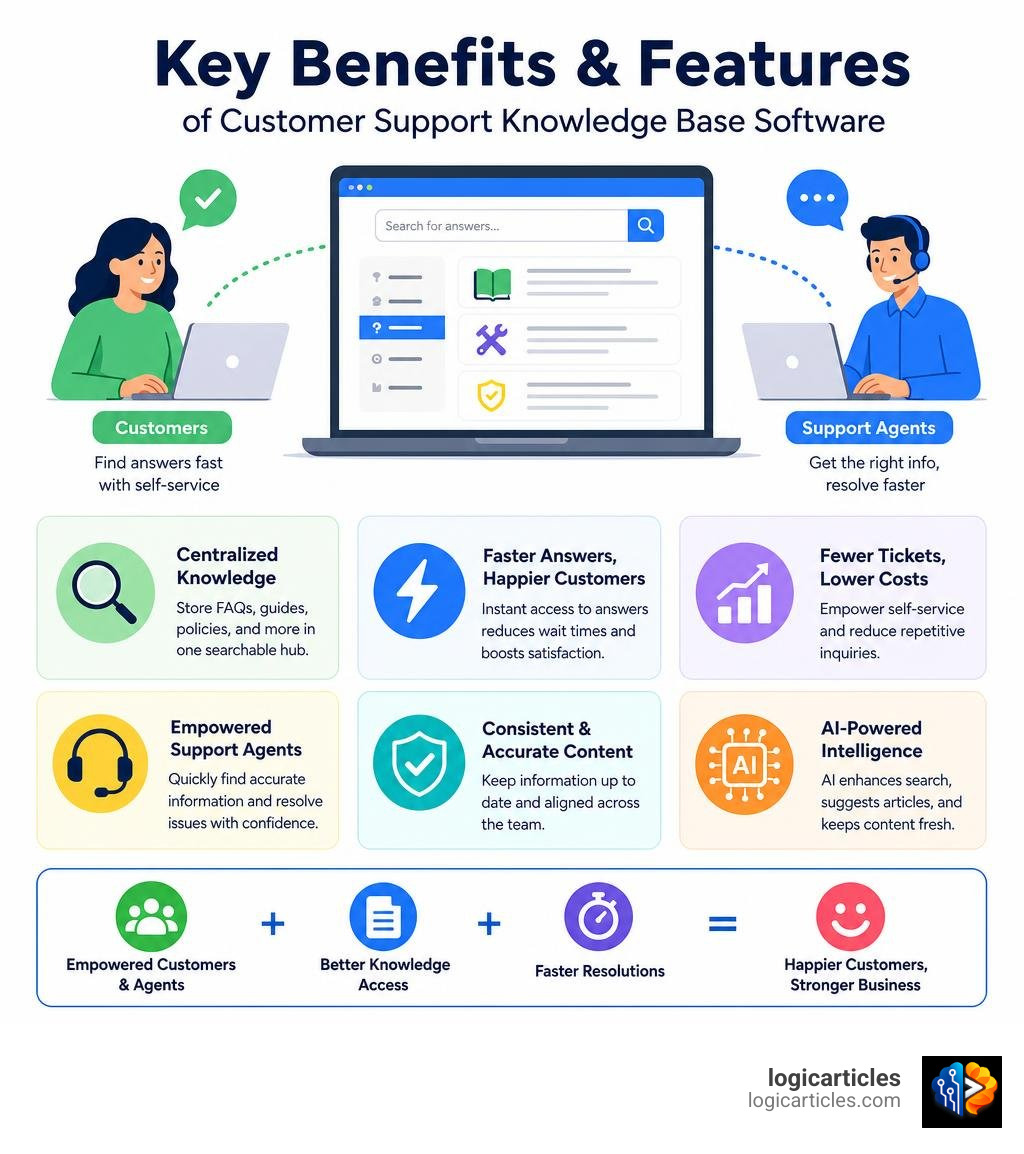
Customer support knowledge base software is a dedicated platform that lets businesses create, organize, and publish a searchable library of help content — so customers and agents can find answers fast, without back-and-forth emails or long hold times.
Here’s a quick snapshot of what it is and why it matters:
- What it does: Centralizes FAQs, guides, troubleshooting articles, and policies in one searchable hub
- Who uses it: Both customers (self-service) and support agents (faster responses)
- Key result: Fewer incoming tickets, faster resolutions, and happier customers
- Modern twist: AI now powers search, article generation, and content upkeep automatically
The numbers tell a clear story. 87% of support teams say customer expectations have surged, yet desk workers already spend 41% of their time on repetitive, low-impact tasks — including hunting down the same information over and over again.
That’s not a staffing problem. That’s a knowledge problem.
When a customer can’t find an answer at 2 AM, they file a ticket. When an agent can’t find the right policy during a call, resolution times balloon. A well-built knowledge base fixes both — at the same time.
And with 90% of people saying a response time of 10 minutes or less is “very important” to their experience with a brand, the margin for slow, disorganized support has never been thinner.
What is Customer Support Knowledge Base Software and How Does It Work?
At its core, customer support knowledge base software acts as a digital library for your company’s collective intelligence. Instead of burying important answers in Slack threads, email folders, or the brains of your senior agents, this software translates institutional knowledge into an organized, highly searchable database.
Traditional knowledge bases functioned like static digital filing cabinets. They relied on rigid category trees and exact-keyword matching. If a user didn’t type the exact phrase your writer used, they were met with a frustrating “No results found” screen.
In July 2026, the landscape looks entirely different. Modern platforms use cognitive computing, vector databases, and semantic search to understand the intent behind a query. If a customer searches for “How do I stop my subscription?” the software is smart enough to serve up an article titled “Canceling or Downgrading Your Account,” even if the word “stop” never appears on the page.
Using a robust Help Desk Knowledge Base — Kayako allows businesses to seamlessly connect these information repositories directly to their ticketing systems. This means the knowledge base isn’t just sitting in a corner of your website; it is actively working to resolve issues the moment they arise.
The Mechanics of Modern Customer Support Knowledge Base Software
So, how does the magic happen under the hood? The life cycle of information inside modern knowledge base software follows a streamlined, automated workflow.
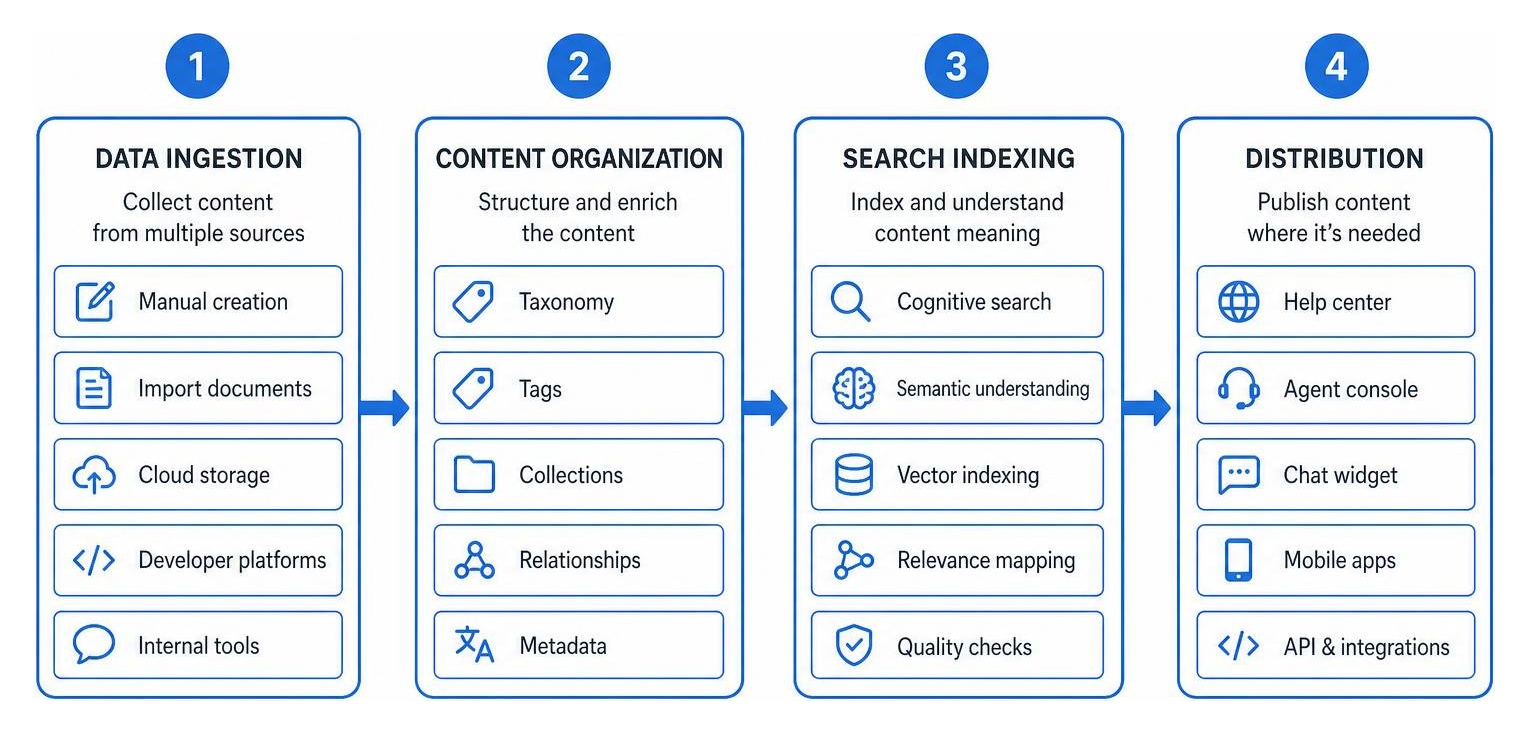
- Data Ingestion: The software pulls information from multiple sources. This could be manual article creation, importing existing Google Docs, or syncing with developer platforms.
- Content Organization: The system structures the data using taxonomy, tags, and collections.
- Search Indexing: Advanced search engines index the content, mapping semantic relationships between words so that queries yield accurate answers.
- Distribution: The platform pushes the content to various front-end interfaces, such as customer-facing help centers, internal agent consoles, or interactive chat widgets.
When integrated with the Best Ticketing Software, this workflow becomes even more powerful. For instance, when an agent begins typing a response to a ticket, the system automatically runs a search in the background and suggests the exact knowledge base article needed to resolve the issue.
Internal vs. External Knowledge Bases
A common misconception is that a knowledge base is only for customers. In reality, the most successful organizations run dual-workspace environments:
- External (Customer-Facing) Knowledge Bases: This is your public self-service portal. It features user-friendly guides, FAQs, product setup tutorials, and troubleshooting videos. It is designed to be accessible 24/7/365, allowing customers to resolve issues independently.
- Internal (Agent-Facing) Knowledge Bases: This is a secure, private repository for your employees. It stores complex company policies, HR guidelines, standard operating procedures (SOPs), technical troubleshooting steps, and billing workflows.
By separating these workspaces, we can ensure that customer support reps have instant access to sensitive internal guidelines, while customers only see polished, easy-to-digest instructions.
Key Benefits of Implementing a Customer Support Knowledge Base
Implementing a centralized knowledge management strategy does more than just clean up your desktop files; it delivers measurable return on investment (ROI). Organizations that put the right knowledge management tools in place report productivity gains of up to 25%.
Furthermore, having a single source of truth improves the accuracy and speed of decision-making by 34%. When support agents don’t have to guess or ask around for answers, they make fewer mistakes. This translates directly into a better customer experience. In fact, 91% of customers are highly likely to repeat purchases at businesses that offer excellent, reliable customer service, and implementing a knowledge base has been shown to increase customer retention by 13%.
To see how this fits into your broader customer experience strategy, check out our guide on the Best Customer Experience Software.
Reducing Support Ticket Volume and Improving Efficiency
The most immediate financial benefit of a customer-facing knowledge base is ticket deflection. Every customer who finds their own answer is a customer who doesn’t open a support ticket, chat, or phone call.
With 40% of C-level support executives prioritizing customer self-service empowerment, and 75% of support leaders planning to increase technology spending over the next 12 months to manage conversation volumes, ticket deflection is no longer optional.
By using platforms that help you Stop Drowning in Support: Get 15 Hours Back Per Week | FAQ Hub , companies can automate the resolution of repetitive questions. When a customer attempts to submit a ticket, the software scans their text and suggests relevant articles. If the article solves the issue, the ticket is deflected before it ever touches a human agent’s inbox, keeping support costs low and queue times short.
Accelerating Agent Onboarding and Training
High agent turnover is a notorious challenge in support departments, with replacement costs reaching up to $20,000 per agent. A major factor in this turnover is the stress of learning complex products and systems.
Employees spend an average of 3.2 hours daily searching for and gathering information. That is effectively one full workday per week lost to unproductive search activities. For a new hire, this challenge is even more daunting.
By curating a comprehensive internal knowledge base, companies can reduce new hire training ramp-up time by 50%. Instead of forcing new hires to memorize thousands of pages of product details, you teach them how to search the knowledge base effectively. This empowers them to handle complex cases on day one with the confidence that they are delivering accurate, consistent answers.
Essential Features to Look For in a Knowledge Base Tool
Not all knowledge base platforms are created equal. When shopping for customer support knowledge base software, you should look for features that make content creation easy for your writers and information retrieval effortless for your users.

At a minimum, your chosen software should offer:
- An Intuitive WYSIWYG Content Editor: Writers should be able to draft rich-text articles, embed videos, and add step-by-step formatting without needing to write a single line of HTML.
- Granular Access Controls & Permissions: You must be able to control who can view, edit, and publish content—especially when dealing with sensitive internal policies.
- Version History & Auditing: The ability to see who changed an article, compare past drafts, and roll back updates is critical for maintaining data integrity.
For a platform optimized specifically for interactive customer service workflows, check out Knowledge base software for customer service | Stonly , which specializes in step-by-step guidance.
Advanced Search and Navigation Capabilities
A knowledge base is only as good as its search bar. If users can’t find what they need in under five seconds, they will abandon the page and contact support.
Look for tools that offer semantic search, which understands typos, synonyms, and conversational phrases. Your system should also support robust taxonomy—meaning you can organize articles into clear categories, subcategories, and tags. Clear, intuitive navigation paths ensure that users who prefer browsing over searching can still find answers logically.
Analytics and Performance Tracking
To manage a knowledge base successfully, you need data. Analytics play a vital role in identifying what is working and what is broken.
Your platform’s dashboard should track:
- Popular Search Queries: What are your customers searching for the most?
- Failed Searches (Zero Results): This highlights immediate content gaps where customers are looking for help, but you have no articles written.
- Article Helpfulness Ratings: Simple “Was this article helpful? Yes/No” buttons let you identify confusing or outdated content.
- Deflection Rate: Measuring how many users visited the help center and did not subsequently open a ticket.
How AI is Transforming Knowledge Management in 2026
The biggest evolution in knowledge management is the transition from static digital warehouses to active, self-maintaining networks. AI is no longer a futuristic add-on; it is the core engine of modern support.

In July 2026, top-performing support teams are leveraging AI-powered knowledge base software to power both agent workflows and autonomous AI agents. These AI systems don’t just search for articles; they read, synthesize, and construct direct, personalized answers for customers in real time.
AI-Powered Search and Content Creation in Customer Support Knowledge Base Software
AI has drastically sped up the content creation process. In fact, users with AI access create 55% more documents per month than those without it.
Instead of starting from a blank page, support writers can use generative AI to draft articles instantly. Some advanced platforms can even analyze a highly detailed, resolved support ticket thread and automatically convert it into a clean, formatted, public-facing help article with one click.
By deploying AI Knowledge Base Software | AI-Powered KB , businesses can utilize advanced Retrieval-Augmented Generation (RAG) to deliver instant semantic search answers. This means a customer gets a single, direct answer with clickable sources, rather than a list of ten links they have to open and read themselves.
Self-Maintaining Knowledge and Preventing Hallucinations
One of the greatest risks of AI in customer support is the “hallucination” problem—where an AI model confidently makes up an incorrect answer. In support, giving a customer the wrong refund policy or incorrect technical step can be disastrous.
To solve this, 2026 platforms utilize strict RAG grounding. The AI is locked to your verified knowledge base documents. If the answer does not exist in your approved files, the AI is trained to say, “I’m sorry, I don’t have that information, let me connect you to a human.”
Additionally, we must fight the “maintenance gap.” Documentation decays the moment it is published. Advanced systems, like AI knowledge base software | AI-powered knowledge management , feature built-in drift detection. They scan your incoming tickets and product updates, auto-detecting when an article’s instructions no longer match real-world workflows, and flag them for human review. This “human-in-the-loop” gatekeeping ensures absolute accuracy.
How to Choose the Right Software for Your Business
Choosing the right platform depends on your company’s size, technical resources, and support style. Let’s look at the primary hosting models:
| Feature | Cloud-Based (SaaS) Knowledge Base | On-Premise Knowledge Base |
|---|---|---|
| Setup Time | Minutes (No-code setup) | Weeks to Months (Requires IT) |
| Maintenance | Handled by vendor (Automatic updates) | Handled internally by your engineering team |
| Scalability | High (Grows instantly with your traffic) | Medium (Requires hardware upgrades) |
| Data Control | Shared with vendor (High security standards) | 100% internal control (Ideal for highly regulated sectors) |
| Best For | Fast-growing B2B, B2C, and SaaS startups | Enterprise banks, healthcare, and government |
When evaluating platforms, make sure they offer native integrations with your existing CRM, ticketing software, and team communication tools (like Slack or Teams).
To compare the top-rated tools on the market today, read our full review of the Best Knowledge Base Software in 2026.
Frequently Asked Questions about Customer Support Knowledge Bases
What is the difference between a CMS and a customer support knowledge base?
While both manage digital content, a CMS (Content Management System) like WordPress is built for general website publishing, blogging, and marketing. It lacks specialized support tools.
A customer support knowledge base is specifically engineered for organizing troubleshooting material. It includes support-specific features like ticketing integrations, article helpfulness ratings, semantic search optimized for questions, and deflection analytics.
How does a knowledge base support 24/7 customer self-service?
An external knowledge base is always online. It acts as an automated first line of defense. When a customer in a different timezone encounters an issue at midnight, they don’t have to wait 12 hours for your office to open. They can search the knowledge base and instantly get the exact troubleshooting steps they need, ensuring continuous, global support without the overhead of hiring night-shift agents.
How do you measure the ROI of knowledge base software?
The return on investment can be calculated using several key support metrics:
- Ticket Deflection Rate: A higher deflection rate means fewer incoming tickets, reducing the cost per resolved issue.
- First Contact Resolution (FCR): Internal knowledge bases help agents solve issues on the first try, raising CSAT scores.
- Average Resolution Time: Agents with instant access to accurate internal guides close tickets much faster.
- Onboarding Costs: Cutting agent training times in half directly lowers operational expenses.
Conclusion
In today’s high-expectation digital landscape, your support team cannot afford to spend hours searching for information, nor should your customers have to wait in queues for simple answers. Implementing modern customer support knowledge base software is the single most effective way to eliminate repetitive tickets, boost agent productivity, and deliver the instant, self-service experiences that customers expect.
By unifying your internal and external knowledge, leveraging AI-powered search, and tracking performance analytics, you can turn your company’s documentation from a static digital library into a dynamic, revenue-retaining asset.
Ready to find the perfect tools to upgrade your tech stack? Explore our curated recommendations in the Best Software Categories to find the ideal solution for your business.