What Does Procore Construction Software Actually Cost?

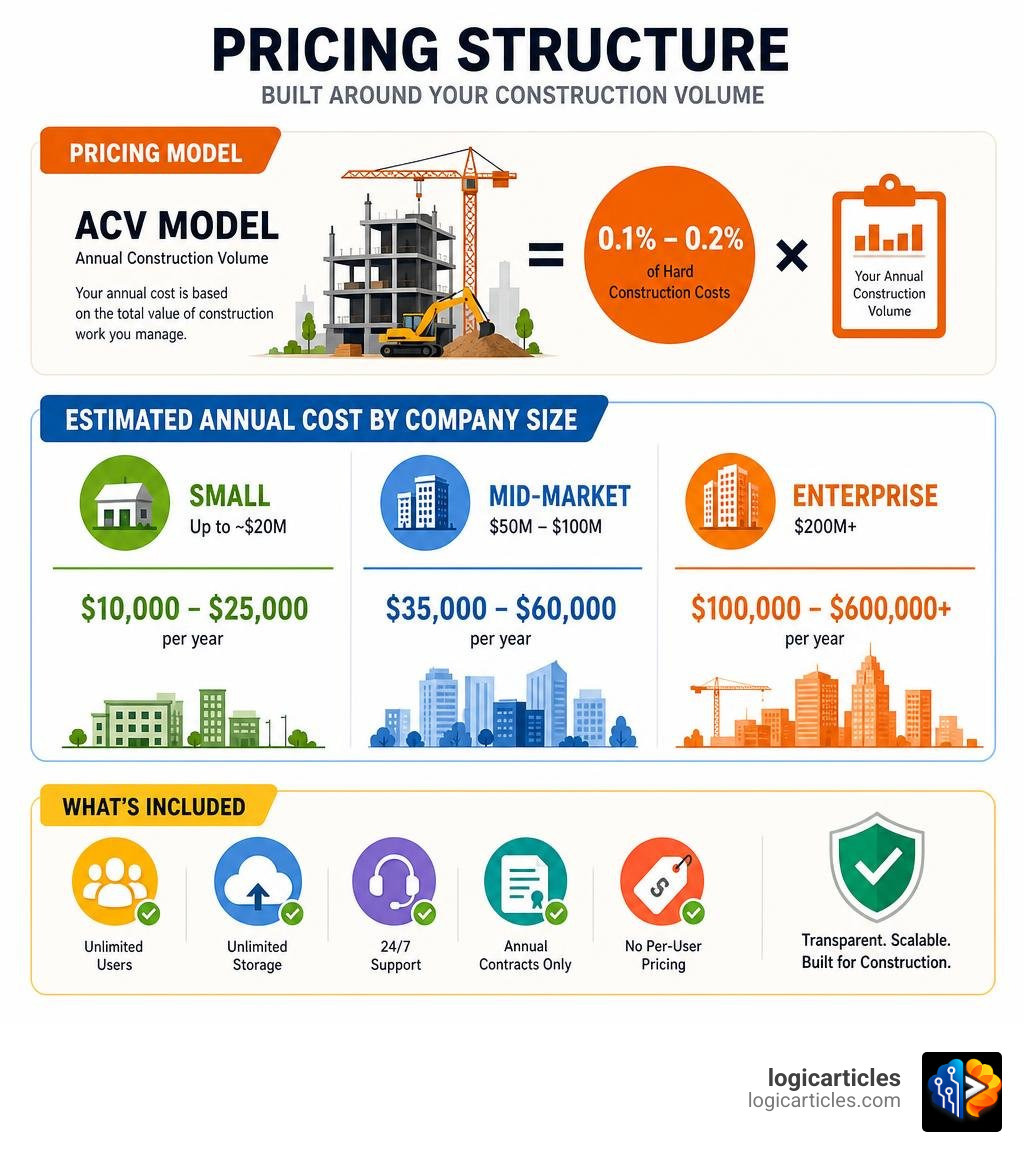
The cost of Procore construction software is not a fixed number — it scales with your Annual Construction Volume (ACV), which means the more work you manage, the more you pay.
Here’s a quick overview of what contractors typically pay:
| Contractor Size | Annual Construction Volume | Estimated Annual Cost |
|---|---|---|
| Small | Up to ~$20M | $10,000 – $25,000/year |
| Mid-Market | $50M – $100M | $35,000 – $60,000/year |
| Enterprise | $200M+ | $100,000 – $600,000+/year |
Key pricing facts at a glance:
- Procore does not publish prices on its website
- Pricing is based on ACV, not the number of users
- The effective rate typically falls between 0.1% and 0.2% of hard construction costs
- Annual contracts only — no monthly billing option
- Unlimited users, storage, and 24/7 support are included
Procore is one of the most widely used construction management platforms in the industry, with over 3 million users. But its pricing model is famously opaque, which makes budgeting a real challenge for contractors.
One contractor managing a $59 million project reported paying around $80,000 — without the financial module. That kind of number gets attention fast.
This guide breaks down every layer of what Procore actually costs: subscription fees, implementation, hidden overhead, renewal increases, and how it compares to alternatives — so you can make a clear-eyed decision before you talk to their sales team.
Understanding the Cost of Procore Construction Software
To understand the cost of Procore construction software, you have to throw out the traditional software-buying playbook. Most cloud software platforms charge you a flat fee per user license (or “seat”) every month. Procore does the exact opposite.
They use an Annual Construction Volume (ACV) model. Instead of paying for each person who logs into the system, your pricing is tied directly to the total dollar value of the construction projects you run through the platform each year.
This model has a major upside: you get unlimited users. You can invite your entire office staff, your field superintendents, all of your subcontractors, the project owners, and even the architects into the system without paying an extra dime per person. This eliminates the “license hoarding” problem where field guys share a single login, which inevitably leads to communication bottlenecks and security issues.
However, there is a catch. Procore enforces a pricing floor. While the starting price is theoretically around $375 per month, this is a baseline that rarely reflects real-world implementations. If you are a very small contractor, Procore’s pricing model can feel incredibly restrictive. For example, a 12-person team managing about $8 million in annual volume received a quote of over $15,000 per year and was explicitly told by sales representatives that the product was not designed for companies of their scale.
To learn more about how they position these tiers, you can visit the official Procore – Plans and Pricing [Estimate] | Procore page.
How Annual Construction Volume (ACV) Dictates the Cost of Procore Construction Software
Your ACV is calculated using the total value of your active construction projects over a 12-month period. Procore applies a sliding-scale percentage rate to this volume to determine your annual subscription fee.
Typically, this percentage rate lands between 0.1% and 0.2% of your hard construction costs.
- If you run $10 million in volume, a 0.15% rate means you pay $15,000 per year.
- If you manage $55 million in volume, a 0.1% rate puts your annual cost at approximately $55,000 (a real-world rate verified by active contractors).
As your volume scales upward, the percentage rate Procore charges generally decreases. However, your overall bill will still rise as your business grows. This can create a frustrating dynamic for growing contractors: even if your team size and software utilization remain completely flat, a successful year with more contract volume automatically triggers a larger bill at your next renewal.
Furthermore, long-term customers have reported that Procore’s base rates have risen significantly over time. A few years ago, contractors reported paying roughly $500 per $1 million of ACV. In 2026, many of those same customers report that their baseline has doubled to approximately $1,000 per $1 million of ACV.
For a detailed analysis of how this volume-based pricing impacts your bottom line, check out the breakdown on What Does Procore Construction Software Actually Cost? — OpsRev .
Subscription Tiers and Estimated Annual Cost of Procore Construction Software
Because Procore customizes every quote, your actual cost will depend heavily on your contractor type (General Contractor, Specialty Contractor, or Owner), your exact ACV, and the specific modules you select.
Here is what the realistic annual subscription costs look like across different business sizes in 2026:
| Contractor Profile | Annual Construction Volume (ACV) | Typical Annual Subscription Range | Common Module Setup |
|---|---|---|---|
| Small / Specialty Contractor | Under $20 Million | $10,000 – $25,000 | Project Execution (Core PM, drawings, RFIs, submittals) |
| Mid-Market GC | $50 Million – $100 Million | $35,000 – $60,000 | Project Execution + Quality & Safety |
| Mid-Market GC (Full Suite) | $50 Million – $100 Million | $50,000 – $150,000 | Project Execution + Quality & Safety + Financials |
| Enterprise Firm | $200 Million+ | $100,000 – $600,000+ | Full Platform Suite + Custom Integrations + Analytics |
For smaller specialty contractors, the cost of entry is high. If you are running less than $5 million in volume, paying $10,000 a year for software can be hard to justify unless you are managing highly complex projects with massive document control requirements. Conversely, for a mid-market GC running $75 million in volume, paying $50,000 a year to keep hundreds of subcontractors, owners, and field staff aligned on a single platform often yields an immediate return on investment.
Core Modules vs. Premium Add-Ons
Procore is not a single software tool; it is a modular platform. When you buy Procore, you don’t automatically get access to everything they build. You buy specific “products” or “modules” that are bundled together.
The core of the platform is Project Execution (which includes your basic project management tools). If you want to track job costs, manage budgets, or plan your workforce, you will need to purchase premium add-on modules, which will drive up your total cost of ownership.
If you are looking to compare how Procore’s financial tools stack up against dedicated accounting systems, take a look at our guide on the Best Construction Financial Management Software.

Base Platform Features
The base platform tier—usually referred to as the Project Execution bundle—is where most contractors start. This package handles the daily administrative heavy lifting of a construction project.
Key features included in the base platform:
- Document Control: A centralized repository for all project files, contracts, and specs.
- Drawing Management: Unlimited plan hosting with automatic OCR (optical character recognition) that auto-populates drawing sheets, labels them, and makes them text-searchable.
- RFIs and Submittals: Digital workflows to track, assign, and answer questions from the field.
- Daily Logs & Punch Lists: Field tools for superintendents to log weather, labor, and progress photos.
- Native Scheduling: A scheduling tool (updated in early 2026) that allows teams to view and modify project timelines directly in the cloud.
For simple task tracking and basic project management, these tools are highly effective. To see how these scheduling and task features compare to general-purpose business tools, read our review of the Best Task Management Software In 2026 Tested.
Premium Upgrades and Financial Tools
If you want to connect your field operations to your back-office accounting, you have to upgrade to Procore’s premium modules. These add-ons significantly increase your annual subscription cost, but they also unlock the platform’s true enterprise capabilities.
The most common premium upgrades include:
- Construction Financials: This module adds budget tracking, prime contracts, change orders, and invoice management. It acts as the bridge between your project managers and your accounting team.
- Workforce Planning: A tool for scheduling and tracking your self-perform labor and field staff across multiple job sites.
- Preconstruction & Estimating: Tools for bid management, 3D takeoffs, and historical cost analysis.
- BIM (Building Information Modeling): Allows field crews to view complex 3D models on mobile devices without needing expensive CAD software.
For general contractors who manage dozens of subcontractors, these premium upgrades are essential for controlling margin fade. If managing subcontractors is your primary pain point, you may also want to explore our list of the Best Contractor Management Software.
Hidden Costs and Total Cost of Ownership (TCO)
Many contractors make the mistake of budgeting only for Procore’s annual subscription fee. In reality, the subscription is just the starting point. The true Total Cost of Ownership (TCO) includes implementation, data migration, ongoing training, and the administrative labor required to keep the system running.

Implementation and ERP Integration Fees
Procore is not a “plug-and-play” tool that you can set up on a weekend. Implementing the software across a mid-sized firm typically takes 2 to 6 months of active onboarding.
- Onboarding & Implementation Services: Procore often charges an upfront fee for setup and training. For a mid-market contractor, this setup fee can range from $20,000 to $60,000 depending on complexity.
- ERP Integration Setup: If you want Procore to sync with your accounting software (like Sage, QuickBooks, or Vista), you will have to pay for an integration connector. Procore charges a mandatory ERP Launch Services fee of around $3,500 just to set up the connector.
- The Risk of Failed Integrations: Integrations are notoriously complex. One verified customer documented a loss of over $15,000 in wasted staff wages and training hours trying to get a Xero integration to work smoothly, only to abandon it due to technical limitations.
Before signing a contract, make sure you understand exactly how the software will communicate with your accounting system. For more details on these setup fees and integration hurdles, read Procore Pricing 2026: Plans, Costs & Hidden Fees – Procore | CheckThat.ai .
Dedicated Administrator Overhead
Perhaps the most significant hidden cost of Procore is labor overhead.
Because Procore is incredibly powerful and highly customizable, it requires regular maintenance. You have to manage user permissions, set up project templates, clean up drawing uploads, and troubleshoot integration errors.
If you run more than $50 million in annual volume, you will almost certainly need to designate or hire a Dedicated Procore Administrator. This is a full-time “power user” who manages the system for your entire company.
- According to industry salary data, a qualified Procore Administrator costs between $83,000 and $127,000 per year in salary and benefits.
If you don’t budget for this role, the administrative burden will fall on your office managers or project managers, pulling them away from their core responsibilities. For a breakdown of these labor costs, see the Procore Construction Software Cost and Pricing Guide – Cost Brief .
Managing Annual Renewal Increases
Once your initial contract term ends, you can expect your pricing to go up. Procore’s reported Net Revenue Retention (NRR) is 114%, which statistically implies that the average existing customer pays 14% more year-over-year through a combination of volume growth, module add-ons, and base rate increases.
Standard annual renewals often come with automatic price increases of 10% to 14%.
- One long-term contractor reported that their renewal rates climbed steadily year after year, despite their construction volume remaining flat.
- Another reviewer on TrustRadius noted that verbally promised price protections were not honored by their account manager at renewal time because they weren’t explicitly written into the contract.
If you sign a multi-year agreement, you can often negotiate renewal rate caps (typically limiting annual increases to 5% to 8%), but you must get these protections in writing before you sign the initial contract. To read real-world reviews of these renewal challenges, check out Procore Pricing & Review 2026: What It Really Costs .
Negotiation Playbook for Contractors
When you sit down with a Procore sales representative, everything is negotiable. They want your business, and they have room to adjust their pricing packages.
Here is our playbook for getting the best possible deal:
- Plan for Future Growth, But Pay for Today: Don’t buy a subscription based on the massive project volume you hope to win next year. Start with your current, conservative ACV. You can always scale up mid-contract, but scaling down is much harder.
- Negotiate Multi-Year Agreements with Rate Caps: If you are committed to Procore for the long haul, sign a 2- or 3-year contract. In exchange, demand a written renewal cap (ideally no more than 5% per year) to protect yourself from surprise rate hikes.
- Bundle Your Modules Upfront: You will get a much better discount if you buy Project Execution and Financials together on Day One than if you try to add the Financials module six months later.
- Leverage Competitors: Let your sales rep know you are actively evaluating other systems. Having alternative quotes in hand is your strongest leverage for securing a discount (G2 reports that buyers negotiate an average discount of 9% off initial Procore quotes).
Frequently Asked Questions about Procore Pricing
Buying enterprise construction software is a major commitment. Here are answers to the most common questions contractors ask about the cost of Procore construction software.
Is there a free trial available for Procore?
No, Procore does not offer a standard, self-service free trial of its full platform. Because the software requires extensive setup and integration, a simple trial wouldn’t give you a realistic experience. However, Procore does offer a limited free account option for subcontractors in the US and Canada to collaborate on active projects, as well as guided demo requests where a sales engineer will walk you through the platform using your own project drawings.
Is data storage truly unlimited?
Yes. One of Procore’s strongest selling points is that data storage is genuinely unlimited across all paid tiers. You can upload thousands of high-resolution progress photos, massive 3D CAD models, and endless PDF drawing sets without worrying about running out of space or hitting data overage fees.
Can contractors scale down their ACV mid-contract?
Generally, no. Procore contracts are rigid annual commitments. If you sign a contract for $50 million in ACV and your business experiences a sudden downturn, you cannot scale down your subscription mid-contract to reduce your payments. You are locked into that pricing tier until your contract comes up for renewal, which is why we recommend budgeting your ACV conservatively.
Conclusion
Is Procore worth the investment? For many growing contractors, the answer is a resounding yes.
While the cost of Procore construction software is high, the cost of not having centralized communication is often much higher. A single missed change order, a delayed RFI, or an outdated drawing used in the field can easily cost a contractor $20,000 to $50,000 in rework and margin disputes. By bringing your office and field teams into a single source of truth, Procore dramatically reduces these costly errors.
According to user data compiled by G2, the average payback period for Procore is 16 months. If you are a general contractor managing more than $15 million in annual volume with multiple active projects, the platform’s ability to streamline collaboration and prevent margin fade makes it an industry standard for a reason.
However, if you are a small specialty contractor or a home builder with straightforward, highly repetitive projects, Procore’s high price floor and administrative overhead may not make financial sense. In those cases, looking at simpler, more affordable alternatives is often the smarter business move.
To research other tools and find the perfect fit for your business, Explore the Best Software Categories on our site today.