Why the Right Client Management App Can Transform Your Business

The top client management apps available today do far more than store contact details — they centralize client data, automate routine tasks, track communications, and give your team a single place to manage every client relationship.
Here’s a quick look at the leading options:
| App | Best For | Starting Price | Rating |
|---|---|---|---|
| Zoho CRM | Scalable businesses, all industries | ~$14/user/month | 4.5/5 |
| Client Hub | Accounting & bookkeeping firms | Per-firm pricing | 4.4/5 |
| Agiled | Agencies & service businesses | Free plan available | 4.7/5 |
| Clientjoy | Freelancers & solopreneurs | Free plan available | 4.5/5 |
| HubSpot CRM | Startups & small businesses | Free / $15/seat/month | 4.4/5 |
| Pipedrive | Visual pipeline management | $14/user/month | 4.4/5 |
| TaxDome | Tax professionals | Custom pricing | 4.7/5 |
Managing clients well isn’t optional anymore. Research shows a 5% increase in customer retention can boost profitability by 25% to 95%. And with 82% of consumers rating “immediate response” as important or very important, the pressure on businesses to stay organized and responsive has never been higher.
Without the right tools, teams end up buried in email chains, scattered spreadsheets, and missed follow-ups. That leads to frustrated clients — and burned-out staff.
The good news? A strong client management app solves all of this in one place.
Understanding Client Management Apps vs. Traditional CRMs
To choose the right tool, we first need to clear up a common point of confusion: Is a client management app just a fancy Customer Relationship Management (CRM) platform? Not quite.
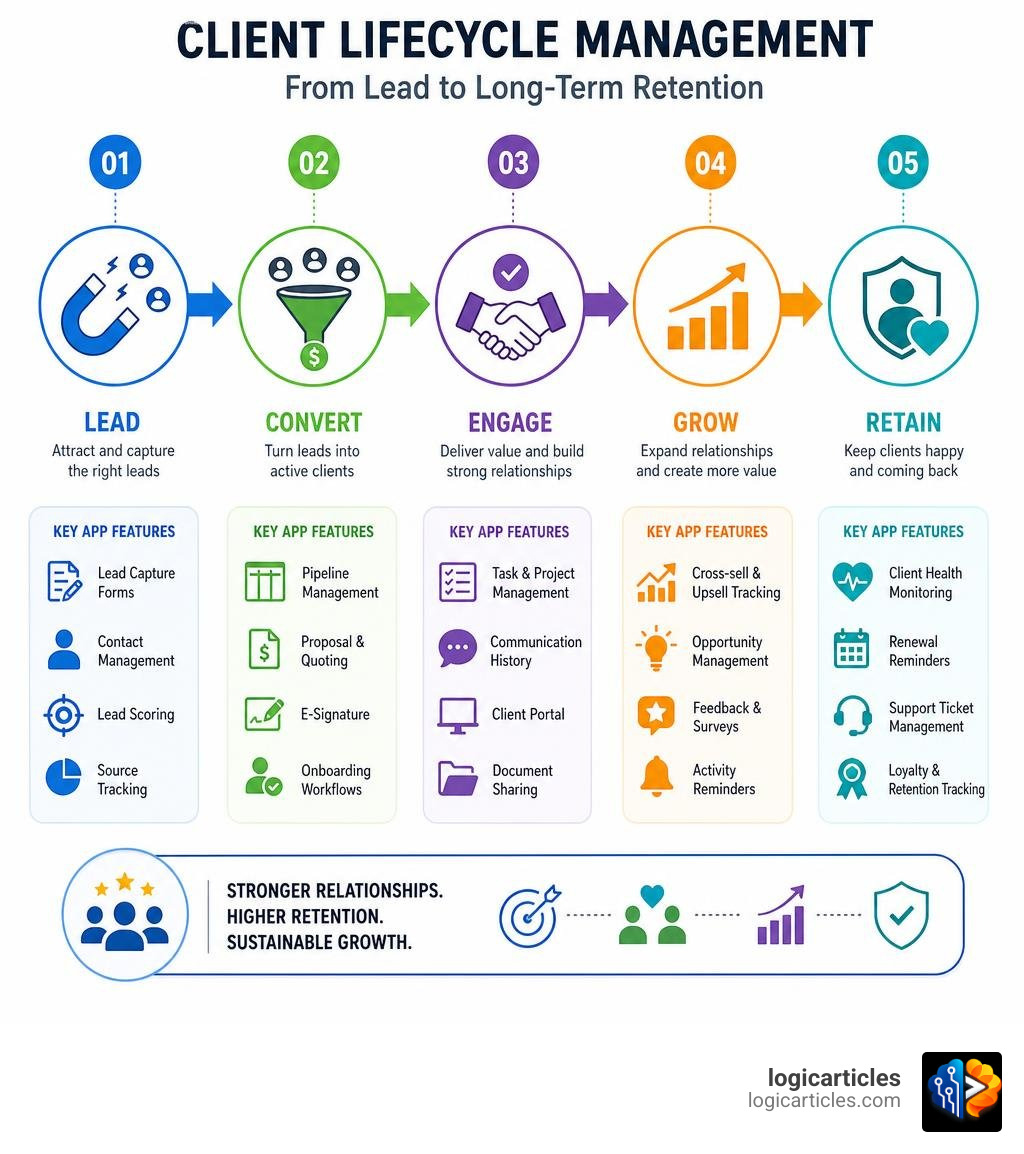
While traditional CRMs focus heavily on the pre-sale stage — think lead generation, lead scoring, cold email tracking, and pushing prospects down a sales pipeline — client management apps focus on the post-sale relationship. They are designed for service-driven teams that need to nurture relationships and deliver project work once a client is officially on board.
Here is a breakdown of how these tools differ from basic contact managers and trackers:
- Traditional CRMs: Built for sales teams to track deals and hit quotas. Once a deal is “Closed-Won,” the CRM’s job is mostly done.
- Contact Managers: Think of these as digital address books. They store phone numbers and emails but won’t help you track a project milestone or send an invoice.
- Basic Client Trackers: Often built inside spreadsheets, these are manual, prone to human error, and completely lack automation.
- Client Management Apps: These platforms bridge the gap between sales and active delivery. They link client communication, files, contracts, billing, and active projects in a single hub.
When you convert a sales lead into an active client, you do not want that data to vanish. A solid client management app ensures a smooth handoff, turning sales notes directly into delivery milestones. To keep your team aligned during this transition, using the Best Task Management Software in 2026 Tested helps map out deliverables, while integrating the Best Revenue Management Software in 2026 ensures your post-sale billing remains accurate.
Core Features to Look For in Top Client Management Apps
If you are shopping for the perfect app, it is easy to get distracted by flashy features you will never use. Instead, keep your eyes on these core, non-negotiable features:
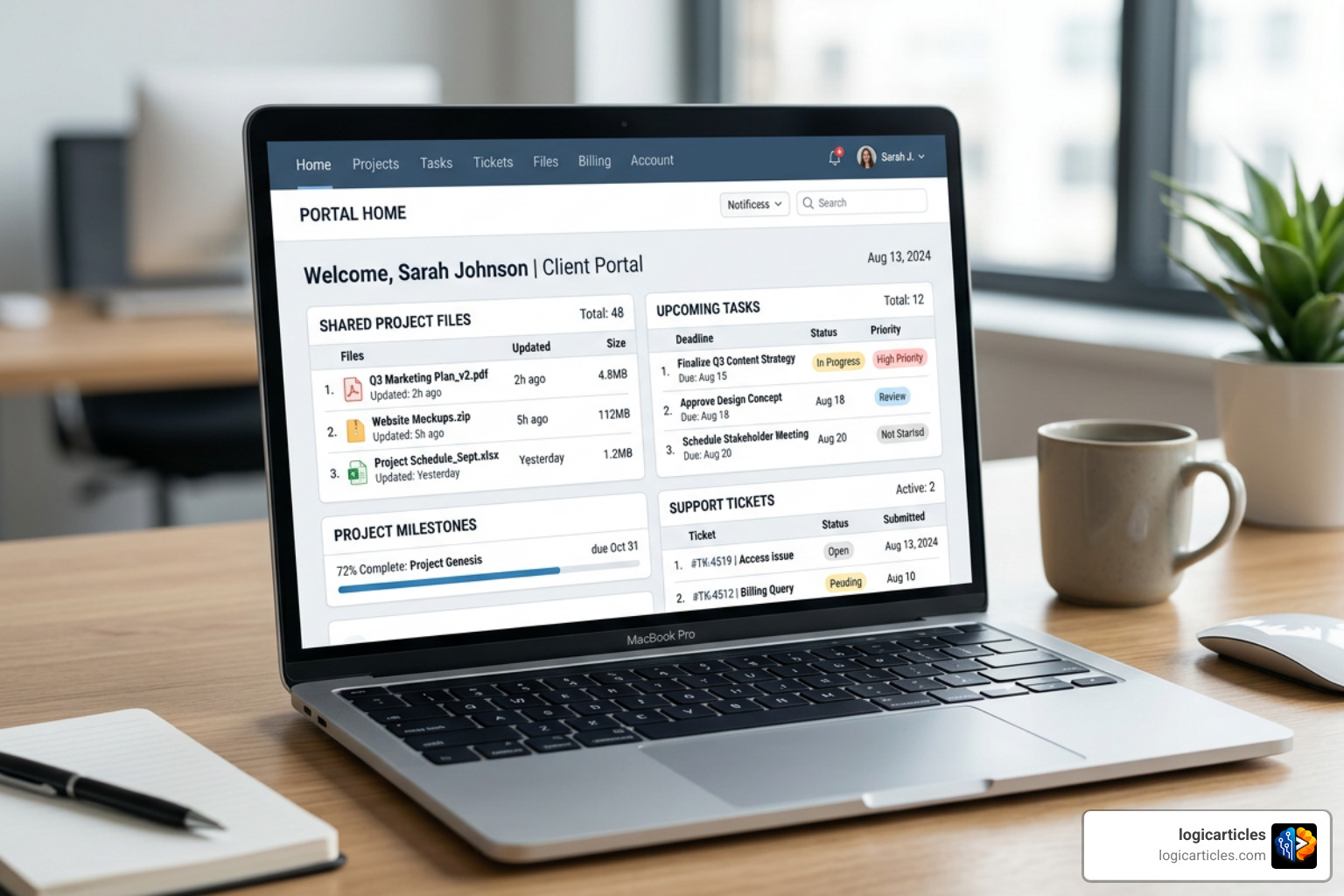
- Centralized Contact Database: A single source of truth where you can view a client’s entire history, from their initial inquiry to their latest invoice.
- Communication Tracking: No more asking, “Who emailed Sarah back?” Every email, chat message, and meeting note should live on a unified timeline.
- Project and Task Management: The ability to convert signed contracts directly into project tasks, with clear deadlines and assignees.
- Invoicing and Payments: Built-in billing tools that let you send professional invoices, track payment history, and set up recurring retainers.
- Client Portals: A secure, white-labeled space where clients can log in, upload documents, view project status, and pay invoices without emailing you for updates.
- Document Sharing and Security: Robust file storage with role-based permissions to protect sensitive client data.
For teams on the move, combining these core features with Mobile Workforce Management Software Features Benefits AI 2026 ensures your field staff stay connected. Meanwhile, maintaining a centralized knowledge base using the Best Knowledge Base Software in 2026 allows clients and staff to find answers to common questions instantly.
Why Agencies Need Top Client Management Apps
Agencies juggle a unique kind of chaos. On any given day, an agency might be onboarding three new clients, sending out five proposals, and managing dozens of active creative deliverables.
Without specialized software, agency operations quickly fall apart. Communication silos form, clients complain about lack of transparency, and retention rates suffer.
By utilizing dedicated platforms like the CRM for Agencies | AgencyPro Client Management Platform, agencies can manage the entire post-sale client account lifecycle. This keeps project conversations, brand assets, active subscriptions, and hourly credit balances neatly organized under one roof, eliminating the need to jump between endless browser tabs.
Key Benefits of Implementing Top Client Management Apps
Investing in client management software is not just about keeping things tidy; it delivers a massive productivity boost.
- Automated Workflows: You can set up triggers to send automated onboarding emails, generate recurring tasks, and shoot over polite payment reminders.
- Seamless Team Collaboration: Team members can assign tasks to one another, share internal notes on client profiles, and view real-time updates.
- Elevated Client Satisfaction: Clients love transparency. When they can log into a branded portal to see exactly where their project stands, their trust in your business skyrockets.
Platforms like SimplifyClient | AI-Powered Client OS for Freelancers & Agencies show just how powerful consolidation can be. By replacing up to six separate tools (like separate storage, chat, and invoicing apps), agencies and freelancers can save hours of administrative work every week.
The Best Client Management Apps for 2026
To help you choose the right fit, we have reviewed the top contenders in the market for 2026. These platforms excel at keeping your clients happy and your operations running smoothly.
Zoho CRM
For businesses looking for deep customization, advanced automation, and scalability, Zoho CRM is a powerhouse. Trusted by over 300,000 businesses worldwide, it stands out for its robust feature set and intelligent assistant, Zia.
- Key Features: Sales automation, unified team spaces, custom canvas layouts, and Zia AI (which helps with anomaly detection, email writing, and custom module creation).
- Pros: Exceptionally secure, highly scalable, and integrates with over 1,000 popular business applications.
- Cons: The sheer volume of features can create a steep learning curve for smaller teams.
- Pricing: Paid plans start at approximately $14/user/month (billed annually), with a basic free edition available for up to 3 users.
If you want a platform that can grow with you from a small team to a massive enterprise, check out Zoho CRM | Top-rated Sales CRM Software by Customers.
Client Hub
If you run an accounting or bookkeeping practice, generic client management apps won’t cut it. You need a tool designed for financial workflows. That is where Client Hub shines.
- Key Features: Built-in bookkeeping workflows, automated month-end close reviews, secure document management, and deep two-way sync with QuickBooks Online and Xero.
- Pros: Speeds up client response times by allowing you to send queries regarding uncategorized transactions directly to their portal.
- Cons: Highly specialized for accounting, so it isn’t suitable for creative agencies or retail businesses.
- Pricing: Offers simple per-firm user pricing with unlimited client users and storage, saving firms an average of 40% when switching from modular competitors.
Keep your bookkeeping firm running smoothly and profitably by exploring Client Hub | Modern Accounting Practice Management & Client Portal Software.
Agiled
For agencies, consultants, and service businesses that want to run their entire operation from a single dashboard, Agiled is an exceptional all-in-one business management platform.
- Key Features: Visual sales pipelines, project tracking (Kanban and Gantt charts), time tracking, employee directories, white-labeled client portals, and e-signatures.
- Pros: Replaces up to eight different apps; features native AI agents that assist with drafting proposals and summarizing client histories.
- Cons: Because it covers so many areas (including HR and scheduling), it can take a few days to fully configure.
- Pricing: Free plan available; paid tiers are highly competitive and scale with your team size.
Stop paying for disconnected subscriptions and unify your business operations today with Agiled – All In One Business Management Platform.
Clientjoy
Designed specifically for freelancers, solopreneurs, and smaller “0-to-1” teams, Clientjoy makes client management incredibly simple and approachable.
- Key Features: White-labeled client portals, custom onboarding templates, proposal creation with e-signatures, and multi-currency invoicing.
- Pros: Extremely user-friendly interface that lets solo founders get up and running on day one without complex training.
- Cons: Lacks the deep enterprise-level reporting and heavy HR features found in larger systems.
- Pricing: Offers a generous free trial and affordable tiered pricing plans built for growing small businesses.
If you want to spend less time on paperwork and more time doing the work you love, take a look at Best CRM for Freelancers, Consultants & Solopreneurs | Clientjoy.
How to Evaluate and Choose the Right Software
Choosing the right client management software can feel overwhelming, but breaking it down into a practical checklist makes the decision straightforward.

- Ease of Use: If the software is too complicated, your team won’t use it, and your clients will ignore the portal. Prioritize intuitive user interfaces.
- Integration Capabilities: Ensure the app plays nice with your existing tech stack, especially your email provider, calendar, and accounting tools like QuickBooks or Xero.
- Customization & Scalability: Can you rename pipeline stages to match your real-world processes? Can the app scale as your client roster grows?
- Customer Support: Look for platforms that offer comprehensive onboarding support, training webinars, and responsive help desks.
- Value for Money & ROI: Don’t just look at the starting price. Consider how many separate subscriptions the tool will help you cancel and how many billable hours it will save your team.
For businesses that rely on external partners, coordinating your team with the Best Contractor Management Software is essential. Additionally, if you are looking to streamline your internal hiring and employee onboarding alongside your client workflows, integrating the Best HR Software for Small Businesses will keep your entire organization structured and compliant.
Frequently Asked Questions about Client Management
How do client management apps differ from traditional CRMs?
Traditional CRMs focus on pre-sale activities like lead acquisition, cold outreach, and managing sales pipelines. Client management apps focus on the post-sale relationship, helping service teams handle project delivery, ongoing communication, client portals, document sharing, and recurring billing.
Can small businesses benefit from client management software?
Absolutely. In fact, small businesses often see the greatest return on investment. It allows small teams to present a highly professional, branded image, automate repetitive administrative tasks, and compete with larger corporations without needing to hire extra administrative staff.
What is the typical implementation timeline for these apps?
For freelancers and small teams, basic setup and data migration (via CSV import) can be completed in a single day. For larger agencies or accounting firms with multiple team members, a phased rollout — including software configuration, data cleanup, and team training — typically takes between 2 to 3 weeks.
Conclusion
In 2026, delivering an exceptional client experience is the ultimate competitive advantage. Moving away from scattered spreadsheets and chaotic email threads toward one of the top client management apps is a crucial step in your business’s digital transformation.
By centralizing your data, automating routine workflows, and giving your clients a secure, branded space to collaborate, you will drive higher retention rates, eliminate administrative burnout, and set your business up for sustainable growth.
Ready to explore more tools to optimize your business operations? Check out our curated guides in the Best Software Category to find the perfect solutions for your tech stack.