What’s the Real Difference Between Firmware and Software?
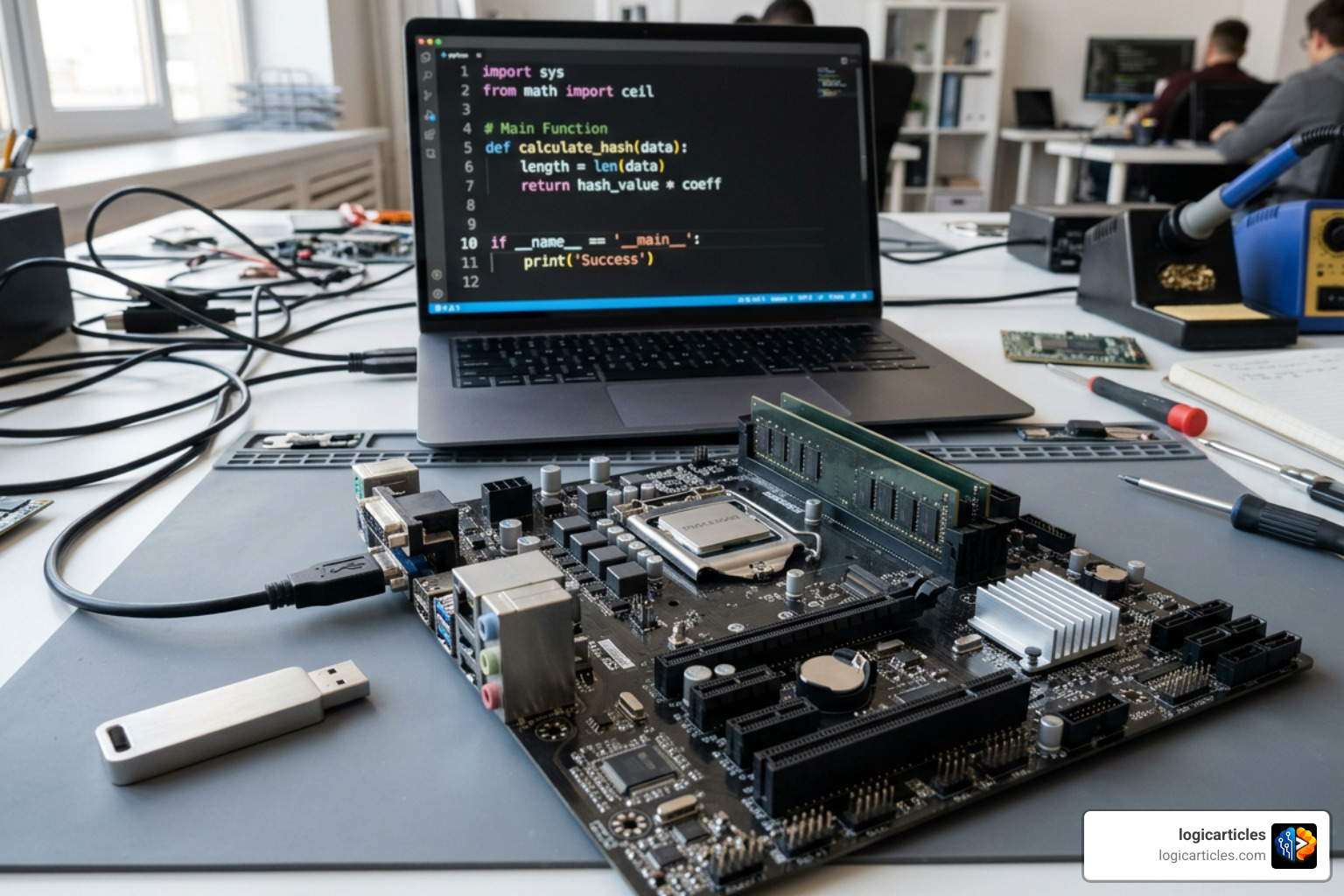
When comparing firmware vs software, here’s the short answer:
| Firmware | Software | |
|---|---|---|
| What it is | Low-level code embedded in hardware | Programs that run on top of an OS |
| Where it lives | Non-volatile memory (ROM/Flash) | Writable storage (SSD, HDD, Flash) |
| What it controls | Hardware directly (boot, I/O, timing) | User-facing features and applications |
| Update frequency | Rare — 5-10x less often than software | Frequent, sometimes daily |
| Update risk | High — a bad update can brick the device | Low — most bugs can be patched easily |
| Size | A few KB to a few MB | Hundreds of KB to several GB |
| Languages used | C, Assembly | Python, Java, C++, and more |
| Examples | BIOS, router bootloader, camera sensor code | Windows, Chrome, Microsoft Word |
There’s a common assumption that firmware vs software is a simple, clear-cut distinction. In practice, the line is blurrier than most people expect — and getting it wrong has real consequences.
One engineer described spending an entire afternoon chasing what looked like a software bug, only to discover it was a stale firmware image on a smart network card. The fix wasn’t a code patch. It was a firmware update — and without one, someone would have had to physically visit the data center.
That’s the difference in a nutshell. A software bug gets a patch. A firmware bug can ground a drone, disable a medical device, or mean rolling a truck to a server rack.
Firmware and software are both sets of instructions that tell a device what to do. But they live in different places, serve different purposes, and carry very different risks when something goes wrong.
This article breaks down exactly how they differ — and when it matters.
Defining the Boundary: Firmware vs Software
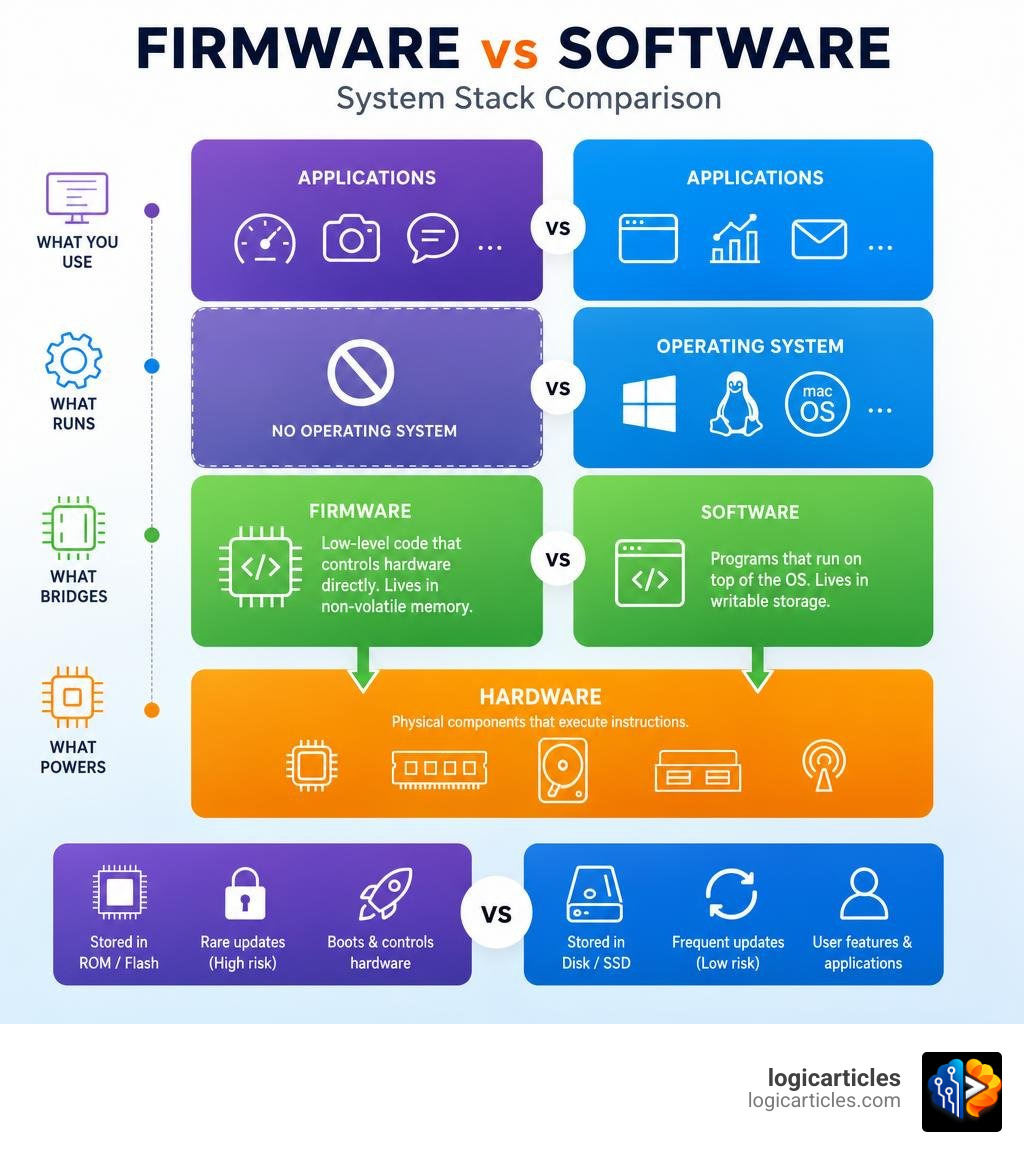
To truly grasp the boundary between these two concepts, we have to look back at how modern computing systems are structured. In 1967, computer scientist Ascher Opler coined the term “firmware” to describe a microprogram that sat conceptually “in-between” hardware and software. He wanted to differentiate the hardwired physical circuitry (hardware) from the highly flexible programs loaded into memory (software).
Today, we view firmware as a specialized subset of software. It consists of low-level instructions written to directly control physical hardware components. Unlike typical software, which operates under the assumption that an operating system will manage resources like memory, processor time, and networking, firmware speaks directly to the silicon.
In the broader system architecture, we can think of firmware as the “nervous system” of a device—translating raw physical signals like voltages and sensor inputs into logical data—while software acts as the “brain,” performing complex calculations, managing user interfaces, and executing high-level business logic.
Understanding the Role of Firmware vs Software in Hardware Initialization
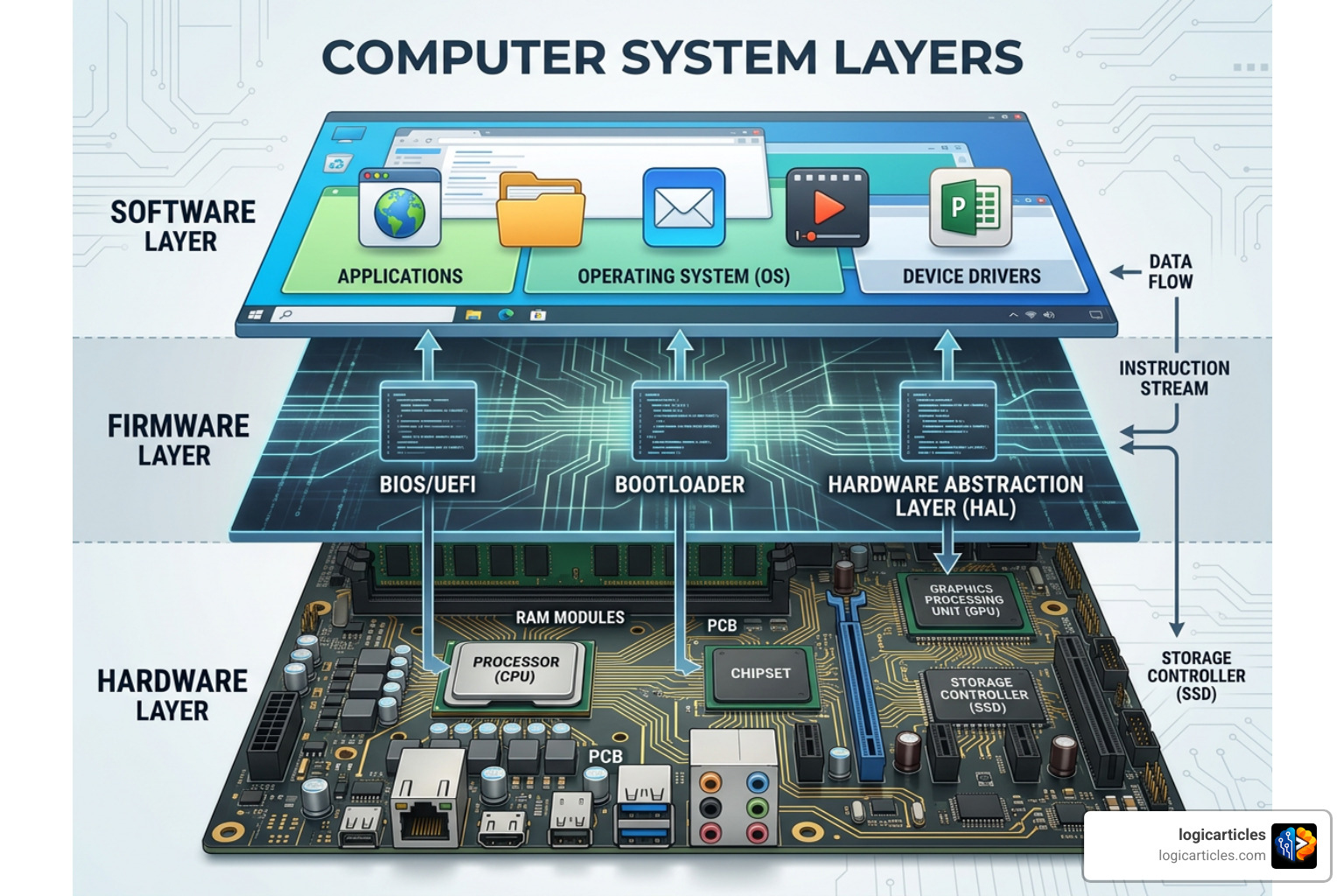
When you power on a device, it is essentially a cold, inanimate block of copper and silicon. It has no concept of what an operating system is, let alone how to run an application. This is where firmware steps in to perform the heavy lifting of hardware initialization.
On a standard PC, the system’s UEFI or Basic Input/Output System (BIOS) is the primary firmware that executes immediately upon power-up. This bootloader code performs a Power-On Self-Test (POST), checking that the system RAM, processor, and peripheral components are functioning correctly. It establishes a minimal, reliable state before handing over control to the main operating system bootloader.
This handoff relies on hardware abstraction layers (HALs). The firmware exposes standardized interfaces to the operating system, shielding high-level software from needing to know the exact physical address of a memory register or the specific voltage requirements of a storage controller. Without this foundational layer of firmware, the microprocessors inside our devices would never know how to load the very software that makes them useful. For a deeper look at these physical-to-logical parameters, you can explore this Analytical comparison of software and firmware.
Why the Distinction of Firmware vs Software Matters for Modern Devices
In simple embedded systems, such as a basic television remote control or a digital microwave, the distinction between firmware and software practically disappears. These devices use “bare-metal” designs where a single firmware binary contains both the hardware control loops and the simple user interface logic.
However, as devices grow more complex, drawing a clear architectural boundary becomes essential. In a modern smartphone, for example, the baseband processor (which manages cellular communication) and the camera sensor each run their own dedicated, low-level firmware. Meanwhile, the main application processor runs a massive operating system (like Android or iOS) and dozens of user applications.
If a developer mistakenly pushes volatile, fast-changing application logic down into the firmware layer, they introduce severe maintenance issues. Conversely, trying to handle real-time, timing-critical hardware control inside a high-level operating system can cause massive performance bottlenecks or system crashes. Understanding where to draw this line is a core engineering discipline, as explored in this Operator’s guide to the architectural boundary.
Architectural Differences: Storage, Lifecycle, and Risk Profiles
The practical differences between firmware and software are rooted in where they live, how long they are expected to survive, and what happens when they fail.
Storage and Memory Execution
- Firmware is stored in non-volatile memory chips soldered directly onto the printed circuit board (PCB). Historically, this meant Read-Only Memory (ROM) or Erasable Programmable ROM (EPROM), which required physical removal and exposure to ultraviolet light to erase (often resulting in 20-minute coffee breaks for developers). Today, we use modern flash memory or EEPROM, allowing firmware to be updated electronically, but it still executes “in place” or loads into highly restricted, dedicated microchip memory.
- Software is stored on secondary storage media—such as Solid-State Drives (SSDs), Hard Disk Drives (HDDs), or external storage—and is loaded into volatile Random Access Memory (RAM) for execution by the main CPU.
Update Frequency and the Danger of “Bricking”
Because software lives on easily writable media, it can be updated constantly. Modern cloud applications and desktop software are updated weekly, daily, or even hourly with virtually zero risk to the underlying system.
Firmware updates, on the other hand, are 5-10x less frequent. Why? Because updating firmware carries a much higher risk of “bricking” the device. If a smartphone software update crashes midway through, you simply restart the installer. If a firmware update to a device’s bootloader suffers a power failure or interruption halfway through, the chip may be left in an incomplete state, unable to boot or even recognize external recovery tools. The device becomes as useless as a brick.
File Size and Programming Languages
- Size: Firmware size typically ranges from a few kilobytes (KB) to a few megabytes (MB). Software ranges from hundreds of kilobytes to several gigabytes (GB) for complex operating systems and modern applications.
- Languages: Firmware development requires extreme hardware intimacy, meaning engineers write code in low-level languages like C or Assembly to optimize every byte of memory. Software developers use higher-level languages such as Python, Java, and C++ that prioritize developer productivity and ease of maintenance over raw hardware control. For those looking to enter this field, choosing the right educational path is crucial; you can learn more about academic options in our guide to the Online Best Software Engineering Degree in 2026.
The Partitioning Decision: When to Put Logic in Firmware vs. Software
One of the most critical decisions in product development is partitioning—determining exactly which features should live in the firmware and which should be handled by high-level software.
We recommend using a clean, risk-aware framework to guide this decision:
Put Logic in Firmware When:
- Strict timing is required: If a function must run within a deterministic microsecond window (e.g., a motor control loop or a safety interlock on an industrial machine), it must live in the firmware. Software running on general-purpose operating systems suffers from scheduling delays that can cause latency spikes of 40ms to 60ms.
- It is safety-critical: If the system must safely shut down or handle a hardware failure even when the main operating system has completely crashed, that logic must be hardcoded into the firmware.
- It manages direct hardware dependencies: Reading raw voltage values from an analog-to-digital converter or managing the low-level power states of a chip belongs in the firmware.
Put Logic in Software When:
- The logic changes frequently: If a feature is driven by business rules, user preferences, or marketing decisions, keep it in the software layer where it can be patched instantly.
- It is resource-heavy: Complex databases, heavy graphical user interfaces, and machine learning models require significant RAM and processing power. Forcing these into constrained firmware memory is a recipe for system instability.
- It benefits from rapid iteration: Software development cycles are fast and agile. Keeping your core product features in the software layer allows your team to iterate without risking the foundational stability of the hardware.
Balancing these layers effectively is a key part of modern system design. To learn more about structuring your application layers, read about Software Stack Management in 2026.
Operational Impact: Reliability, Security, and Total Cost of Ownership
The way we partition firmware and software has a massive ripple effect on a product’s long-term success, security, and financial viability.
The Growing Threat of Firmware Security Vulnerabilities
Historically, firmware was ignored by mainstream cybersecurity because it was difficult to access. Today, that has completely changed. Firmware vulnerabilities accounted for 25% of all IoT security incidents in 2024.
Firmware attacks are highly prized by malicious actors because they operate beneath the operating system. If malware successfully infects a device’s firmware, it can survive complete operating system reinstalls and hard drive wipes. It has unrestricted access to hardware resources, completely invisible to standard antivirus agents.
To combat this, modern systems utilize secure boot chains. This process uses cryptographic signatures to verify the integrity of the firmware before allowing it to execute, creating a hardware-rooted chain of trust. As security demands rise, the global market for firmware signing platforms is projected to grow from USD 1.4 billion in 2025 to USD 2.84 billion by 2029 (representing a 19.5% CAGR).
The Financial Reality of Recalls vs. Patches
If we ship a software application with a bug, the total cost of ownership (TCO) impact is relatively low. We push an Over-the-Air (OTA) patch, and the user’s device updates silently in the background.
If we ship a device with a fatal firmware bug that prevents it from connecting to the internet, we cannot push an OTA update. The only solution is a physical recall—either shipping the product back to the factory, sending a technician to the field, or writing off the inventory entirely. For industrial equipment or medical devices, a physical recall can cost millions of dollars and permanently damage a brand’s reputation.
For more insights on balancing low-level and high-level systems, check out the IBM insights on firmware and software.
Modern Development Workflows: Hardware Simulation and Risk Mitigation
Because the stakes are so high in firmware development, modern engineering teams cannot rely on traditional software development workflows. Forcing a rapid, purely agile “move fast and break things” methodology onto a firmware team without the right infrastructure is a recipe for disaster.
Instead, successful teams use hardware simulation to de-risk their development cycles.
Parallel Development and Hardware-in-the-Loop (HIL) Testing
In the past, firmware engineers had to wait for hardware prototypes to be manufactured before they could write and test their code. This siloed approach led to massive schedule slips when hardware bugs and firmware issues were discovered late in the development cycle.
Today, we use Evaluation Kits (EVKs) and software-based hardware simulators to write firmware and software in parallel with physical board design. By simulating the microprocessor and peripheral sensors, software teams can test their integration points months before the first physical PCB is populated.
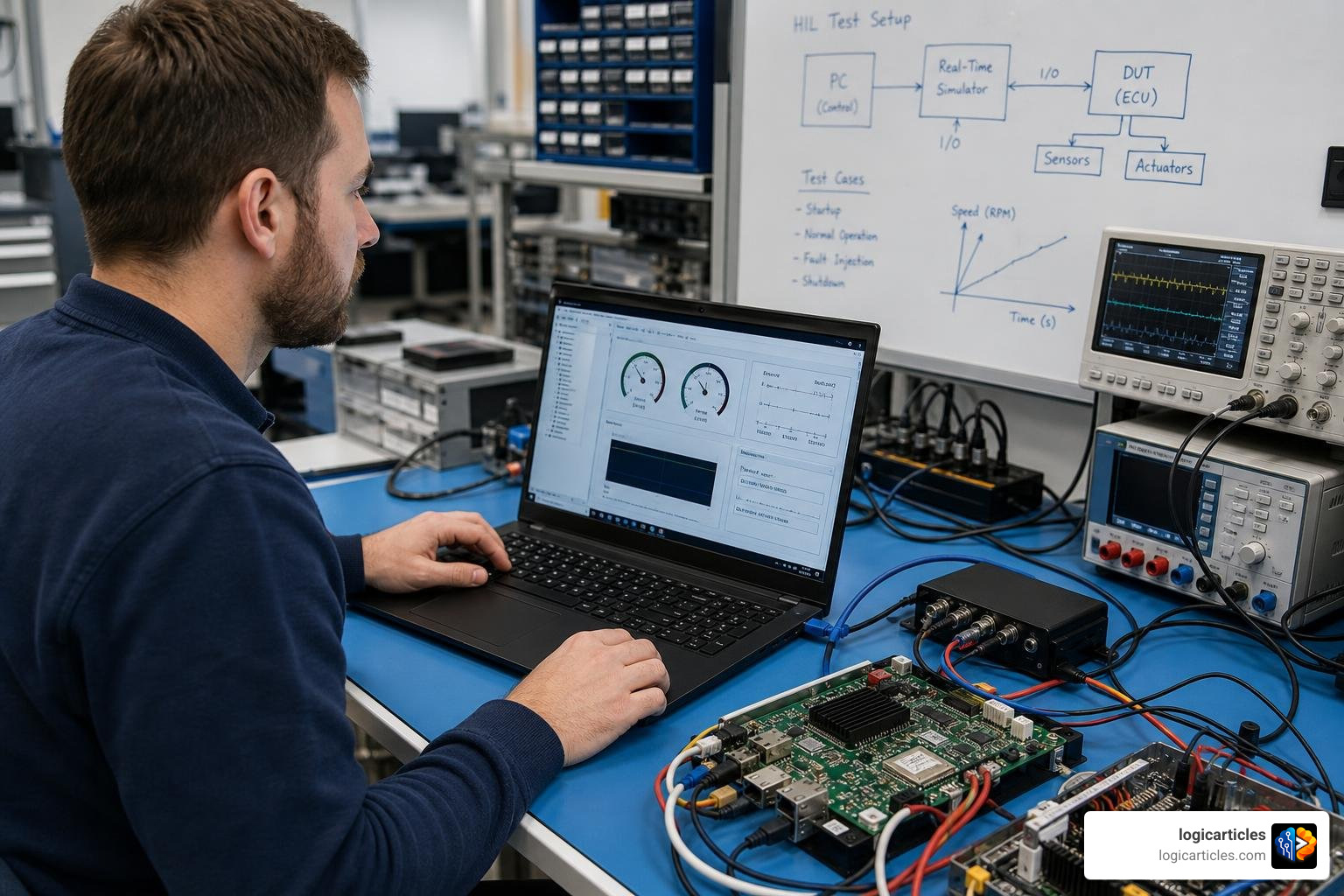
Once physical hardware is available, teams use Hardware-in-the-Loop (HIL) testing. This involves connecting the physical device to a test rig that simulates real-world sensor inputs and monitors the device’s electrical outputs. This allows engineers to run automated test suites, verifying how the firmware handles extreme edge cases and failure modes without risk of damaging physical equipment.
Safe Update Strategies: A/B Partitioning
To mitigate the risk of bricking devices during field updates, robust systems employ A/B partitioning (also known as dual-bank updates).
The device’s flash memory is split into two distinct bootable sections:
- Partition A contains the currently running, stable firmware.
- Partition B is where the new firmware update is written.
When an update is initiated, the device downloads the new image directly to Partition B. Once the download is complete and cryptographically verified, the system bootloader changes a pointer to boot from Partition B on the next restart. If the new firmware fails to boot or crashes during startup, a watchdog timer detects the failure and automatically reverts the bootloader pointer back to Partition A. The device remains fully functional, and the failed update can be reported back to the software telemetry system.
Maintaining these rigid development standards is just as important as keeping up with modern software architectures. For more on optimizing your software development lifecycles, read our guide on Web Development Best Practices 2026, and see how these concepts apply to modern coding practices in this breakdown of Practical differences for modern developers.
Frequently Asked Questions about Firmware and Software
Navigating the intersection of hardware and software can lead to confusing technical overlaps. Here are answers to some of the most common questions we receive.
Can a device run with only firmware and no software?
Yes. In fact, millions of devices do. Simple embedded systems, often called “bare-metal” designs, run entirely on firmware.
Devices like television remotes, basic kitchen appliances, digital watches, and simple industrial temperature sensors do not have an operating system or separate application software. Instead, a single firmware image is programmed directly onto the microcontroller, handling everything from reading physical button presses to updating basic segment displays.
Is an operating system considered firmware or software?
An operating system (OS)—like Windows, macOS, Linux, or Android—is classified as system software.
While it sits closer to the hardware than user applications (like web browsers or games), it still relies on firmware (like UEFI or BIOS) to initialize the hardware and load its kernel into memory.
The line can blur slightly with Real-Time Operating Systems (RTOS) used in embedded systems. An RTOS is highly specialized system software designed to run on resource-constrained microcontrollers, but it is still technically distinct from the low-level bootloaders and hardware-specific drivers that constitute pure firmware.
Why is firmware development so much harder than software development?
Firmware development is exceptionally challenging for three primary reasons:
- Hardware Intimacy: Firmware engineers cannot treat hardware as a generic resource. They must write code with a deep understanding of chip datasheets, timing diagrams, register maps, and electrical schematics.
- Highly Constrained Resources: While a software developer might not worry about using an extra 50MB of RAM, a firmware engineer might be working on a microchip with only 32KB of total execution memory. Every byte of code and clock cycle must be optimized.
- Specialized Tooling: You cannot debug firmware with simple print statements. It requires specialized hardware debugging tools like JTAG (Joint Test Action Group) probes, logic analyzers, and oscilloscopes to monitor physical electrical signals on the board.
Conclusion
Understanding the distinction between firmware vs software is far more than a simple academic exercise. It is a critical architectural boundary that directly shapes how products are designed, built, secured, and maintained.
While software provides the flexible, rapidly evolving features that users love, firmware provides the rock-solid, secure, and reliable foundation that allows the physical hardware to function in the first place. Getting this boundary wrong leads to bloated development budgets, delayed timelines, and high-risk field failures. Getting it right allows teams to build products that are both highly innovative and incredibly stable.
At logicarticles, we track the evolution of these technologies to help your team stay ahead of the curve. Ready to build your next product or optimize your current software ecosystem? Explore the best software solutions to discover the tools and strategies that will de-risk your next engineering program.