Why Slow MySQL Queries Bring Down Your Entire Application

If you’re dealing with how to fix slow MySQL queries, here’s the short answer:
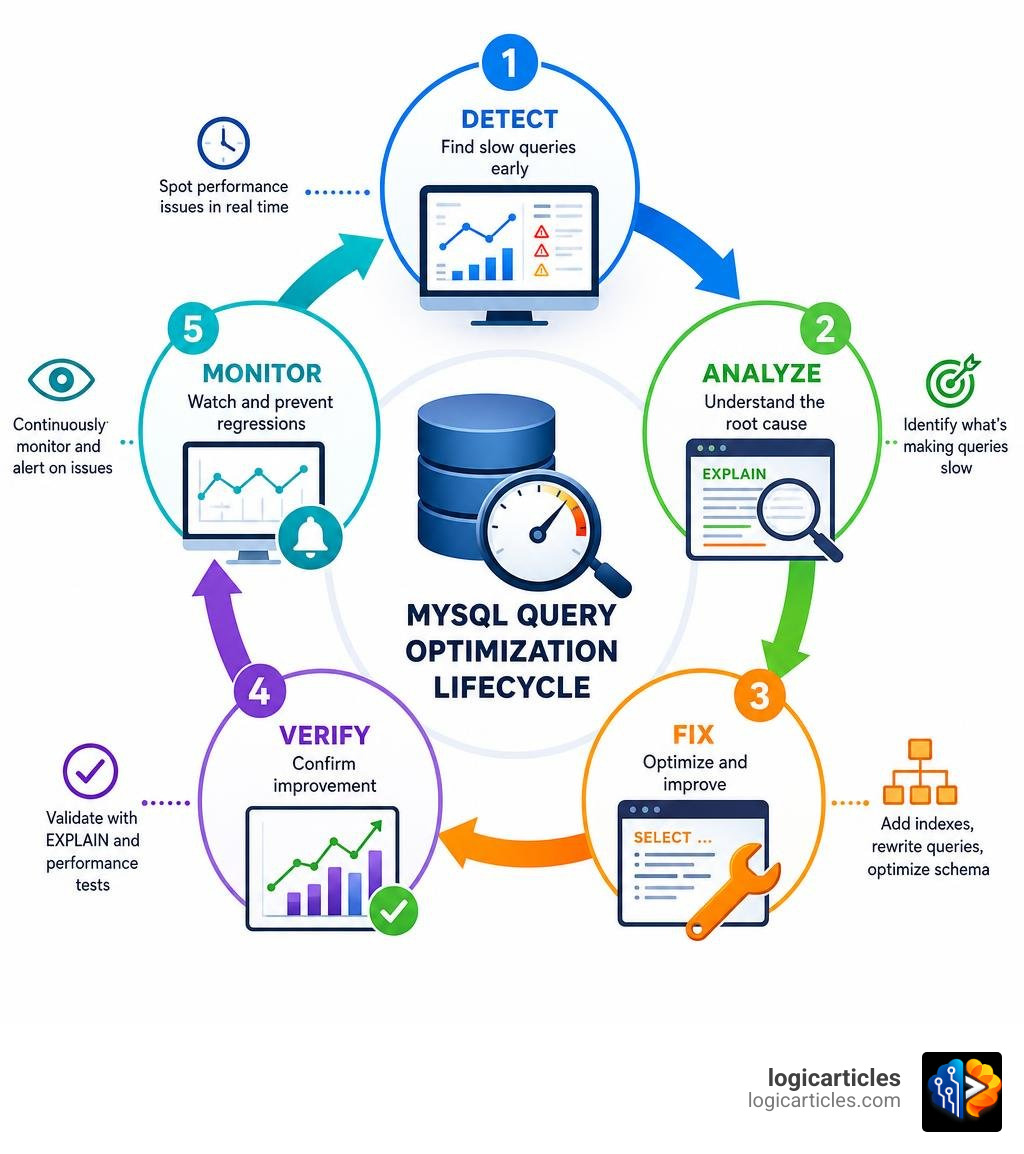
How to fix slow MySQL queries (quick steps):
- Enable the slow query log — set
long_query_time = 1(not the default 10 seconds, which is already too late) - Find the worst offenders — use
mysqldumpsloworpt-query-digestto identify patterns - Run EXPLAIN — look for
type=ALL,key=NULL,Using filesort, orUsing temporary - Add the right indexes — composite indexes for multi-column filters, equality columns before range columns
- Rewrite problem queries — fix N+1 patterns, remove functions on indexed columns, replace
SELECT * - Verify and monitor — confirm improvements with EXPLAIN and watch for regressions
A slow database query rarely stays a small problem. One poorly written query on a table with a million rows can take down an API endpoint, freeze a checkout page, or cascade into timeouts across your whole application.
The tricky part? The query probably worked fine when your table had 10,000 rows.
Most MySQL performance problems follow a predictable pattern. A query examines hundreds of thousands of rows to return just a handful — a ratio of 100 rows read for every 1 row returned is a strong signal something is wrong. The fix is usually a missing index, a query that needs rewriting, or a schema change that quietly broke something weeks ago.
The good news: these problems are almost always visible and fixable without taking your database offline.
This guide walks you through the full process — from finding slow queries to fixing them and keeping them fixed.
How to Fix Slow MySQL Queries: Identifying the Root Causes
Before we can fix anything, we must understand why MySQL is struggling. When a query drags, it is usually because of one of several classic database “anti-patterns.”

Let’s break down the most common culprits:
1. Missing Indexes and Full Table Scans (type=ALL)
The absolute most common cause of a slow query is a missing index. Without an index, MySQL has to perform a full table scan. If you have a table with 500,000 rows and you run a query to find a single customer by their email address, MySQL must inspect all 500,000 records.
A query that examines 500,000 rows to return just 10 is doing an enormous amount of unnecessary work. This is a clear indicator that MySQL is bypassing or missing an index entirely.
2. Wrapping Indexed Columns in Functions
This is a silent performance killer. You might have an index on a created_at column, but you write your query like this:
SELECT * FROM orders WHERE YEAR(created_at) = 2026;
Because you wrapped created_at in the YEAR() function, MySQL cannot use the index. It must run the YEAR() function on every single row in the table to see if it matches.
3. N+1 Query Patterns (ORM Abuse)
Object-Relational Mapping (ORM) frameworks are great for developer speed, but they are notorious for generating N+1 query patterns. Instead of running one efficient join query, your application runs one query to fetch 100 users, and then loops through those users, executing 100 individual queries to fetch their orders.
These individual queries might take only 2ms each, but executing them 100 times back-to-back adds 200ms of network overhead and database load.
4. Correlated Subqueries
A correlated subquery is a subquery that depends on the outer query. For example:
SELECT product_name,
 (SELECT COUNT(*) FROM order_items WHERE order_items.product_id = products.id)
FROM products;
For every single row returned by the outer products query, MySQL must execute the subquery. If you have 10,000 products, MySQL executes 10,001 queries in total.
5. Blindly Using SELECT *
Using SELECT * forces MySQL to fetch every column, including heavy text or BLOB fields, and transfer them over the network. This prevents MySQL from utilizing “covering indexes” (indexes that contain all the columns requested by the query), forcing it to perform expensive data page lookups.
To dive deeper into how MySQL handles these operations internally, check out the MySQL SELECT Optimization Guide.
Enabling and Analyzing the MySQL Slow Query Log
If you want to know how to fix slow MySQL queries, your first diagnostic tool is the slow query log. This log tracks any SQL statement that takes longer than a specified threshold to execute.
By default, the slow query log is turned off, and the default long_query_time is set to 10 seconds. In 2026, a 10-second query is a lifetime—most modern web applications expect database responses in under 100 milliseconds.
Step 1: Enable the Log at Runtime
You can enable the log dynamically without restarting your MySQL server by running the following commands as an administrative user:
SET GLOBAL slow_query_log = 'ON';
SET GLOBAL long_query_time = 1.0; -- Capture queries taking longer than 1 second
SET GLOBAL log_queries_not_using_indexes = 'ON';
Note: If your server is under extreme load, enabling log_queries_not_using_indexes can flood your disk space if you have many unindexed tables. To prevent this, you can limit the rate of logging:
SET GLOBAL log_throttle_queries_not_using_indexes = 10; -- Max 10 per minute
Step 2: Make the Configuration Persistent
To ensure these settings survive a MySQL restart, add them to your my.cnf or my.ini configuration file:
[mysqld]
slow_query_log = 1
slow_query_log_file = /var/log/mysql/mysql-slow.log
long_query_time = 1.0
log_queries_not_using_indexes = 1
Analyzing the Log Files
A raw slow query log is hard to read. It contains timestamps, execution times, rows examined, and raw SQL. To make sense of it, we use specialized log analyzers.
The two industry-standard tools are mysqldumpslow (built into MySQL) and pt-query-digest (part of Percona Toolkit).
| Feature | mysqldumpslow | pt-query-digest |
|---|---|---|
| Availability | Installed by default with MySQL | Requires Percona Toolkit installation |
| Output Type | Simple, text-based summary | Rich, detailed report with metrics |
| Grouping | Groups similar queries together | Groups queries and displays execution time distribution |
| Detail Level | Basic (average time, count, rows) | Advanced (concurrency, lock time, query footprint) |
| Best For | Quick, on-the-server sanity checks | In-depth performance audits and reporting |
To find the top 10 queries sorted by average execution time using mysqldumpslow, run:
mysqldumpslow -s t -t 10 /var/log/mysql/mysql-slow.log
Alternatively, pt-query-digest provides a much deeper analysis, showing you which queries consume the highest percentage of total database time.
How to Fix Slow MySQL Queries Using EXPLAIN and EXPLAIN ANALYZE
Once you have identified a slow query, prefix it with EXPLAIN to see MySQL’s execution plan. This tells us exactly how MySQL plans to execute the query before running it.
EXPLAIN SELECT * FROM orders WHERE customer_id = 45212 AND status = 'pending';
When reading the EXPLAIN output, look for these critical warning signs:
type = ALL: This indicates a full table scan. MySQL has to read every row in the table.key = NULL: No index is being used for this query.rows: This is the estimated number of rows MySQL must examine. If this number is in the hundreds of thousands while your query returns only a few rows, you have an index mismatch.Extra = Using filesort: MySQL must perform an extra pass to sort the data. This is highly CPU-intensive.Extra = Using temporary: MySQL has to create an internal temporary table (often on disk) to resolve the query, usually due to complexGROUP BYorDISTINCTclauses.
Going Deeper with EXPLAIN ANALYZE
In modern MySQL versions (8.0.18+), we can use EXPLAIN ANALYZE. While standard EXPLAIN only shows estimates, EXPLAIN ANALYZE actually runs the query, measures the execution time at each step, and returns a detailed tree structure of the query execution plan.
EXPLAIN ANALYZE SELECT * FROM orders WHERE customer_id = 45212;
The output will show you the exact startup cost, total cost, actual time to return the first row, and actual time to return all rows. This makes it incredibly easy to pinpoint the exact step where the query slows down.
Step-by-Step Guide to Optimizing Slow Queries
Now that we have diagnosed the problem, let’s look at how to apply targeted fixes.

Step 1: Add the Right Indexes
If you are filtering by multiple columns, a single-column index is often not enough. You need a composite index (an index on multiple columns).
When designing a composite index, remember the Left-to-Right Rule:
- Put columns used for equality comparisons first (e.g.,
status = 'active'). - Put columns used for range comparisons last (e.g.,
created_at > '2026-01-01').
-- Good composite index for: WHERE status = 'active' AND created_at > '2026-01-01'
CREATE INDEX idx_status_created ON orders (status, created_at);
Step 2: Rewrite Inefficient Queries
If indexing doesn’t solve it, the query itself must change.
Fix Functions on Columns
Instead of wrapping your column in a function, rewrite the query to use a range:
-- Slow:
SELECT * FROM orders WHERE YEAR(created_at) = 2026;

-- Fast (uses the index on created_at):
SELECT * FROM orders WHERE created_at >= '2026-01-01 00:00:00' AND created_at < '2027-01-01 00:00:00';
Replace Correlated Subqueries with JOINs
Correlated subqueries can usually be rewritten as a single, highly efficient LEFT JOIN with aggregation:
-- Slow correlated subquery:
SELECT p.name,
 (SELECT COUNT(*) FROM reviews r WHERE r.product_id = p.id) as review_count
FROM products p;

-- Fast JOIN rewrite:
SELECT p.name, COUNT(r.id) as review_count
FROM products p
LEFT JOIN reviews r ON r.product_id = p.id
GROUP BY p.id;
For more practical rewriting patterns, read the Practical Guide on Fixing Slow Queries.
How to Fix Slow MySQL Queries Caused by Schema Changes and Table Growth
A query that runs in 5ms in staging can easily take 5 seconds in production. Why? Staging databases rarely mimic the sheer volume or data distribution of production.
1. Table Growth and Index Degradation
As tables grow, indexes can become fragmented, and MySQL’s optimizer might stop using them if it estimates that a full table scan is faster. Keep your table statistics up to date by running:
ANALYZE TABLE orders;
2. Silent Type Conversions
If your column is a VARCHAR but your query passes an integer, MySQL must convert every single value in the column to an integer to perform the comparison, completely bypassing the index.
-- Slow (implicit conversion):
SELECT * FROM users WHERE phone_number = 5551234;

-- Fast (types match):
SELECT * FROM users WHERE phone_number = '5551234';
3. Online DDL (Data Definition Language)
Adding indexes to massive tables in production can lock the table and cause downtime. Always use online DDL tools (like pt-online-schema-change or native MySQL Online DDL features) to add indexes safely without blocking reads or writes.
Proactive Monitoring and Prevention in Production
Fixing slow queries is great, but preventing them from ever reaching production is even better.
1. Leverage the Performance Schema and Sys Schema
MySQL has a built-in diagnostic tool called the Performance Schema. You can query the sys schema to find the most resource-intensive queries currently running on your server without having to parse log files:
-- Find queries with the highest total latency
SELECT query, total_latency, exec_count, rows_examined
FROM sys.statement_analysis
ORDER BY total_latency DESC
LIMIT 5;
2. Implement SQL Reviews in CI/CD
Integrate automated SQL linters and static analysis tools into your deployment pipeline. These tools can flag missing indexes, SELECT * statements, and dangerous schema migrations before the code is merged.
Frequently Asked Questions about MySQL Performance
What is the default longquerytime and what should I use in 2026?
The default long_query_time is 10 seconds. For modern web applications, we recommend setting this to 1.0 second or 0.5 seconds in production to catch queries that are slow enough to degrade the user experience.
Why does EXPLAIN show a good plan but the query is still slow?
This usually happens because of stale table statistics or lock contention. If another transaction has locked the rows your query needs to read or write, your query will sit in a “Waiting for table metadata lock” or “waiting for lock” state. Run ANALYZE TABLE to refresh statistics, and check SHOW ENGINE INNODB STATUS for lock issues.
Can adding too many indexes slow down MySQL?
Yes. Every index you add must be updated whenever a row is inserted, updated, or deleted. Too many indexes will slow down your write operations (INSERT, UPDATE, DELETE) and consume excessive disk space. Use sys.schema_unused_indexes to identify and safely drop redundant indexes.
Conclusion
Tuning database performance is an iterative process. By systematically enabling the slow query log, analyzing execution plans with EXPLAIN, designing smart composite indexes, and avoiding common query design traps, you can keep your application fast, responsive, and reliable.
Looking to automate your development workflows and optimize your technical stack? Explore our AI Tools to see how we help engineering teams build faster, smarter software.