Why Secure Healthcare Messaging Is Critically Important in 2026

A HIPAA compliant messaging app is purpose-built software that lets healthcare teams send patient information securely — without violating federal privacy law.
If you need a quick answer, here’s what you need to know:
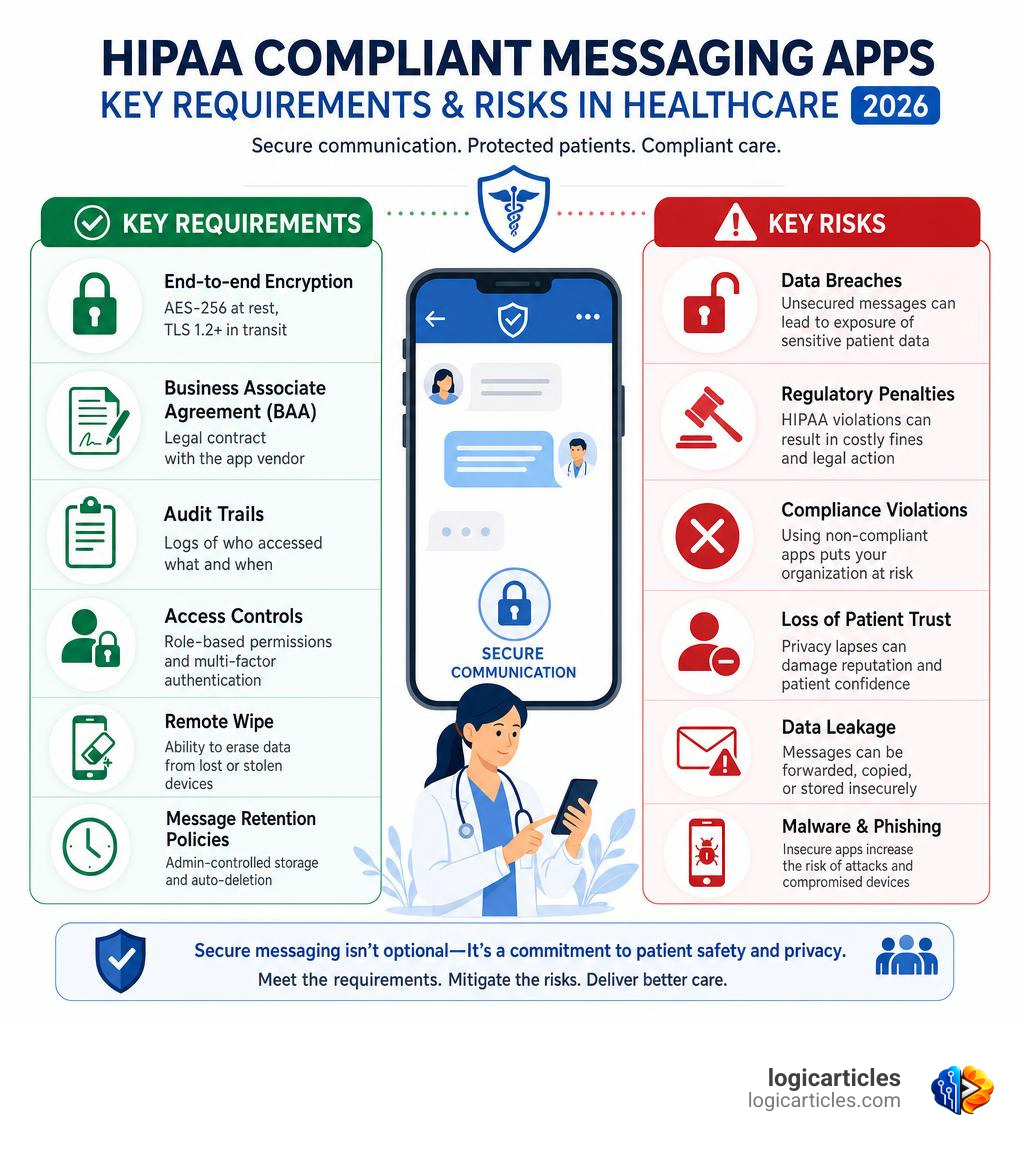
What makes a messaging app HIPAA compliant?
| Requirement | What It Means |
|---|---|
| End-to-end encryption | AES-256 at rest, TLS 1.2+ in transit |
| Business Associate Agreement (BAA) | Legal contract with the app vendor |
| Audit trails | Logs of who accessed what and when |
| Access controls | Role-based permissions and multi-factor authentication |
| Remote wipe | Ability to erase data from lost or stolen devices |
| Message retention policies | Admin-controlled storage and auto-deletion |
The stakes are high. In 2024, the average healthcare data breach cost $9.77 million — the highest of any industry, for 14 years running. In 2023 alone, 725 large healthcare data breaches were reported to the HHS Office for Civil Rights. That’s nearly two every single day.
What’s driving so many of those breaches? Messaging. Texting and messaging misuse accounted for 22% of all PHI breach incidents in 2023. And nearly 1 in 3 hospitals still rely on non-compliant tools.
Consumer apps like WhatsApp, standard SMS, or iMessage were never built for healthcare. They lack the legal agreements, encryption standards, and admin controls that HIPAA requires. Using them with patient data isn’t just risky — it’s a compliance violation waiting to happen.
This guide walks you through everything you need to choose, implement, and maintain a HIPAA compliant messaging app for your organization.
Why a HIPAA Compliant Messaging App is Non-Negotiable in 2026
In the modern healthcare landscape, speed is everything. Clinicians need to coordinate patient care instantly, share lab results, and consult with specialists on the go. However, doing so over insecure channels is a recipe for disaster.
The HIPAA Security Rule mandates strict administrative, physical, and technical safeguards to protect electronic Protected Health Information (ePHI). When sensitive patient data is transmitted, it must remain entirely confidential, integrated, and accessible only to authorized personnel.
When a healthcare organization fails to secure these communication channels, the consequences go far beyond regulatory fines. A single data breach can compromise the personal records of thousands of patients, destroying clinical trust overnight. In fact, over 133 million health records were exposed last year alone, highlighting how aggressive and persistent cyber threats have become in the healthcare space.
To mitigate these operational dangers, utilizing a dedicated HIPAA-Compliant Collaboration Platform for Healthcare Teams | ClinicianCore is no longer a luxury—it is the baseline infrastructure required to protect patient privacy and keep your practice legally secure.
The Hidden Costs of Shadow IT and Consumer Apps
Many healthcare professionals fall into the trap of “Shadow IT”—the use of unsanctioned, consumer-grade technology to get work done faster. It starts innocently enough: a nurse texts a doctor a quick photo of a rash on personal SMS, or a care team coordinates shift changes over a WhatsApp group.
However, consumer platforms create massive, architectural compliance gaps. Standard SMS messages sit unencrypted on telecommunication servers indefinitely. iMessage and WhatsApp may offer end-to-end encryption, but they lack the administrative controls, audit logging, and legal agreements required by federal law.
Most importantly, consumer app companies will not sign a Business Associate Agreement (BAA). Without a signed BAA, any transmission of ePHI through that service is an immediate, explicit violation of HIPAA.
To make matters worse, Shadow IT adds an average of $200,000 in additional costs to the total expense of a data breach. When a breach occurs via unauthorized apps, identifying the source, scope, and affected individuals becomes exponentially more difficult and expensive.
| Feature / Requirement | Consumer Apps (WhatsApp, SMS, iMessage) | HIPAA Compliant Messaging App |
|---|---|---|
| End-to-End Encryption | Sometimes (not standard SMS) | Yes (AES-256 & TLS 1.2+) |
| Business Associate Agreement (BAA) | No (Never signed by consumer brands) | Yes (Mandatory for compliance) |
| Centralized Admin Controls | No | Yes (User management, remote wipe) |
| Detailed Audit Logging | No | Yes (Tracks reads, views, and edits) |
| EHR/EMR Integration | No | Yes (Seamless clinical workflows) |
| Auto-Deletion & Device Lock | Limited / User-controlled | Yes (Enforced by organizational policy) |
Core Security Features of a HIPAA Compliant Messaging App
To ensure your communications are fully secure, any platform you adopt must include these non-negotiable security features:
- Military-Grade Encryption: Data must be encrypted both in transit (using TLS 1.2 or higher) and at rest (using AES-256 bit encryption). This ensures that even if data packets are intercepted, they are completely unreadable.
- Comprehensive Audit Trails: The app must generate tamper-resistant logs of all user activity. This includes tracking exactly who logged in, which messages were read, when files were downloaded, and any administrative changes made to the system.
- Granular Access Controls: Users should only have access to the specific patient information necessary to perform their roles. Implementing Multi-Factor Authentication (MFA) and single sign-on (SSO) ensures that unauthorized users cannot slip into the system.
- The Business Associate Agreement (BAA): This is the legal foundation of HIPAA compliance. A BAA is a contract where the software vendor officially agrees to protect your ePHI according to federal standards and shares liability in the event of a platform-side breach.
Step-by-Step Implementation of a Secure Messaging Platform
Transitioning your entire team to a new hipaa compliant messaging app requires a deliberate, structured approach. You cannot simply tell your staff to download an app and hope for the best.

Here is a practical, step-by-step framework to successfully implement your secure messaging solution:
- Step 1: Conduct a Comprehensive Risk Assessment: Before choosing a platform, identify how your staff currently communicates. Where is ePHI leaking? Which departments rely most heavily on quick text updates?
- Step 2: Choose the Right Tool for Your Workflow: Different teams have different needs. For example, therapists might look for specialized tools listed in guides like the 7 best HIPAA-compliant texting apps for therapists – Healthie to balance patient scheduling and care. Others might evaluate comprehensive options from the Top 7 HIPAA Compliant Messaging Apps for Healthcare … to find a system that fits their organizational scale.
- Step 3: Draft Clear Communication Policies: Define exactly what can and cannot be sent via the messaging app. Establish strict rules around taking and storing patient photos, and ban the use of personal, non-compliant apps for work-related tasks.
- Step 4: Onboard and Train Your Staff: Organize hands-on training sessions. Show your team how to log in securely, how to attach patient records, and what to do if they suspect their device has been compromised.
Using highly optimized platforms can dramatically improve clinical efficiency. For instance, platforms like Hucu save users an average of 2 hours per day per staff member through intelligent, algorithmic routing and notifications, while increasing overall staff engagement by 80%.
Integrating Your HIPAA Compliant Messaging App with Existing Workflows
A secure messaging app shouldn’t exist in a vacuum. To maximize efficiency, it must integrate seamlessly with your existing clinical tools, such as Electronic Health Records (EHR/EMR), scheduling software, and on-call directories.
Modern platforms leverage HL7, FHIR, and REST APIs to sync patient data in real time. For example, when a clinician starts a chat about a specific patient, the app can pull the patient’s context directly from the EHR, ensuring everyone in the conversation has the correct chart open.
There are several excellent tools on the market that specialize in these integrations:
- For robust, multi-platform team collaboration with deep administrative controls, Top HIPAA Compliant Messaging App – Brosix provides a highly secure, private workspace.
- If you need advanced, bi-directional EMR integration combined with secure, client-controlled archiving, HIPAA-Compliant Texting App for Healthcare – QliqCHAT is a stellar option.
- For teams that want to combine secure texting with built-in video chat and lightweight telehealth features, HIPAA-Compliant Texting App w/ Video Chat – pChat™ by pMD offers an affordable, easy-to-use solution.
- If you are a developer looking to build secure video and communication features directly into your own custom healthcare application, you can utilize a HIPAA Compliant Workspace to ensure your media streams and recordings are fully protected.
Establishing Administrative Controls and Remote Wipe Policies
One of the biggest security vulnerabilities in healthcare is the physical loss of mobile devices. If a doctor leaves their phone in a coffee shop, any ePHI stored on that device is suddenly at risk.
This is why administrative controls are absolutely essential. When selecting your software, ensure it includes:
- Automatic Session Timeout: The app should automatically lock after a short period of inactivity (e.g., 2 to 3 minutes), requiring a PIN, password, or biometric login to reopen.
- Remote Application Wipe: If a device is lost or stolen, administrators must have the ability to immediately wipe all app data and revoke access credentials via a centralized dashboard.
- Client-Side Archiving: Choose platforms that let you store communication logs behind your own firewall or in a secure cloud bucket under your direct control, rather than leaving sensitive records on the vendor’s servers.
Frequently Asked Questions about Secure Healthcare Communication
Can we use standard SMS or WhatsApp for patient communication?
No. Standard SMS and consumer WhatsApp are not compliant for transmitting ePHI. SMS messages are sent in clear text, are stored on carrier servers, and can easily be intercepted. While WhatsApp uses end-to-end encryption, the company will not sign a Business Associate Agreement (BAA), which is a strict legal requirement under HIPAA. For secure, compliant texting that bridges internal staff and external patients, platforms like HIPPA Chat – ROLM can provide the legal and technical safeguards required.
What is a Business Associate Agreement (BAA) and why is it required?
A BAA is a legally binding contract between a healthcare organization (the Covered Entity) and a third-party service provider (the Business Associate). It outlines the specific administrative and technical responsibilities the provider must uphold to protect ePHI. Without a signed BAA, the vendor cannot legally handle any of your patient data. To learn more about how BAAs serve as the legal backbone of secure healthcare IT, check out the Top HIPAA-Compliant Messaging Apps for Healthcare (2026) .
How do secure messaging apps handle lost or stolen devices?
Secure messaging apps protect data on lost devices in several ways. First, no patient data is actually stored in the device’s native photo gallery or local text database. Second, the app automatically logs out after a few minutes of inactivity. Finally, system administrators can use a remote-wipe feature from their central management console to instantly delete all encrypted app data from the missing device.
Conclusion
Transitioning to a dedicated hipaa compliant messaging app is one of the most impactful steps your organization can take in 2026 to protect patient privacy, streamline clinical workflows, and eliminate the catastrophic financial risks of a data breach.
By understanding the key security requirements, avoiding the pitfalls of Shadow IT, and choosing a platform that integrates seamlessly with your existing EHR and on-call systems, you can empower your care teams to communicate faster and safer than ever before.
At logicarticles, we provide practical, logic-driven insights to help businesses and healthcare organizations navigate complex digital tools and regulatory environments. Learn more about digital tools and compliance to keep your organization efficient, secure, and ahead of the curve.