Why Finding the Most Affordable Medical Billing Software Can Make or Break Your Practice

Finding the most affordable medical billing software is one of the most important decisions a small or independent medical practice can make. Billing errors, claim denials, and slow reimbursements directly hurt your cash flow — and the wrong software (or no software at all) makes all of that worse.
Here is a quick look at the most affordable medical billing software options available in 2026:
| Software | Starting Price | Best For |
|---|---|---|
| My Client Plus | $20/month | Mental health and small specialty practices |
| PracticeSuite | Free starter plan (up to 25 claims/month) | Low-volume practices |
| Kareo | $75/month | Non-physician providers |
| billrMD | Free introductory plan | Practices wanting a no-risk start |
| Nue MD | $149/month | Small to mid-sized practices |
| Total MD | $175/month | Growing practices needing full features |
| Medisoft Cloud | $235/month (1 user) | Solo practitioners |
| expEDIum | Flexible (claim-based or subscription) | Specialty and EMS practices |
Quick answer: The most affordable options start as low as $0 (free starter tiers) or $20/month for basic plans. Most practices pay between 3% and 9% of monthly revenue on billing services. The right choice depends on your claim volume, specialty, and whether you need EHR integration.
Medical billing is, at its core, a long and complicated process. A patient visits. Insurance gets billed. Claims get reviewed, sometimes rejected, sometimes resubmitted. Weeks can pass before a practice sees payment. That administrative drag is exactly what good billing software is designed to fix.
But “affordable” is not always straightforward. A low sticker price can hide setup fees, cancellation penalties, per-transaction charges, and costly add-ons. This guide cuts through all of that.
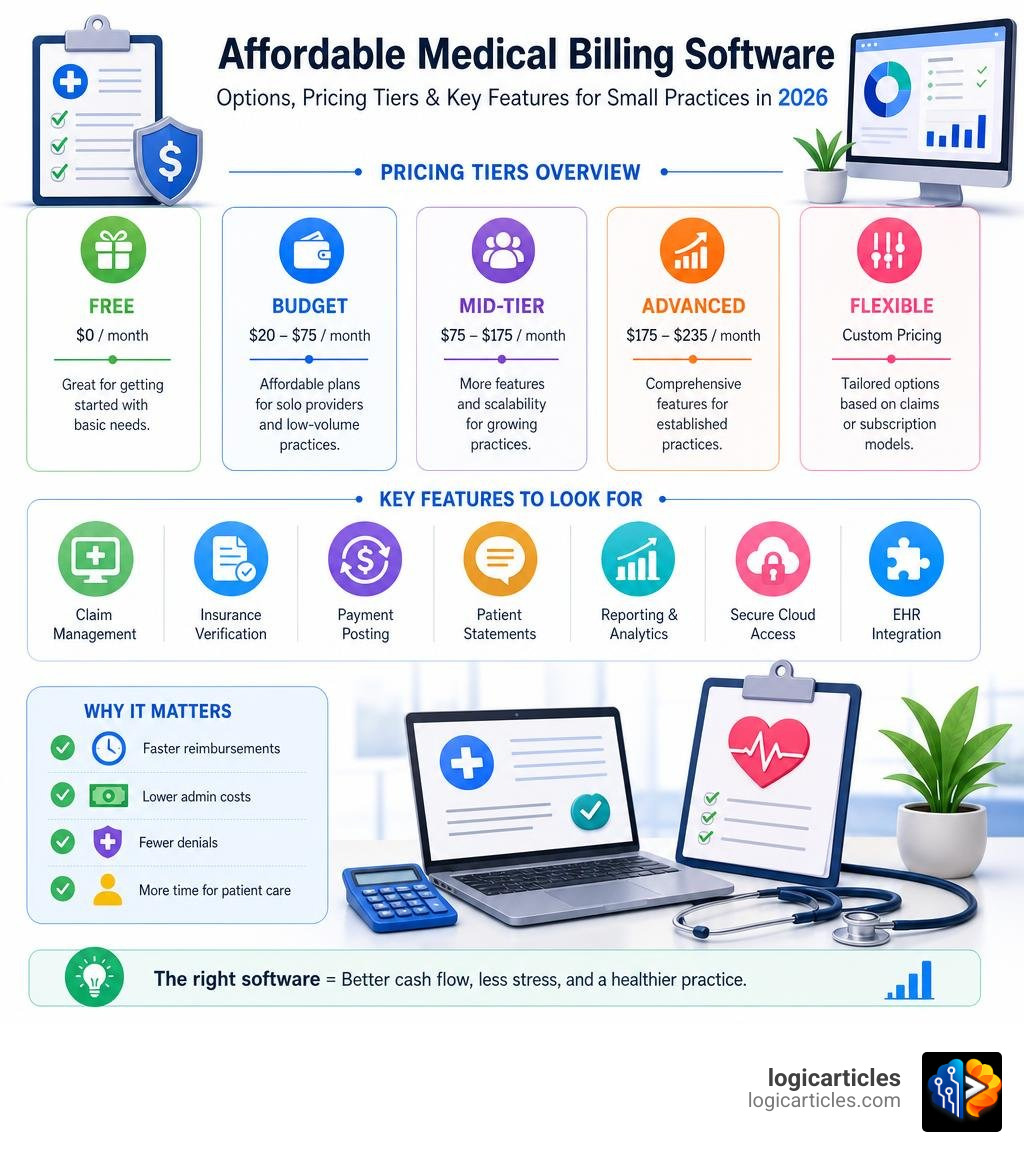
Understanding the Costs of the Most Affordable Medical Billing Software
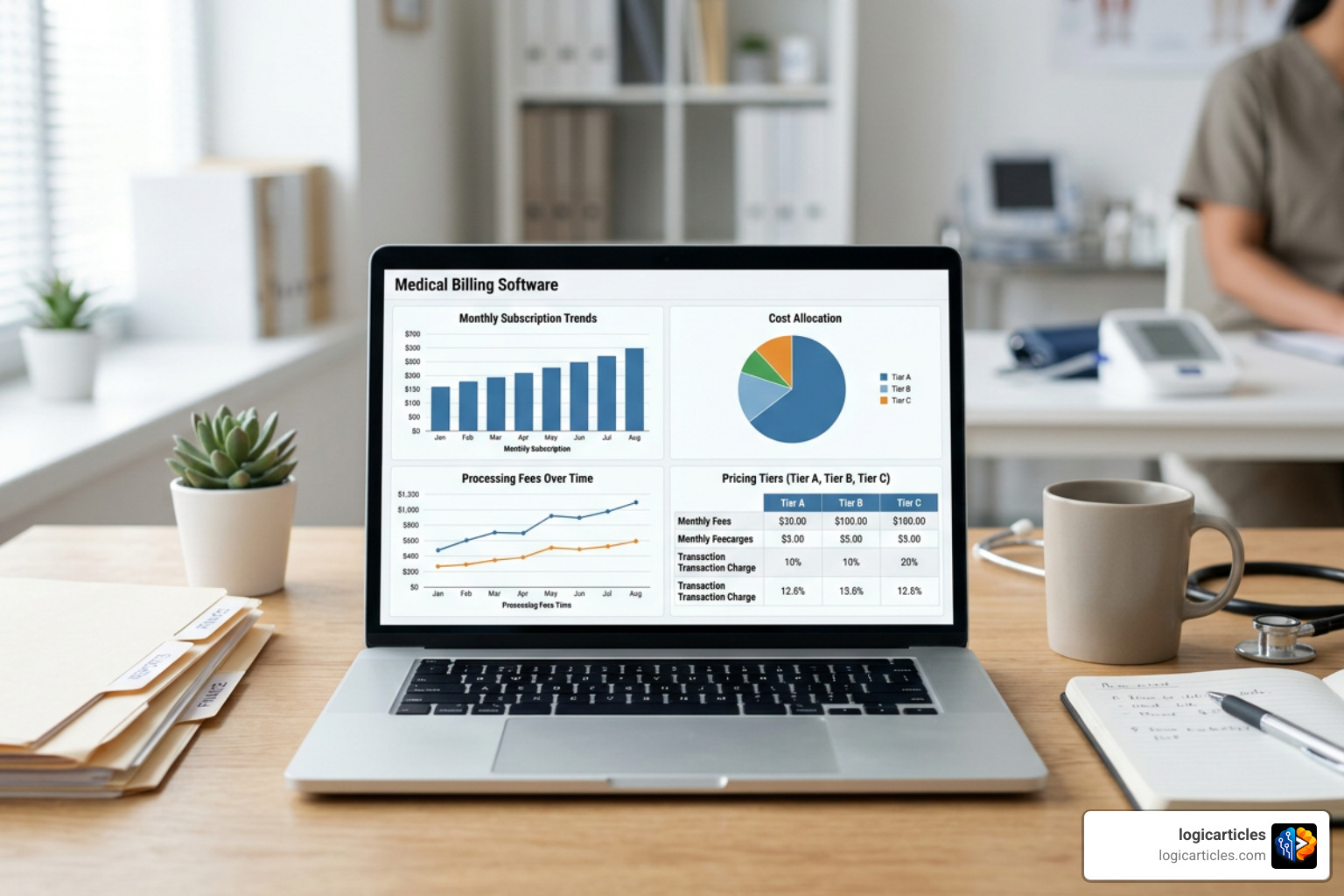
When we evaluate the financial landscape of medical billing, we see that pricing structures are rarely one-size-fits-all. Understanding how software companies charge for their platforms is the first step in finding a truly budget-friendly solution. Just as you would analyze your options when learning how to choose the right accounting software for your business, you must carefully weigh the pricing models of medical billing platforms against your practice’s specific cash flow.
In 2026, the two primary pricing models dominate the medical billing software space:
- Flat Monthly Subscriptions: You pay a fixed fee per user or per provider every month. This is highly predictable and works beautifully for high-volume practices because your costs do not rise as your patient volume grows.
- Percentage of Collections: The software provider (or integrated billing service) takes a cut of the revenue you actually collect, typically ranging between 3% and 9% of monthly revenue. While this keeps upfront costs low, it can become incredibly expensive as your practice scales.
For a small clinic, a flat-rate monthly model is almost always the most cost-effective path. It allows you to keep your overhead predictable and ensures that your hard-earned revenue stays in your practice.
Evaluating Pay-As-You-Go Options for the Most Affordable Medical Billing Software
For low-volume practices, startups, or solo providers, paying a hefty monthly subscription can feel like an unnecessary burden. This is where pay-as-you-go billing models shine. Instead of paying for a massive software suite that you only use a few times a week, you only pay for the actual claims you submit or the eligibility checks you run.
With modern, developer-friendly platforms like Stedi’s transparent pricing, practices can completely bypass traditional monthly minimums and setup fees. Under this type of transaction-based model:
- Real-time eligibility checks (270/271 transactions) can cost as little as $0.30 per transaction, dropping even lower as your volume increases.
- Claim submissions (837 transactions) are billed per use, meaning you are never paying for idle software.
- Electronic Remittance Advice (ERA/835) delivery is charged purely on consumption.
This micro-transaction approach is highly disruptive. It allows small clinics to access the same high-powered clearinghouse networks as major hospital systems without being locked into expensive monthly contracts.
Hidden Fees to Watch Out For
A software package might look incredibly cheap on paper, but the true cost of ownership often hides in the fine print. When we help practices evaluate software, we always advise them to look beyond the basic monthly subscription.
Here are the most common hidden fees to watch out for:
- Setup and Implementation Fees: Some legacy vendors charge hundreds or even thousands of dollars just to activate your account and configure your clearinghouse connections.
- Electronic Data Interchange (EDI) and Clearinghouse Fees: Some “affordable” platforms charge extra monthly fees per National Provider Identifier (NPI) to actually transmit your electronic claims. For example, some add-on clearinghouse services charge a flat $99 per month per NPI.
- Support and Training Costs: If your staff needs help navigating the platform, you might be hit with unexpected support fees. Always look for software that offers free, unlimited technical support and training academies.
- Software Updates and Maintenance: On-premise systems often require paid upgrades to remain compliant with changing billing codes and security standards. To understand how these ongoing costs can impact your budget, check out our guide on the Best Software Maintenance Services 2026 Costs.
- Cancellation and Contract Termination Fees: Many low-cost providers require long-term commitments and charge steep penalties if you decide to switch software before your contract ends.
By identifying these potential financial traps early, you can choose a platform that remains genuinely affordable over the long haul.
Key Features of Low-Cost Medical Billing Solutions

When shopping for the most affordable medical billing software, it is easy to make the mistake of choosing a platform based solely on price. However, a cheap system that lacks critical automation features will cost you far more in lost revenue and administrative hours.
To help you compare, let’s look at how the key features stack up across different affordable billing software models:
| Feature | Pay-As-You-Go (e.g., API-driven) | Entry-Level SaaS (e.g., My Client Plus) | Mid-Tier SaaS (e.g., Nue MD) |
|---|---|---|---|
| Upfront Setup Cost | $0 | Low ($0 – $100) | Moderate ($100 – $300) |
| Monthly Minimum | None | Low ($20 – $50) | Moderate ($100 – $150) |
| Claims Scrubbing | Developer-integrated | Basic | Advanced (Automated) |
| EHR Integration | Highly customizable | Limited | Built-in or modular |
| Support Channels | Developer docs / Slack | Email & Ticket | Phone, Chat, & Email |
The right system must balance cost with usability. A user-friendly design ensures that your administrative staff can enter charges, verify eligibility, and submit claims quickly without a massive learning curve.
Claims Scrubbing and Denial Management
The absolute highest-leverage step in your entire billing cycle is claim scrubbing. Claims scrubbing is the automated process of checking your insurance claims for formatting errors, missing information, and coding mismatches before they are sent to the clearinghouse.
Using a platform like Expedium web-based billing gives practices access to built-in error-pointing features. When a biller makes a data entry mistake, the software immediately highlights the error, allowing for instant correction.
Consider the real-world impact of these features:
- Higher First-Pass Acceptance Rates: Leading affordable platforms report up to a 99% first-pass acceptance rate, meaning nearly every claim is accepted by the payer on the first try.
- Reduced Accounts Receivable (A/R) Times: By automating the scrubbing process, systems like billrMD have demonstrated up to a 60% reduction in outstanding A/R, keeping cash flowing into the practice.
- Systematic Denial Tracking: If a claim is denied, your software should automatically flag it, explain the denial code in plain English, and guide your staff through the resubmission process.
Cloud-Based vs. On-Premise Scalability
In 2026, the debate between cloud-based and on-premise billing software is practically over. Cloud-based (web-based) software is the clear winner for small, budget-conscious practices.
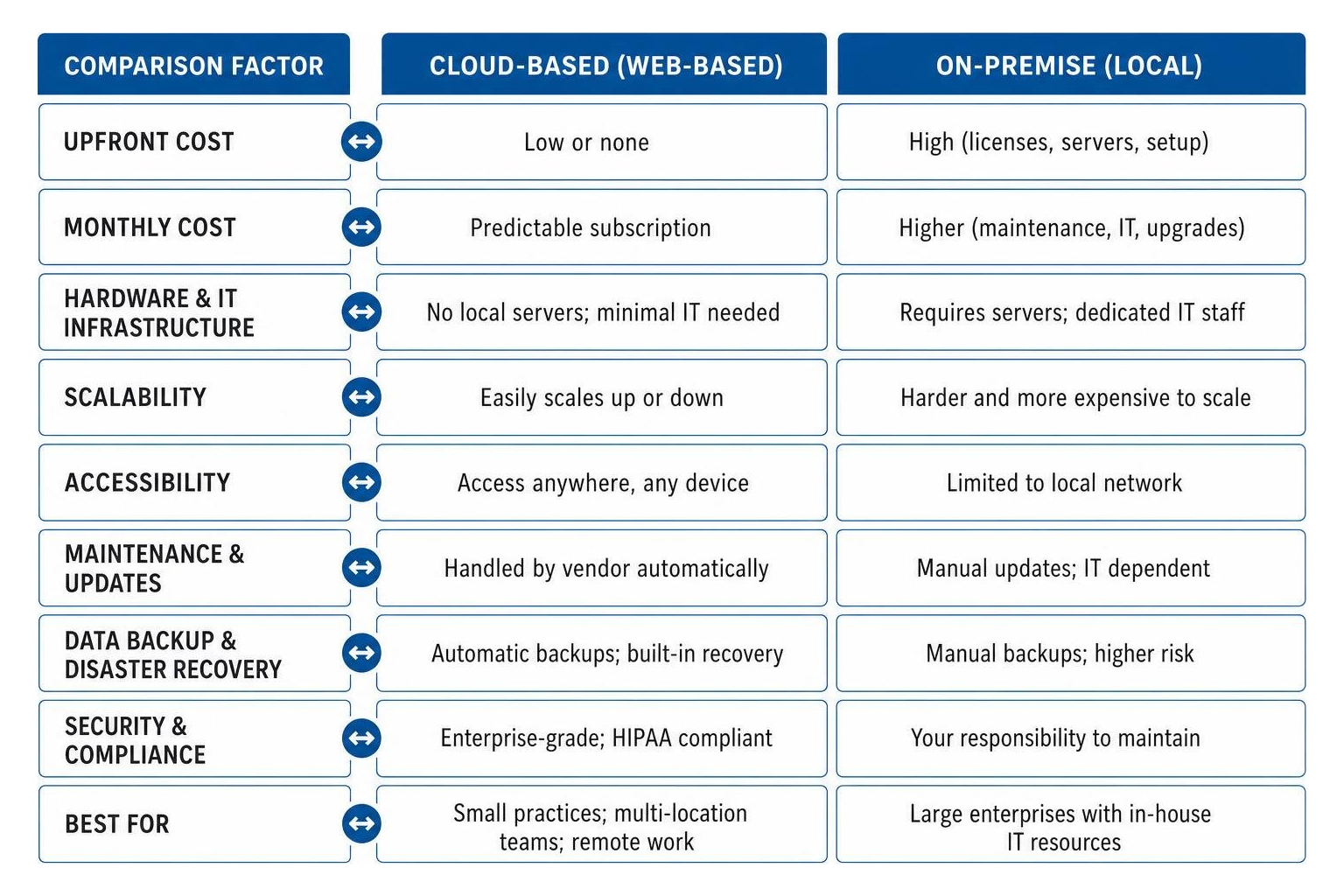
Cloud hosting completely eliminates the need for expensive local servers, manual backups, and dedicated IT staff. The software vendor handles all security updates, compliance standards, and daily data backups automatically. This is especially critical for maintaining strict HIPAA compliance and protecting sensitive Protected Health Information (PHI).
Additionally, cloud systems offer unmatched operational flexibility. Your billing team can securely access the platform from any internet-connected device, whether they are working at the front desk, from home, or across multiple clinic locations.
For specialized compliance needs, such as managing Affordable Care Act tax forms offline to maximize security, tools like the ez1095 ACA software show how offline desktop applications still hold value for specific administrative tasks. However, for daily, high-volume insurance billing, a secure cloud infrastructure is essential for modern scalability.
Integrated EHR vs. Standalone Billing Systems
As a small practice, you must decide whether to adopt a standalone medical billing system or an all-in-one integrated Electronic Health Record (EHR) and billing suite.
Standalone systems are often highly affordable and let you avoid paying for clinical features you do not need. However, they require your staff to manually copy data from your clinical charts into your billing software. This double data entry is time-consuming and opens the door to costly coding errors.
Conversely, integrated systems sync clinical notes directly with your billing workflows. To understand how these clinical systems are built and integrated, you can read about the latest standards in EMR software development in 2026. An integrated workflow allows your providers to complete an exam, sign the note, and automatically generate a clean billing claim in seconds.
Choosing the Most Affordable Medical Billing Software for Small Practices
For small practices operating on tight margins, modular adoption is often the most cost-effective strategy. This means choosing a platform that allows you to start with basic billing features and add scheduling, patient portals, or EHR modules only when your practice grows.
A fantastic example of a scalable, user-friendly platform is Medisoft Cloud billing. This system is highly popular among solo and small practices because its pricing is based on concurrent users rather than the total number of healthcare providers in your office.
This concurrent-user model offers massive savings:
- If you have three part-time doctors but only one billing specialist accessing the system at any given time, you only need to pay for a single-user license.
- It includes 24/7 cloud access, automatic data backups, and free software upgrades, keeping your IT maintenance overhead at absolute zero.
Revenue Cycle Management vs. Standalone Software
It is common to hear the terms “medical billing software” and “Revenue Cycle Management (RCM)” used interchangeably, but they represent very different operational paths:
- Medical Billing Software (In-House): This is the technology tool your in-house staff uses to submit claims, track payments, and manage patient billing. You maintain complete control over your billing process, but you must employ or contract a medical biller. Considering that medical biller salaries typically range from $40,000 to $60,000 per year (with experienced, certified billers earning upwards of $60,000 to $80,000+), this represents a significant fixed payroll expense.
- Revenue Cycle Management (RCM) Services (Outsourced): With RCM, you outsource your entire billing department to a third-party partner. They handle the software, the claim submissions, the denial appeals, and the patient collections.
While outsourcing your billing via RCM can reduce your internal payroll costs, it typically costs a percentage of your monthly collections. If you want to explore how modern automated systems optimize these financial lifecycles, take a look at our breakdown of the best revenue management software in 2026. For most small, growing practices, keeping billing in-house using an affordable standalone or modular cloud platform is the most cost-effective way to protect your margins.
Frequently Asked Questions About Medical Billing Software
Are there any free or freemium medical billing software options available?
Yes, several reputable medical billing platforms offer free starter plans or complimentary introductory tiers. For example, PracticeSuite offers a free starter program that allows low-volume practices to process up to 25 claims per month at zero cost. Other platforms offer completely free introductory plans with no credit card required, allowing startups to test their workflows risk-free.
However, these freemium models always come with restrictions. Once your practice exceeds the monthly claim limit or requires advanced features like automated claims scrubbing, real-time eligibility checks, or multi-user access, you will need to upgrade to a paid subscription tier.
How does medical billing software help reduce claim denials?
Medical billing software acts as an automated gatekeeper for your revenue. It reduces claim denials through several key mechanisms:
- Real-Time Eligibility Verification: The software instantly checks a patient’s insurance status, copay requirements, and deductibles before their appointment, preventing denials related to inactive coverage.
- Automated Claims Scrubbing: The system scans every claim for coding errors, missing modifiers, and payer-specific rules before submission, ensuring only “clean” claims are sent out.
- Instant Rejection Alerts: If a clearinghouse rejects a claim, the software alerts your staff immediately, allowing them to correct and resubmit the claim in seconds rather than waiting weeks for a paper denial notice.
What is the difference between medical billing and RCM software?
While basic medical billing software focuses strictly on generating and transmitting insurance claims and patient invoices, RCM (Revenue Cycle Management) software manages the entire financial lifecycle of a patient encounter.
RCM software tracks the revenue cycle from the very moment a patient schedules an appointment (including prior authorizations and eligibility checks) all the way through clinical documentation, claim submission, denial management, payment posting, and final patient collections. RCM software provides high-level financial dashboards and analytics to help practices identify revenue leaks and optimize their overall financial health.
Conclusion
Choosing the most affordable medical billing software is not about finding the absolute lowest price tag; it is about finding the platform that delivers the highest return on your investment. By automating your claims scrubbing, simplifying patient collections, and eliminating manual data entry, the right software will save your practice countless administrative hours and dramatically reduce your outstanding accounts receivable.
We recommend starting your search by taking advantage of free trials, testing pay-as-you-go clearinghouse integrations, and evaluating concurrent-user pricing models to keep your overhead as low as possible.
Ready to discover more top-tier software solutions tailored for your business? Explore the Best Software Categories on logicarticles today to find the perfect tools to streamline your operations and grow your bottom line!