Why Web Development Best Practices Define the Success of Your Application

Web development best practices are the proven guidelines that separate applications that scale, stay secure, and keep users happy — from ones that quietly fall apart under real-world pressure.
Here’s a quick answer if you need it fast:
The most important web development best practices in 2026:
- Performance — Hit Core Web Vitals targets: INP ≤ 200 ms, LCP ≤ 2.5 s, CLS ≤ 0.1
- Architecture — Use server-first rendering (RSC + SSR/ISR) and composable modular design
- Security — Follow OWASP Top 10:2025, apply zero-trust principles, scan every CI/CD pipeline
- Accessibility — Meet WCAG 2.2 AA from day one, including tap targets and focus indicators
- Clean code — Enforce strict TypeScript, feature-based folder structure, and automated testing
- CI/CD — Aim for daily deploys, under 1-hour lead time, and under 1-hour MTTR (elite DORA)
- SEO — Build with mobile-first, semantic HTML, deep linking, and server-rendered content
- Mobile-first — Over 60% of web traffic is mobile; responsive design is non-negotiable
The stakes are real. A 100 ms increase in page load time costs Amazon roughly 1% in revenue. A data breach now averages over $4.8 million in damages. Accessibility lawsuits routinely settle for $25,000 to $100,000 or more.
And yet — most of these problems are preventable with the right engineering habits in place from the start.
This guide walks through every pillar: architecture, performance, security, accessibility, clean code, DevOps, and SEO. Whether you’re building a new product or improving an existing one, you’ll find actionable steps grounded in how real production systems actually work.
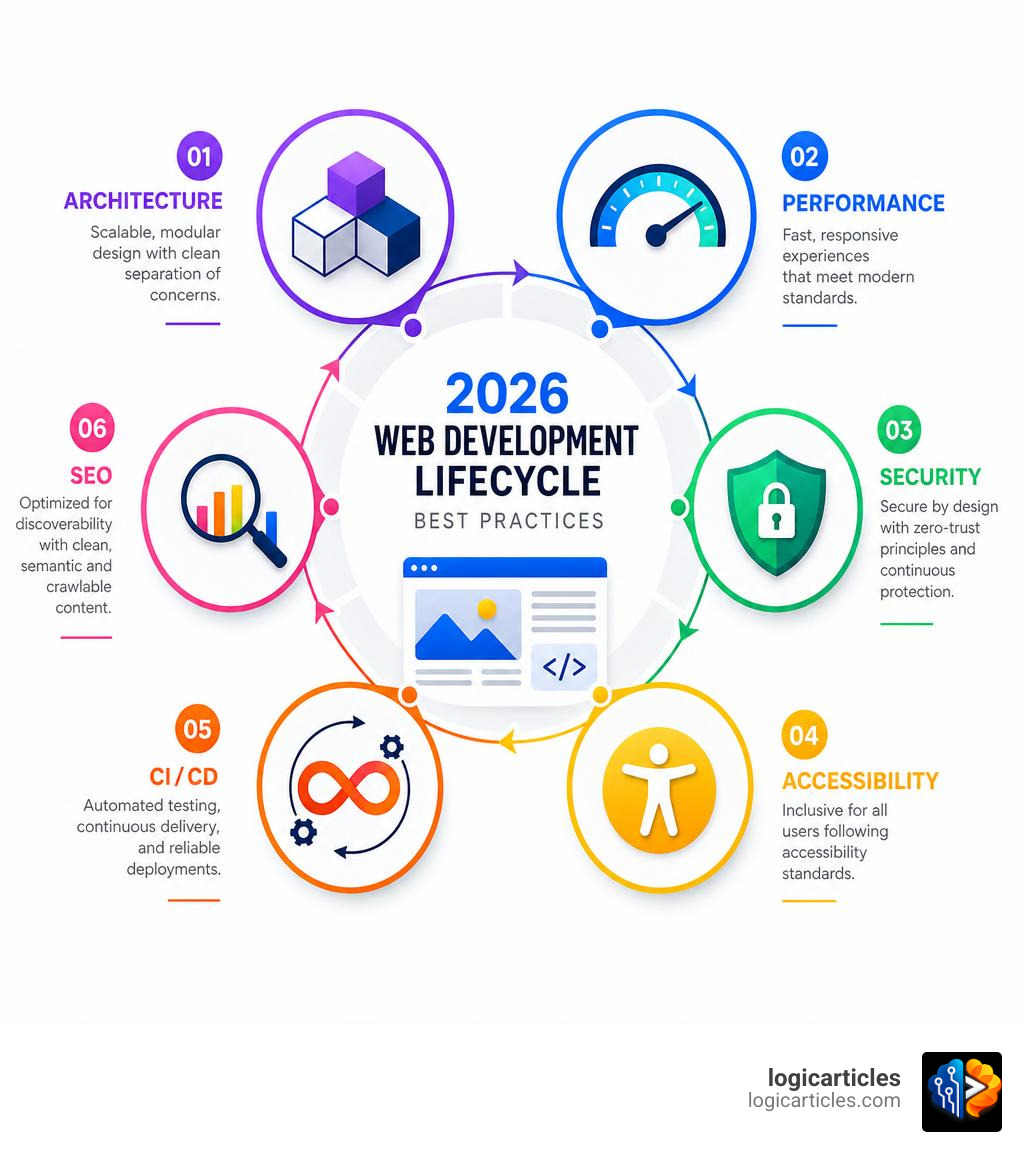
Core Pillars of Web Development Best Practices in 2026
To build applications capable of surviving rapid user growth, compliance reviews, and team expansions, we must move away from the “build fast and break things” mentality. Instead, we focus on architectural stability.
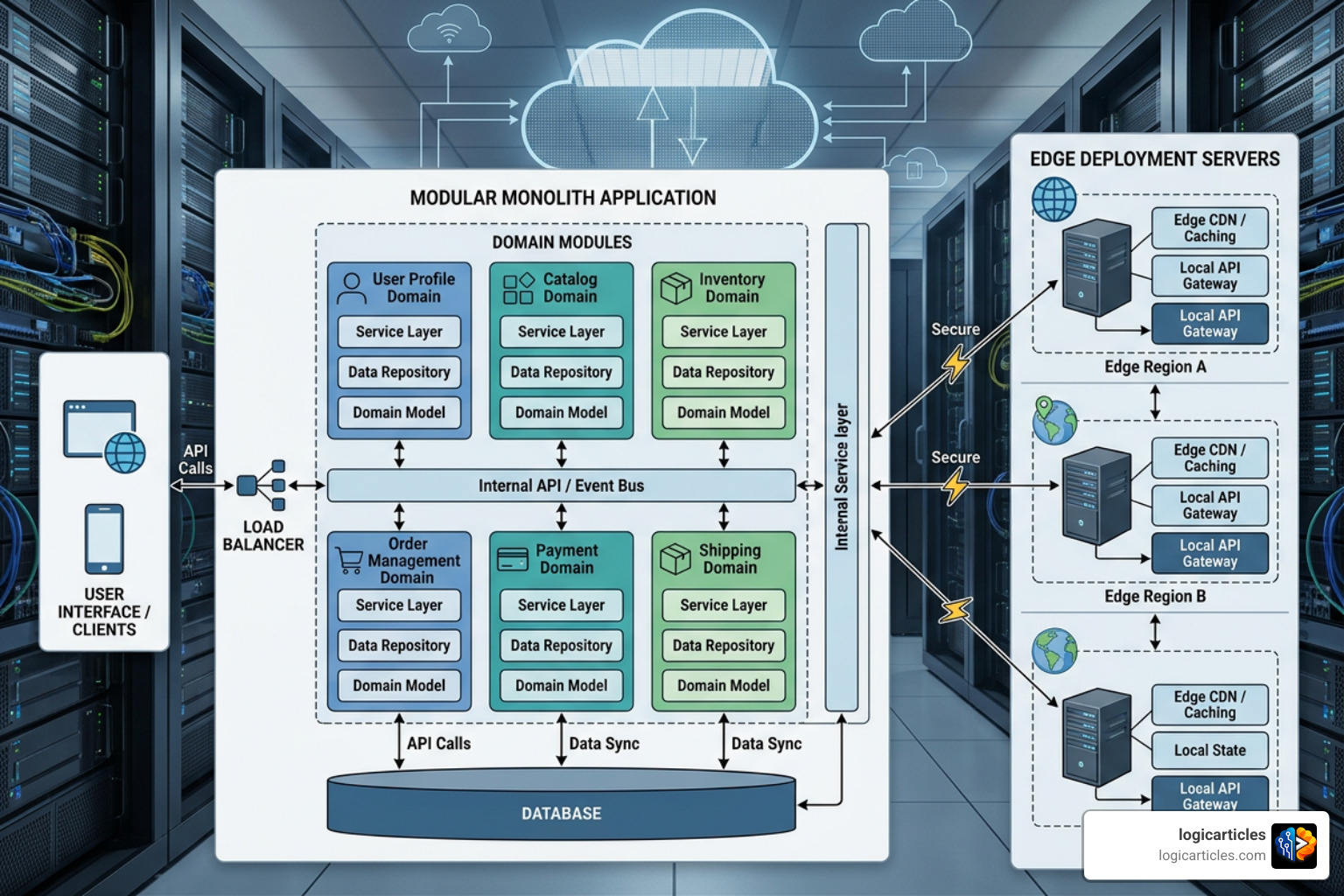
When establishing your foundational architecture, we highly recommend following a composable modular monolith pattern over premature microservices. Microservices introduce complex network overhead and distributed transaction headaches that small-to-medium teams simply do not need. A modular monolith allows you to maintain a single repository with strictly separated domain boundaries. If a specific module eventually needs to scale independently, it can easily be extracted into its own service later.
In 2026, deployment has shifted heavily toward edge deployment and serverless computing. Running stateless services on global edge networks (like Cloudflare Workers or Vercel Edge Network) drops your global Time to First Byte (TTFB) to under 50 ms. Because these services are stateless, they scale horizontally instantly, handling traffic spikes without requiring manual infrastructure adjustments.
Finally, an API-first design ensures your backend serves as a clean, decoupled data engine. Whether your frontend is a web app, a mobile app, or a third-party integration, a well-designed REST or GraphQL API acts as a buffer, letting you revamp your presentation layer without rewriting the core business logic. For a deeper dive into structuring these systems, refer to the Web Development Best Practices 2026: Engineering Guide.
Modern Architecture: Server-First Rendering vs Client-Side Rendering
The rendering landscape has evolved past the binary choice of Client-Side Rendering (CSR) vs. Server-Side Rendering (SSR). In 2026, the industry standard relies on server-first rendering architectures, led by React Server Components (RSC).
To understand why this matters, let’s look at how these models compare:
| Rendering Model | Initial Load Speed | Interactivity Delay | Bundle Size Impact | Best Used For |
|---|---|---|---|---|
| Client-Side Rendering (CSR) | Slow (requires JS download) | Low (once loaded) | High (heavy client bundles) | Highly interactive, private dashboards |
| Server-Side Rendering (SSR) | Fast (pre-rendered HTML) | Moderate (hydration delay) | Medium | Dynamic, public-facing pages |
| Static Site Generation (SSG / ISR) | Extremely Fast (cached globally) | Low | Low | Blogs, marketing sites, documentation |
| React Server Components (RSC) | Extremely Fast | Zero Hydration Delay | Extremely Low (40-70% reduction) | Modern, content-rich web applications |
React Server Components allow us to render components directly on the server, fetching data close to our database and shipping zero client-side JavaScript for those components. By utilizing the React Compiler, modern frameworks automatically handle memoization and optimize hydration.
For interactive parts of the page, we use “hydration islands” (client components) nested inside server components. This server-first approach reduces client-side JavaScript bundle sizes by 40% to 70%, dramatically improving the speed of your site on low-powered mobile devices.
Performance Engineering: Web Development Best Practices for Core Web Vitals
Performance is no longer just a technical metric; it directly impacts your business’s bottom line. Poor Core Web Vitals increase user bounce rates by 20% to 35% and reduce conversions by up to 15% for every additional second of delay.
In 2026, Google’s primary responsiveness metric is Interaction to Next Paint (INP), replacing the older First Input Delay (FID). Your targets must be:
- INP (Interaction to Next Paint): ≤ 200 ms (p75)
- LCP (Largest Contentful Paint): ≤ 2.5 s
- CLS (Cumulative Layout Shift): ≤ 0.1
To hit these targets, we must establish strict performance budgets (e.g., keeping total JavaScript under 400 KB gzipped). We can achieve quick wins by mastering the critical rendering path.
First, use resource hints to tell the browser what to prioritize:
<link rel="preconnect" href="https://api.yoursite.com">
<link rel="preload" href="/fonts/inter.woff2" as="font" type="font/woff2" crossorigin>
Second, optimize your CSS delivery. Avoid blocking the parser by inlining critical “above-the-fold” CSS directly into the HTML document, and load the remaining styles asynchronously using the media attribute trick:
<link rel="stylesheet" href="styles.css" media="print" onload="this.media='all'">
Additionally, always apply font-display: swap to your custom fonts to prevent invisible text during loading, and use modern image formats like WebP or AVIF to reduce payload sizes by up to 50%. For a comprehensive performance checklist, check out the Web Performance best practices & tips – Learn web development | MDN.
Security by Design and Inclusive Accessibility
Security and accessibility cannot be treated as post-launch checklists. They must be baked into your system from day one.

A true zero-trust model assumes that every request—even those coming from inside your network—is potentially malicious. This requires strict authentication, short-lived tokens, and explicit authorization policies (RBAC/ABAC) for every API endpoint.
OWASP Top 10 Compliance and Supply-Chain Protection
Web applications and APIs remain the number one initial access vector for security breaches, with the average cost of a data breach exceeding $4.8 million. To protect your application, your CI/CD pipeline must enforce automated security scans:
- SAST (Static Application Security Testing): Scans your source code for vulnerabilities before compilation.
- DAST (Dynamic Application Security Testing): Tests your running application in a staging environment for real-world exploits.
- SCA (Software Composition Analysis): Scans your third-party dependencies for known vulnerabilities. Supply-chain attacks have risen to the top of security concerns, making SCA non-negotiable.
Additionally, always protect user sessions by using HttpOnly, Secure, and SameSite=Strict cookies to mitigate Cross-Site Scripting (XSS) and Cross-Site Request Forgery (CSRF) risks. Never store sensitive tokens in local storage, where malicious client-side scripts can access them.
Accessibility Standards under WCAG 2.2 AA
Accessibility (a11y) is not just ethical; it is a legal requirement. Non-compliance with WCAG 2.2 AA standards frequently results in costly lawsuits, with settlements averaging between $25,000 and $100,000.
To ensure compliance, we must start with semantic HTML. Standard elements like <button>, <nav>, and <main> have built-in keyboard navigation and screen reader support that custom <div> structures lack.
Key interactive requirements under WCAG 2.2 include:
- Target Size: Ensure all touch targets are at least 24×24 pixels (and ideally 48×48 pixels for mobile-first designs) to prevent accidental taps.
- Focus Indicators: Never disable the default outline style (
outline: none) without providing an equally visible, highly contrasting custom focus indicator. - No Drag-Only Interactions: Provide simple tap or click alternatives for any action that requires dragging (like kanban boards or sliders).
- Color Contrast: Maintain a minimum contrast ratio of 4.5:1 for standard text and 3:1 for large text.
You can run automated accessibility audits using tools like axe-core within your development workflow, and refer to web.dev for guided tutorials on building inclusive user interfaces.
Engineering Workflows: Clean Code, DevOps, and SEO
An exceptional web application is built on top of robust engineering workflows. High-performing teams focus heavily on developer experience (DX) and continuous integration.
To scale your engineering team without losing velocity, we recommend adopting strict code quality standards, automated testing, and comprehensive observability.
Clean Code and Maintainability: Web Development Best Practices at Scale
Maintaining a codebase over five to ten years requires absolute consistency. We enforce this by using strict TypeScript configurations (enabling noImplicitAny and exactOptionalPropertyTypes) alongside Prettier and ESLint. Using pre-commit hooks via Husky ensures that poorly formatted or broken code never leaves a developer’s local machine.
We recommend a feature-based folder structure rather than a flat, technical structure (like putting all components in one massive folder):
src/
├── features/
│   ├── authentication/
│   │   ├── components/
│   │   ├── hooks/
│   │   ├── types.ts
│   │   └── index.ts
│   └── billing/
This isolates domains, making it obvious where code lives and preventing tight coupling between unrelated features.
For testing, we follow the practical testing pyramid:
 /\
 /  \ End-to-End (E2E) Tests (e.g., Playwright)
 /----\
   / \   Integration Tests (e.g., testing component interactions)
  /--------\
 / \ Unit Tests (e.g., Vitest for business logic)
/____________\
Aim for a realistic 70% to 80% code coverage target on your critical business paths rather than chasing a theoretical 100% coverage that slows down feature delivery. For more insights on balancing speed and quality, read through the comprehensive guide on 12 Best Web Development Practices to Follow in 2026 – Web Application Developments.
Achieving Elite DORA Metrics and Observability
Elite engineering teams measure their performance using DevOps Research and Assessment (DORA) metrics. The goals for elite performance are:
- Deployment Frequency: Daily deployments to production.
- Lead Time for Changes: Less than 1 hour from code commit to production.
- Mean Time to Restore (MTTR): Less than 1 hour to resolve a production outage.
- Change Failure Rate: Less than 15%.
To achieve this, implement automated CI/CD pipelines that run your tests, security scans, and build checks on every pull request. Use feature flags (like LaunchDarkly) to decouple code deployment from feature release. This allows you to merge code safely to production while keeping features hidden until they are fully ready.
Combine this with a blue-green or canary release strategy to roll out updates to a small percentage of users first, automatically rolling back if error rates spike.
For observability, implement structured logging in JSON format and use distributed tracing tools like Sentry to catch exceptions in real time before your users notice them.
Architectural SEO and Progressive Web Apps
SEO is no longer just about meta tags; it is deeply tied to your frontend architecture. Because Google uses mobile-first indexing, your application must perform beautifully on mobile browsers.
If your application needs to work reliably on spotty networks, transforming it into a Progressive Web App (PWA) is highly beneficial. By utilizing service workers, you can intercept network requests and provide a custom offline page or even support full offline operation for core tasks.
// Basic service worker registration for offline fallback
self.addEventListener('fetch', (event) => {
  event.respondWith(
 fetch(event.request).catch(() => {
 return caches.match('/offline.html');
 })
  );
});
PWAs must support deep linking, meaning every view in your application must have a unique, indexable URL. This ensures search engines can crawl your pages and users can share direct links. For a deep dive into building reliable PWAs, consult the Best practices for PWAs – Progressive web apps | MDN.
Common Mistakes to Avoid in Modern Engineering
Even experienced teams fall into common traps. When building modern web applications, make sure to avoid these pitfalls:
- Premature Microservices: Do not split your application into microservices on day one. Start with a clean, modular monolith and separate services only when scaling demands require it.
- Hard-Coded Secrets: Never commit API keys, database credentials, or encryption keys to version control. Always use environment variables and secure vault systems.
- Ignoring Performance Budgets: Adding large third-party libraries without checking their impact on your bundle size will destroy your Core Web Vitals.
- Skipping Staging Environments: Testing features directly in production is a recipe for downtime. Always use a staging environment that closely mirrors your production setup.
- Over-Reliance on ARIA: Do not use complex ARIA attributes to turn a
<div>into a button. Use native, semantic HTML elements first. - Uncompressed Media: Serving uncompressed, raw images or video files will severely slow down your application. Always run media through an optimization pipeline before serving it to users.
For a detailed breakdown of these and other common pitfalls, check out Web Application Development Best Practices: A Complete Guide for 2026 – ThriveVerge.
Frequently Asked Questions
What is the recommended rendering model for web development in 2026?
We recommend a server-first rendering model using React Server Components (RSC) combined with Server-Side Rendering (SSR) or Incremental Static Regeneration (ISR). This approach keeps client-side JavaScript bundles incredibly small while delivering fast page loads and excellent SEO performance.
How do Core Web Vitals impact search engine rankings?
Google uses Core Web Vitals (specifically LCP, CLS, and INP) as direct ranking factors. Applications with poor performance metrics experience higher user bounce rates, lower conversion rates, and lower visibility in search results.
What are the minimum accessibility requirements for modern web applications?
Modern web applications should aim for WCAG 2.2 AA compliance. This includes using semantic HTML, ensuring all interactive elements are fully keyboard-navigable, maintaining a minimum 4.5:1 text color contrast, and providing visible focus indicators.
Conclusion
At logicarticles, we believe that following modern engineering standards is the only way to build sustainable, high-quality software. By adopting server-first rendering, prioritizing Core Web Vitals, baking security and accessibility into your pipeline, and aiming for elite DORA metrics, you protect your application against future technical debt and security risks.
Building a great web application is a process of continuous improvement. Keep refining your workflows, keep optimizing your code, and always design with your users in mind.
Ready to take your engineering team to the next level? Boost your team’s productivity with our curated resources and build faster, more resilient applications today.
1 thought on “Web Development Best Practices 2026: 27 Proven Rules for Faster, Secure & Scalable Apps”