Why Choosing the Right Tool for Reporting Incidents Can Transform Workplace Safety

What tool should be used for reporting incidents? The short answer depends on your industry and needs — but here are the most widely used options:
| Tool Type | Best For | Examples |
|---|---|---|
| EHS Software | Workplace safety, OSHA compliance | EHS Insight, EcoOnline |
| ITSM Platforms | IT and service desk incidents | ServiceNow, Jira Service Management |
| Healthcare Platforms | Patient safety, adverse events | ComplianceQuest, dedicated EHR-integrated tools |
| No-Code Builders | Custom workflows, any industry | Softr |
| AI Automation Tools | Fast, compliant report generation | V7 Go |
| Open-Source Tools | Cybersecurity / SOC teams | SIREN (NIST 800-61 aligned) |
Most nurses, safety managers, and IT teams share the same instinct when an incident happens: dread the paperwork. But that reaction can be costly.
Incident reports are not just administrative tasks. They are safety tools. When used correctly, they prevent the next injury, the next medication error, the next system outage.
And the data backs this up. Organizations with structured incident reporting systems can reduce repeat incidents by up to 50% through better root cause analysis and corrective actions.
The challenge is that most teams are still using the wrong tool — or no consistent tool at all. Paper forms get lost. Spreadsheets go out of date. Emails disappear into inboxes. Critical information never reaches the people who can act on it.
The right incident reporting tool changes all of that.
What is an Incident Report and Why is it Crucial for Safety?
Before we dive into the specific software and platforms available, we must first understand what an incident report actually is and the vital role it plays in protecting both patients and employees.
At its core, an incident report is a formal document used to record an unexpected event, accident, near miss, or close call. Whether we are talking about a hospital ward, a manufacturing plant, or an enterprise IT department, these reports serve as the foundational building blocks of a robust safety culture.

Historically, workers have viewed incident reports with a sense of dread, often associating them with finger-pointing and disciplinary action. However, modern safety frameworks—championed by organizations like The Joint Commission—reframe these documents completely. Safety culture is defined as the product of individual and group beliefs, values, attitudes, perceptions, competencies, and patterns of behavior. In a healthy safety culture, incident reporting is treated as a nonpunitive safety tool rather than a tool for placing blame.
One of the most critical aspects of a mature safety culture is the reporting of “near misses” and “close calls.” A near miss is an event that could have caused harm but was caught just in time. For example, imagine a nurse who misreads a medication label but catches the error right before administering the dose, or a family member mentioning that a patient refused to wear their non-skid slippers.
If we only report events that result in actual harm—such as a patient found on the floor next to their bed after a fall—we miss valuable opportunities for proactive intervention. In fact, safety experts warn that low numbers of reported incidents in an organization often point to underreporting due to fear of blame, rather than an exceptionally safe environment. Proper use of incident reporting tools can reduce workplace injuries and near-miss events by 15-25% simply by identifying hazards early.
What Tool Should Be Used for Reporting Incidents?
Now we arrive at the central question: What tool should be used for reporting incidents?
The truth is, there is no single one-size-fits-all solution. The ideal tool depends heavily on your industry, the complexity of your workflows, and your regulatory requirements. However, one thing is certain: the era of paper-based reporting and manual spreadsheets is rapidly coming to an end.
Let’s look at how paper-based methods stack up against modern digital incident management platforms:
| Feature / Capability | Paper-Based & Legacy Systems | Modern Digital Platforms |
|---|---|---|
| Reporting Speed | Delayed (can take hours or days to route) | Real-time (instant submission via mobile/web) |
| Data Quality | Inconsistent, prone to missing fields | Guided forms, required fields, photo attachments |
| Trend Analysis | Manual compilation (highly labor-intensive) | Automated dashboards and Power BI visualizations |
| Regulatory Compliance | Hard to track and audit | Automated logs (OSHA 300, HIPAA, ISO) |
| Resolution Support | No built-in investigation tools | Integrated root cause analysis (RCA) workflows |
If you are evaluating your options in 2026, several categories of tools are available to streamline your processes:
1. Dedicated EHS and Enterprise Incident Management Software
For organizations focused on physical workplace safety, environmental hazards, and regulatory compliance, dedicated Environmental Health and Safety (EHS) platforms are the gold standard. Tools like Efficient Incident Reporting Software and Solutions | EcoOnline provide frictionless reporting. They allow employees and contractors to report hazards or incidents on any device, support over 90 languages, and use QR codes to make reporting incredibly simple.
For broader enterprise needs, you can explore the Best Incident Reporting System Software (2026) to compare industry-leading tools like ServiceNow, Microsoft Dynamics 365, and Salesforce Service Cloud. These platforms excel at structured case-centric workflows, automated routing, and SLA enforcement.
2. Custom No-Code Solutions
If commercial off-the-shelf software is too rigid or expensive for your specific workflows, you can build your own custom application. Platforms like Softr enable you to Build a custom incident reporting system on top of your data | Softr without writing a single line of code.
By connecting Softr to your existing databases (such as Airtable or Google Sheets), you can create customized submission forms, track incident progress on visual dashboards, and manage user permissions so different teams only see the data relevant to them. It is an incredibly fast, flexible, and cost-effective way to transition away from messy spreadsheets.
3. AI-Powered Automation Agents
The cutting edge of incident management involves artificial intelligence. Traditional reporting can take safety managers 3 to 5 hours per incident as they gather emails, witness statements, and photos.
With tools like AI Incident Reporting Automation | Automate Compliance Reports | V7 Go, an AI agent can ingest scattered data—including handwritten notes, system logs, and images—and compile a highly accurate, compliant report in just 15 to 20 minutes. These platforms use multi-step verification to ensure up to 99% accuracy, complete with citations linking every fact back to the original source document.
Key Elements and Best Practices for Documenting Incidents
Regardless of the tool you choose, the quality of your safety program ultimately rests on how well your staff documents each event. Poorly written reports can lead to compliance issues, incomplete investigations, and even legal liability.
To protect your organization and ensure the integrity of your data, follow these industry best practices for completing an incident report:
- Stick to Objective Facts: Write only what you witnessed or know to be true. Avoid assumptions, speculation, or assigning blame. Instead of writing, “The patient fell because the floor was wet and the cleaning staff was lazy,” write, “Patient was found lying on their side on the floor. A small puddle of water was observed on the tile nearby.”
- Include Direct Quotes: When interviewing witnesses or the affected individual, record their statements verbatim using quotation marks. For example: The patient stated, “I forgot to put my slippers on.”
- Act Quickly: Submit reports within 24 hours of the event while details are still fresh in everyone’s mind.
- Document Interventions: Clearly record the immediate actions taken to address the incident (e.g., “Notified Dr. Smith at 14:15, applied ice pack to patient’s left elbow, and monitored vital signs”).
- Keep Reports Separate from Medical Records: In healthcare, never document in a patient’s electronic health record (EHR) that an incident report has been completed. Doing so can compromise the legal protections of the document.
This last point is crucial. Under the Patient Safety and Quality Improvement Act of 2005, incident reports are generally protected from legal discovery as long as they are completed and handled within a designated Patient Safety Evaluation System. Keeping the report separate from the patient’s medical record preserves this privilege, protecting your staff and allowing for honest, nonpunitive safety analysis.
How Organizations Use Incident Data to Improve Safety Systems
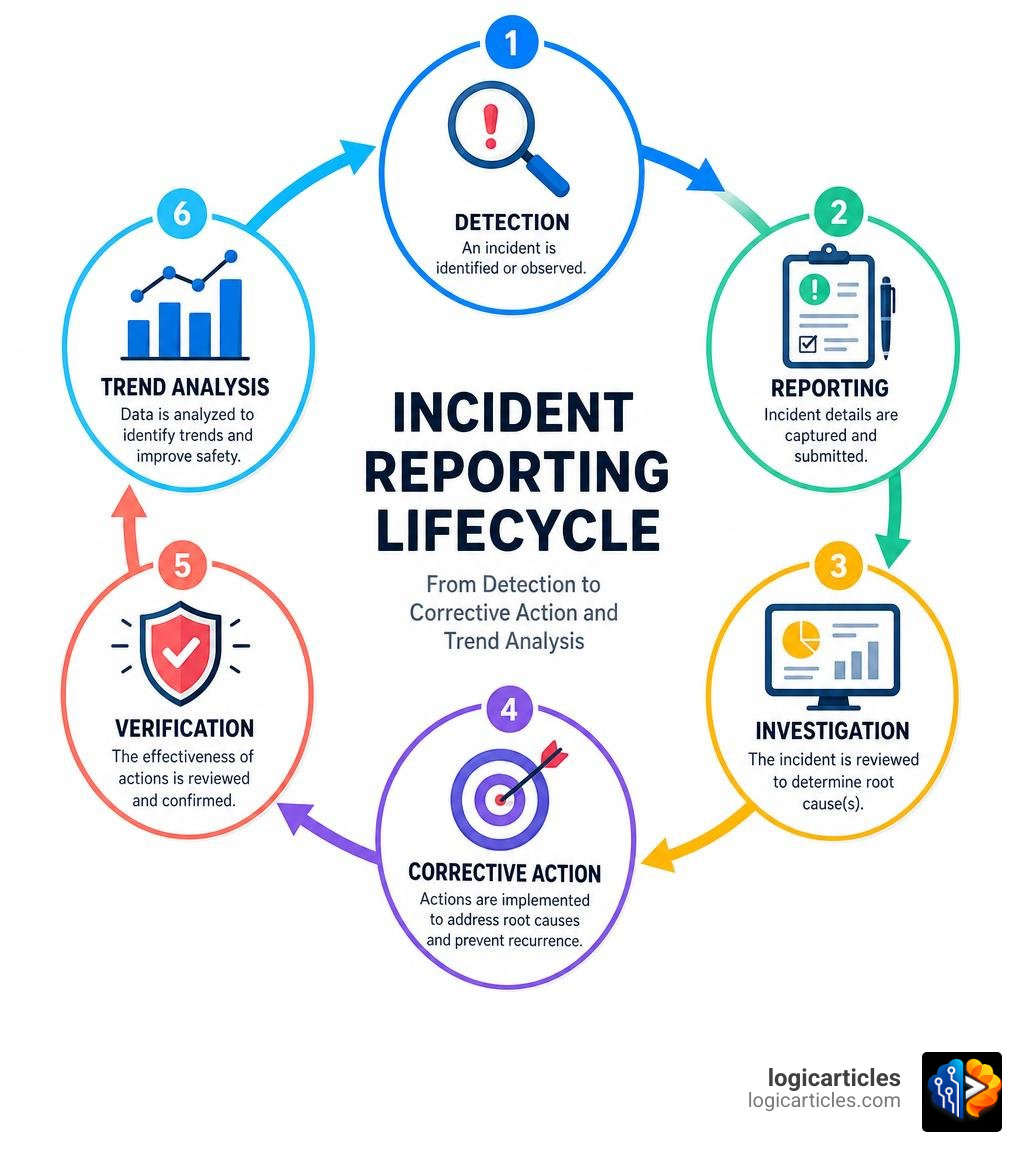
The ultimate goal of reporting incidents is not to fill a digital filing cabinet; it is to prevent future occurrences. When we centralize our incident data, we can move from reactive firefighting to proactive prevention.
One of the most powerful ways to achieve this is through integrated Root Cause Analysis (RCA). Tools like COMET Incident Management | Simplified Incident Management build RCA methodologies directly into the platform. Rather than settling for immediate causes (like “human error”), these systems guide investigators to ask why the error occurred. Was the procedure outdated? Did production pressures play a role? Was safety training inadequate?
By identifying systemic root causes, organizations can implement targeted corrective and preventive actions (CAPA). For instance, a global safety leader using COMET reduced first-aid cases by 29% by systematically addressing the root causes of recurring minor incidents.
Furthermore, integrating incident management platforms with business intelligence tools like Power BI allows safety leaders to visualize trends in real time. You can easily spot patterns, such as a spike in equipment mishaps on a specific shift or a high frequency of medication errors in a particular ward. For healthcare providers looking to optimize these workflows, checking out our guide on the Best Incident Management Software For Healthcare 2026 is an excellent starting point to see how modern platforms handle compliance and patient safety.
Frequently Asked Questions about Incident Reporting Tools
What tool should be used for reporting incidents in healthcare?
In healthcare, patient safety, HIPAA compliance, and integration with Electronic Health Records (EHR) are paramount. Healthcare organizations should use specialized incident management software like ComplianceQuest or dedicated modules within their EHR systems. These tools are designed to track medication errors, patient falls, and sentinel events while maintaining strict data privacy and meeting stringent regulatory standards.
What tool should be used for reporting incidents in IT and cybersecurity?
IT and cybersecurity incidents require rapid timeline reconstruction and tracking of Indicators of Compromise (IOCs). Security Operations Center (SOC) analysts often use tools aligned with the NIST 800-61 framework.
For a lightweight, open-source solution, teams can use Rootless-Ghost/SIREN (Security Incident Response Engine & Notation). SIREN runs locally on your machine, features a dark-themed UI optimized for 24/7 SOC environments, calculates composite severity scores (0-10), and allows analysts to rapidly export structured Markdown or JSON reports during live incident response.
Can we build a custom incident reporting tool without coding?
Yes! No-code platforms like Softr allow organizations to build fully customized incident reporting portals using drag-and-drop interfaces. You can easily connect your portal to secure cloud databases like Airtable, set custom user permissions, and adapt the forms to your exact industry requirements.
If you want to take customization a step further, you can combine these portals with AI integrations like AI Incident Reporting Automation | Automate Compliance Reports | V7 Go to automate report generation from raw, unstructured data.
Conclusion
At the end of the day, what tool should be used for reporting incidents? The answer is the tool that your team will actually use. Whether you choose a robust enterprise EHS system like EcoOnline, a customized no-code portal built on Softr, or a specialized open-source security tool like SIREN, the goal remains the same: to foster a nonpunitive safety culture focused on continuous improvement.
By moving away from outdated paper processes and embracing modern, automated, and AI-driven systems, we can reduce incident resolution times, achieve effortless regulatory compliance, and—most importantly—keep our patients, employees, and systems safe.
Ready to see how artificial intelligence is changing the way we manage business operations and workplace safety? Explore AI Tools on LogicArticles to stay ahead of the curve in 2026 and beyond!