The Best Book Writing Software in 2026: A Quick Guide for Writers

Choosing the best book writing software can be the difference between a manuscript that stalls at chapter three and one that makes it to publication.
Here’s a quick answer if you’re in a hurry:
| Software | Best For | Price | Platform |
|---|---|---|---|
| Atticus | All-in-one writing + formatting | $147 one-time | Win, Mac, Web |
| Scrivener | Organization + long-form drafting | $59.99 one-time | Win, Mac, iOS |
| Reedsy Studio | Free writing + pro formatting | Free (paid upgrades) | Web |
| Sudowrite | AI-assisted fiction writing | From $19/month | Web |
| Google Docs | Collaboration + simplicity | Free / $99.99/year | Web, Mobile |
| Ulysses | Distraction-free writing (Apple only) | $5.99/month | Mac, iOS |
| Novelative | Local-first, visual story mapping | One-time (beta) | Win, Mac |
Now for the longer story.
Most writers start with Microsoft Word. It works — until it doesn’t. Once your manuscript climbs past 30,000 words, Word starts to drag. Reorganizing chapters means endless scrolling, cutting, and pasting. One wrong move and you’ve lost a scene you’ll never recover.
There has to be a better way. And there is.
Dedicated book writing tools solve problems Word was never designed for. Non-linear organization. Scene cards. Word count targets. One-click export to EPUB or print-ready PDF. Some even include AI brainstorming or real-time collaboration with editors.
But with dozens of options on the market in 2026 — from Scrivener to Atticus to newer entrants like Inscript and Novelative — picking the right one isn’t obvious. The best choice depends on how you write, what stage you’re at, and what you actually need to finish your book.
This guide breaks it all down so you can choose with confidence.
Key Features to Look For in the Best Book Writing Software
When we evaluate the best book writing software on the market today, we look past simple text boxes. Any basic word processor can register keystrokes. A true book-production system must handle the chaotic, non-linear reality of writing a novel or an extensive non-fiction book.
As we help authors navigate their choices, we focus on several core pillars:
- The Binder (Document Hierarchy): Instead of one endless, scrolling file, the best tools allow you to break your manuscript into folders, chapters, and individual scenes.
- The Corkboard (Visual Outlining): A digital space where each scene or chapter is represented by a virtual index card. This lets you reorganize your plot by dragging and dropping cards.
- Distraction-Free Writing Mode: A clean interface that hides menus, toolbars, and operating system notifications, leaving you with nothing but your words.
- User Interface (UI) and Aesthetics: Some writers thrive in a feature-rich environment with buttons for every conceivable task. Others need a minimalist canvas.
- The Learning Curve: A tool is only useful if you actually understand how to use it. Some programs require hours of tutorials, while others are intuitive from day one.

How the Best Book Writing Software Handles Long-Form Organization
Writing a book is rarely a straight line. Many authors write scenes out of order, jump back to insert foreshadowing, or completely restructure their second act during revisions. In a traditional word processor, this involves dangerous amounts of cutting and pasting.
Dedicated book writing programs use a non-linear approach. For example, Scrivener : The #1 Writing Software for Mac, Windows & iPad utilizes a virtual ring-binder metaphor. This structural sidebar allows you to keep your outline, character sheets, research documents, and drafts in one unified project window.
Within this setup, features like “Scrivenings” mode let you view and edit multiple separate scenes as if they were a single continuous document, or isolate a single 500-word sequence to polish it without distraction. Authors switching to this structured workflow report massive productivity boosts. In fact, some writers report saving hundreds of hours on book projects, with one notable author reducing their writing time from 550 hours to just 200 hours after moving their manuscript organization out of Microsoft Word.
Formatting and Exporting with the Best Book Writing Software
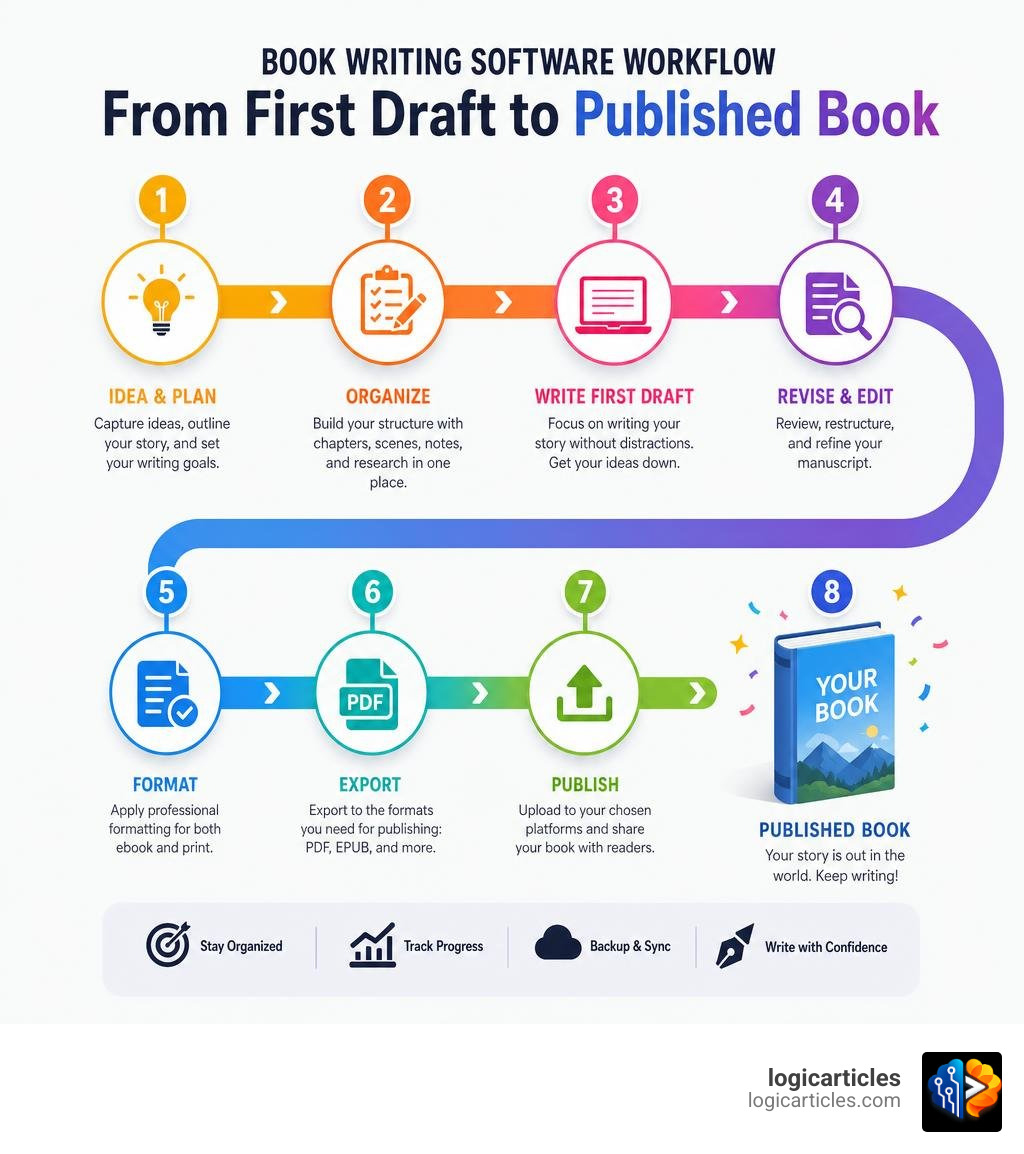
Getting the words on the page is only half the battle. Once your manuscript is complete, you have to prepare it for the real world. This means exporting it into industry-standard formats: EPUB files for digital e-readers and print-ready PDFs for physical distribution.
Historically, formatting was a painful, expensive process. Authors had to buy separate, high-end design programs or hire professional typesetters to ensure their books looked right on a Kindle or on paper. Today, modern writing suites have built-in compilation engines.
If you want a desktop application that bridges the gap between drafting, styling, and business execution, tools like Inscript Studio — Write, Format, Publish. One App. Now in Beta. are changing the game. These applications automatically typeset your pages to professional standards while you write, allowing you to manage front matter, back matter, and copyright pages with a single click.
Other dedicated formatting tools like Vellum have long been the gold standard for Mac users, but they come with a hefty price tag of $199.99 for ebooks only or $249.99 for ebooks and print. Meanwhile, cross-platform alternatives like Atticus offer a one-time purchase price of $147 and run on Windows, Mac, and Linux, making professional-grade book formatting highly accessible.
Top Book Writing Tools for Plotting and World-Building
For genre fiction writers—especially those writing fantasy, sci-fi, or complex mystery series—a blank page is rarely the starting point. You need a place to store your map designs, magic systems, historical timelines, and character genealogies. If your world-building notes are scattered across random notebooks, sticky notes, and Google Keep, you’re bound to run into continuity errors.
The best book writing software integrates world-building directly into your writing environment, ensuring your reference material is always just a click away.

Visual Storyboards and Timelines
When linear outlines fail, visual storyboards and spatial canvases step in. Writers who identify as “planners” love being able to map out their character arcs and plot points across a visual grid before writing.
This is where local-first, highly visual workspaces shine. Programs like Novelative | The Writers Studio allow you to plot with virtual file cards on an open canvas, sorting scenes by tags and linking references directly into your prose using wiki-links. Instead of constantly switching tabs to remember what a specific magical relic does, you simply hover over a linked word in your text to see its story card. This spatial arrangement helps you visualize colored clusters of related content, making it easy to see if your subplot has disappeared for too many chapters.
Character Bibles and Relationship Maps
A great story is driven by its characters. Keeping track of their eye colors, backstories, and shifting alliances across a multi-book series is a monumental task.
Many modern book writing environments include dedicated character bible templates. These templates allow you to assign metadata to your files, tracking which characters appear in which scenes. Some advanced tools even generate interactive relationship maps, showing how different factions or families connect. If you’re looking to expand your toolkit, we have also evaluated the Best Free Script Writing Software In 2026 Top Picks For Writers, which highlights tools that excel at character tracking and structural pacing for dramatic writing.
Collaboration and Editing Workflows for Authors
No book is written in a vacuum. Once you finish your first draft, you must share it with developmental editors, line editors, copyeditors, and beta readers. Managing this feedback loop without losing control of your manuscript version is one of the biggest challenges writers face.
Real-Time Co-Authoring and Editor Feedback
For years, Microsoft Word’s “Track Changes” has been the default language of professional publishing house editors. However, sending static .docx files back and forth via email is an invitation for version control disasters. It is incredibly easy to accidentally overwrite an editor’s work or publish the wrong draft.
Cloud-based, real-time collaboration has become a necessity for co-authors and modern editing teams. If you prefer a streamlined, budget-friendly collaborative workspace, Reedsy Studio: A FREE Online Writing App | Reedsy offers a powerful online platform where you can write, edit, and format your book for free. It allows real-time co-writing, comment threads, and direct editing access, making it incredibly simple to polish your draft alongside a professional editor.
Version Control and History Tracking
Have you ever cut a 2,000-word scene, only to realize three days later that you desperately need it back? Without a robust version history system, that scene is gone forever.
The best book writing software packages include built-in version control features:
- Snapshots: This feature (prominent in Scrivener) allows you to take a quick “photo” of a specific scene before you begin a heavy rewrite. If the rewrite fails, you can instantly roll back to the previous version.
- Writing Timelines: Cloud-based platforms often track your writing history minute-by-minute, allowing you to scroll back in time to see exactly how your story evolved and restore any previous iteration of your manuscript.
- Local Backups: Desktop tools with automatic backup configurations protect your work from sudden computer crashes or power outages.
Pricing Models: One-Time Purchases vs. Subscriptions
The software industry has largely shifted toward Software-as-a-Service (SaaS) subscription models. However, the writing community has pushed back strongly against this trend. Many writers prefer to own their tools outright rather than paying a monthly fee to access their life’s work.
Here is how the pricing models break down:
- One-Time Purchases: Programs like Scrivener ($59.99) and Atticus ($147) require a single payment. Once you buy them, you own the software forever and can write without worrying about recurring fees.
- Monthly Subscriptions: Tools like Ulysses ($5.99/month) and Sudowrite (AI writing assistant starting at $19/month) require ongoing payments. If you stop paying, you lose access to the software’s premium features.
- Free-to-Use Platforms: Reedsy Studio provides its core writing and typesetting functions entirely for free, making it an exceptional starting point for budget-conscious self-publishers.
Long-Term Cost Implications for Writers
When planning your writing budget, it is critical to look at the long-term cost of your tools. A $99.99/year subscription for Microsoft 365 or a $19/month drafting tool might seem affordable at first, but over a five-year writing career, those costs compound significantly.
Investing in a high-quality, one-time purchase desktop app is often the most cost-effective path for serious authors. If you are also managing a broader digital business, we recommend looking at our guide on the Best Content Software to see how different digital platforms balance licensing fees with long-term utility.
Additionally, as your publishing business grows, you may want to explore specialized tools for marketing and scaling. You can read our analysis of the Best Content Marketing Software or learn about professional content production in our review of the Best Content Writing Agency In 2026 to see how high-performing teams streamline their publishing pipelines. For those focused on search engine visibility, our breakdown of Seo Content Writing Services offers deep insights into optimizing written content for digital audiences.
Offline Capabilities and Cross-Device Syncing
As any seasoned writer knows, inspiration can strike anywhere—on a flight, in a remote cabin, or during a daily commute. Relying entirely on an internet connection to write your book is a recipe for writer’s block (and opening a web browser is an open invitation to distraction).
Local-first desktop tools excel because they work 100% offline, keeping your projects stored safely on your machine’s hard drive. However, if you like to write on both your desktop and your tablet, cross-device syncing is crucial. Most offline-first tools use secure cloud integrations (like Dropbox or iCloud) to sync your project files automatically when you reconnect to the internet, giving you the best of both worlds: distraction-free offline drafting and seamless mobile accessibility.
Frequently Asked Questions About Book Writing Tools
What is the main drawback of traditional word processors for books?
Traditional word processors like Microsoft Word or Google Docs are designed for short, linear documents like essays, letters, and reports. When a manuscript exceeds 30,000 words, these programs often experience significant performance lag. Furthermore, their linear layout makes it incredibly tedious to reorganize chapters, manage character research, and view outline structures side-by-side with your active draft.
Can I write a book offline and sync it later?
Yes. Many of the premier book writing applications are built with local-first architectures. Programs like Scrivener, Novelative, and Inscript Studio store your files directly on your computer, allowing you to write without an internet connection. Once you connect to Wi-Fi, these tools can sync your progress to cloud storage services to ensure your work is safely backed up across all your devices.
Is AI-assisted writing useful for fiction authors?
AI-assisted writing tools like Sudowrite (which starts at $19/month) can be highly effective for brainstorming character names, generating sensory descriptions, and breaking through writer’s block. However, we advise authors to use these tools mindfully. Relying too heavily on AI to write prose can make your voice feel generic, and many writers prefer to keep their creative output entirely human-driven.
Conclusion
Finding the best book writing software is a highly personal journey. If you are a meticulous planner who loves deep organization, Scrivener remains an industry powerhouse. If you want a seamless, all-in-one writing and formatting experience on a budget, Atticus or Reedsy Studio are phenomenal choices. For those who prioritize visual story mapping and local data ownership, newer tools like Novelative are leading the charge.
The most important step is to choose a tool that fits your natural creative rhythm, establish a consistent writing routine, and start putting words on the page.
If you are looking to build out your complete digital workspace, we invite you to explore our comprehensive software evaluations at logicarticles Software Category to find the perfect tools for your creative business.