Why Ads Keep Interrupting Your Music — and What You Can Do Right Now

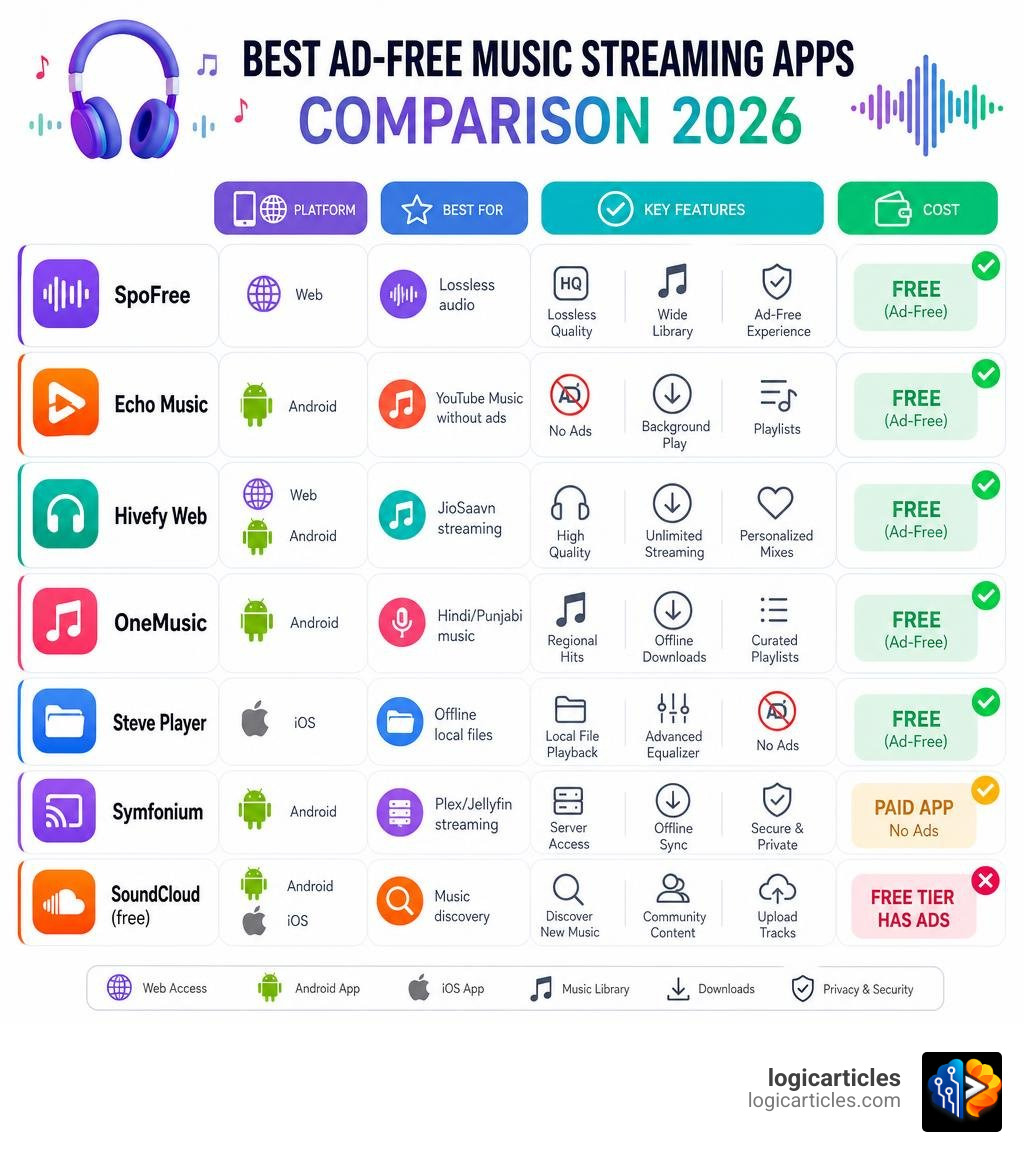
If you’re tired of interruptions ruining your listening sessions, here are the best music streaming apps without ads available right now in 2026:
| App | Platform | Free & Ad-Free | Best For |
|---|---|---|---|
| SpoFree | Web | Yes | Lossless audio via Tidal |
| Echo Music | Android | Yes | YouTube Music without ads |
| Hivefy Web | Web/Android | Yes | JioSaavn streaming |
| OneMusic | Android | Yes | Hindi/Punjabi music |
| Steve Player | iOS | Yes | Offline local files |
| Symfonium | Android | Paid app, no ads | Plex/Jellyfin streaming |
| SoundCloud (free) | Android/iOS | No (has ads) | Music discovery |
You’re mid-workout. A great song is building momentum. Then — an ad for lawn fertilizer. Ruined.
That frustration is exactly why millions of people are searching for music apps that don’t interrupt them. The problem is that most “free” music apps aren’t really free. They pay their bills through ads. Spotify, SoundCloud’s free tier, and Amazon Music all do this.
And things got tighter recently. Tidal shut down its free tier in the US in April 2026, pushing users toward an $11/month paid plan. That’s one fewer free option in an already shrinking pool.
The good news? There are still genuinely ad-free options — some open-source, some offline-only, and some surprisingly powerful. This guide covers all of them clearly.
Why Finding the Best Music Streaming Apps Without Ads Is Hard in 2026
The music industry is built on licensing. Every time a song streams, artists, songwriters, and record labels expect to get paid. For mainstream platforms, there are only two ways to cover these massive licensing fees: monthly subscription models or audio and visual ads.
This is why finding a truly free, ad-free music streaming service is incredibly rare. The major players have steadily tightened their restrictions. Apple Music does not offer a free tier at all. Spotify’s free tier limits your skips, forces shuffle play, and bombards you with loud ads. Even Tidal, which previously offered a free, ad-supported tier, officially discontinued it on April 10, 2026, leaving users with no choice but to upgrade to their $11/month paid plan.
Because of this shifting landscape, music lovers are looking elsewhere. Many are turning to open-source alternatives, third-party clients, and self-hosted libraries. If you are ready to move away from the mainstream giants, we have ranked some of the top choices in our guide on the 9 Best Spotify Alternatives in 2026 Ranked to help you make the switch.
Top Open-Source and Third-Party Ad-Free Music Players
Open-source and third-party music applications have exploded in popularity. Instead of hosting their own content, these apps act as custom frontends (or “wrappers”) that pull music directly from public APIs like YouTube Music, Tidal, or JioSaavn. Because they do not route through the official, ad-supported apps, they bypass audio ads entirely while giving you a clean, modern user interface.
Let’s look at how these top open-source players compare:
| App | Source API | Offline Support | Key Feature |
|---|---|---|---|
| SpoFree | Tidal | Yes (Export to FLAC) | Lossless audio, Spotify-like UI |
| Echo Music | YouTube Music | Yes (Caching) | Material You theme, Synced lyrics |
| OneMusic | JioSaavn & YouTube | Yes (Local database) | No login required, great for regional music |
| Hivefy Web | JioSaavn | Yes (localForage) | Web-based, Next.js framework |
How SpoFree Ranks Among the Best Music Streaming Apps Without Ads
For audiophiles who refuse to compromise on sound quality, SpoFree is a remarkable project. It is a free, open-source, and completely ad-free web application designed to look and feel almost identical to Spotify, but with a massive twist: it streams high-fidelity music.
SpoFree works by leveraging public HiFi API instances to fetch direct stream links from Tidal’s extensive library. Because it bypasses official account restrictions, you can listen to lossless, CD-quality audio without paying a subscription.
Key features of SpoFree include:
- Lossless Playback: Access to high-resolution FLAC and AAC streams.
- Local Storage: Your playlists, liked songs, and settings are saved directly to your browser using IndexedDB.
- Easy Import/Export: You can import your existing playlists via CSV or text files and export tracks as lossless files.
- No Sign-Up: You do not need to create an account or hand over any personal data.
To check out the code or host your own instance, visit the redretep/spofree repository on GitHub.
Why Echo Music is One of the Best Music Streaming Apps Without Ads for Android
If you are on Android and want access to virtually every song ever recorded, Echo Music is an incredible option. Echo Music is a third-party, open-source client designed specifically for YouTube Music. It does not host any files itself; instead, it acts as a highly optimized player for YouTube’s massive library.
Echo Music stands out because of its beautiful, modern design. It fully supports Android’s Material You theme, meaning the app’s accent colors automatically adapt to match your phone’s wallpaper.
Other standout features include:
- Zero Ads: No audio or visual interruptions, forever.
- Synced Lyrics: Real-time lyrics that scroll along as the song plays.
- Smart Queue: Easily manage what plays next with an intuitive queue system.
- No Account Required: You can start listening immediately without logging into a Google account.
You can download the app directly from the official Echo Music – Free Open-Source Music for Android website.
OneMusic and Hivefy Web: Cross-Platform Gems
For users who want access to regional music—particularly Bollywood, Punjabi, and other South Asian tracks—without ads, OneMusic and Hivefy Web are brilliant choices.
OneMusic is an open-source Android app built using the Flutter framework. It streams millions of tracks by combining the APIs of JioSaavn and YouTube Music. It requires zero logins, does not collect user data, and supports background playback, making it one of the best music streaming apps without ads for Android users who want a simple, lightweight streaming experience. You can grab the latest APK from the AkshatRaj00/OneMusic GitHub page.
Hivefy Web takes a similar approach but is built for the browser. It is a free, open-source, Spotify-inspired web player built with Next.js and TailwindCSS using the unofficial JioSaavn API. Because it is web-based, you can run it on your phone, tablet, or desktop computer. It utilizes localForage for offline-first caching, so your playlists remain accessible even with a spotty internet connection. You can explore the project at the Harish-Srinivas-07/hivefyweb repository.
Best Offline and Self-Hosted Music Players Without Ads
While streaming from third-party APIs is convenient, it relies on external services remaining online. If you want absolute control over your music library, zero tracking, and 100% reliability, the best approach is to go offline or host your own music server.
Steve: The Private iOS Offline Player
iOS users often have a harder time installing open-source streaming APKs due to Apple’s ecosystem restrictions. However, if you have a local collection of audio files, Steve is an exceptional solution.
Steve is a 100% offline, private, and ad-free music player available on the App Store. It requires no accounts, no subscriptions, and zero internet connection to function.
Why offline music collectors love Steve:
- High-Res Audio Support: Playback for FLAC, ALAC, WAV, AIFF, MP3, OGG, and Opus.
- WiFi Import: You can easily transfer files from your computer to your iPhone over your local WiFi network without plugging in a cable.
- Advanced Player Features: Includes a built-in equalizer, A/B looping, a sleep timer, and a duplicate track cleaner.
- Complete Privacy: The app collects absolutely no data and does not track your listening habits.
You can download it directly from the Steve – Ad-Free Music Player App – App Store.
Self-Hosted Streaming: Plex, Jellyfin, and Symfonium
If you have a large music collection on your computer but still want the convenience of streaming it to your phone on the go, building a personal streaming server is the ultimate solution.
By setting up a media server like Plex or Jellyfin, you turn your home computer into your own private Spotify. You can store high-quality audio files on your own hardware, bypassing third-party cloud lockers. If you are looking for secure storage options for your backups, you can read our comparison of Cloud Storage Alternatives.
To stream from your personal server on Android, we highly recommend Symfonium. Symfonium is a premium, ad-free music player that aggregates music from Plex, Jellyfin, Subsonic, Kodi, and local storage into a single, cohesive library. It supports offline caching, smart playlists, and advanced audio configuration, making it the absolute best hybrid player for self-hosters.
Legal, Privacy, and Security Considerations
While we love comparing productivity and business tools like Best Docusign Alternatives or Best Exceed Software Alternatives Competitors, digital privacy in your personal life is just as crucial. Just as you might look for private Discord Alternatives to escape tracking, choosing open-source music players keeps your data safe from massive ad networks.
When using third-party apps, keep these safety rules in mind:
- Source Verifiability: Only download APKs directly from trusted developers on GitHub or reputable app stores. Avoid third-party “modded” APK sites, which often bundle malware with popular apps.
- API Terms of Service: Third-party players that scrape YouTube or Tidal run in a legal gray area. While using them is generally safe for the end-user, these apps can occasionally stop working if the host platform updates its API security.
- Privacy Policies: Always check what data an app collects. For example, regional streaming apps like Zvuk: HiFi music, podcasts – Apps on Google Play offer great high-fidelity tracks but have specific data-sharing policies that you should review if privacy is your top priority.
Frequently Asked Questions About Ad-Free Music Apps
Is it legal to use third-party ad-free music streaming apps?
Yes, using these apps is legal. Open-source players like Echo Music or SpoFree do not host or pirate music; they simply act as custom browsers that stream content using publicly available APIs. However, they may violate the terms of service of platforms like YouTube or Tidal, which is why these apps are hosted on GitHub rather than mainstream app stores.
Which ad-free music apps support high-quality or lossless audio?
If you want lossless audio, SpoFree is your best bet for streaming, as it pulls high-resolution FLAC streams via Tidal’s API. For offline listening, Steve Player (iOS) and Symfonium (Android) support local playback of 24-bit FLAC and ALAC files.
Are there free ad-free music apps that work on both Android and iOS?
Because iOS has strict security limitations regarding third-party app installation, cross-platform options are usually web-based. SpoFree and Hivefy Web run perfectly in mobile browsers (like Safari and Chrome) on both Android and iOS, giving you ad-free streaming without needing to jailbreak or sideload apps.
Conclusion
Finding the best music streaming apps without ads in 2026 requires looking outside the traditional app store ecosystems. Whether you choose an open-source API wrapper like SpoFree, a local-first player like Steve, or build your own self-hosted streaming library, you can easily reclaim your music from annoying ad interruptions.
We are dedicated to helping you find the absolute best tools for your digital life. To explore more curated recommendations and deep dives into top-tier tools, check out our logicarticles best software category.