Why Choosing the Right AI Accounting To
ol Can Make or Break Your Small Business

Which AI tool is best for accounting for small businesses? It depends on your size and needs, but here are the top picks for 2026:
| Business Type | Best AI Accounting Tool | Why |
|---|---|---|
| Freelancers & solopreneurs | FreshBooks or Zoho Books | Simple, affordable, easy invoicing |
| Growing small businesses | QuickBooks Online | Powerful automation, 650+ integrations |
| Startups needing real-time data | Digits or Rillet | AI-native, continuous close |
| Multi-entity or scaling businesses | Xero or Sage Intacct | Multi-currency, advanced reporting |
| Accounting firms managing clients | Docyt or Botkeeper | High-volume, multi-client automation |
Bookkeeping. Reconciliation. Financial reporting. These tasks used to eat up hours every week for small business owners — time better spent on growing the business.
That math has changed fast.
AI accounting tools now automate the tedious work, from categorizing transactions to closing the books, so you can focus on decisions that actually move the needle. According to research from MIT Sloan and Stanford, accountants using AI cut 7.5 days off the monthly close and reallocated 8.5% of their time away from routine data entry.
And adoption is accelerating. Nearly 72% of businesses are already piloting or using AI in financial reporting — with that number expected to hit 99% within three years.
But with dozens of tools on the market, the real challenge isn’t whether to use AI for accounting. It’s which tool is the right fit for your business.
Key Features to Look For in AI Accounting Software
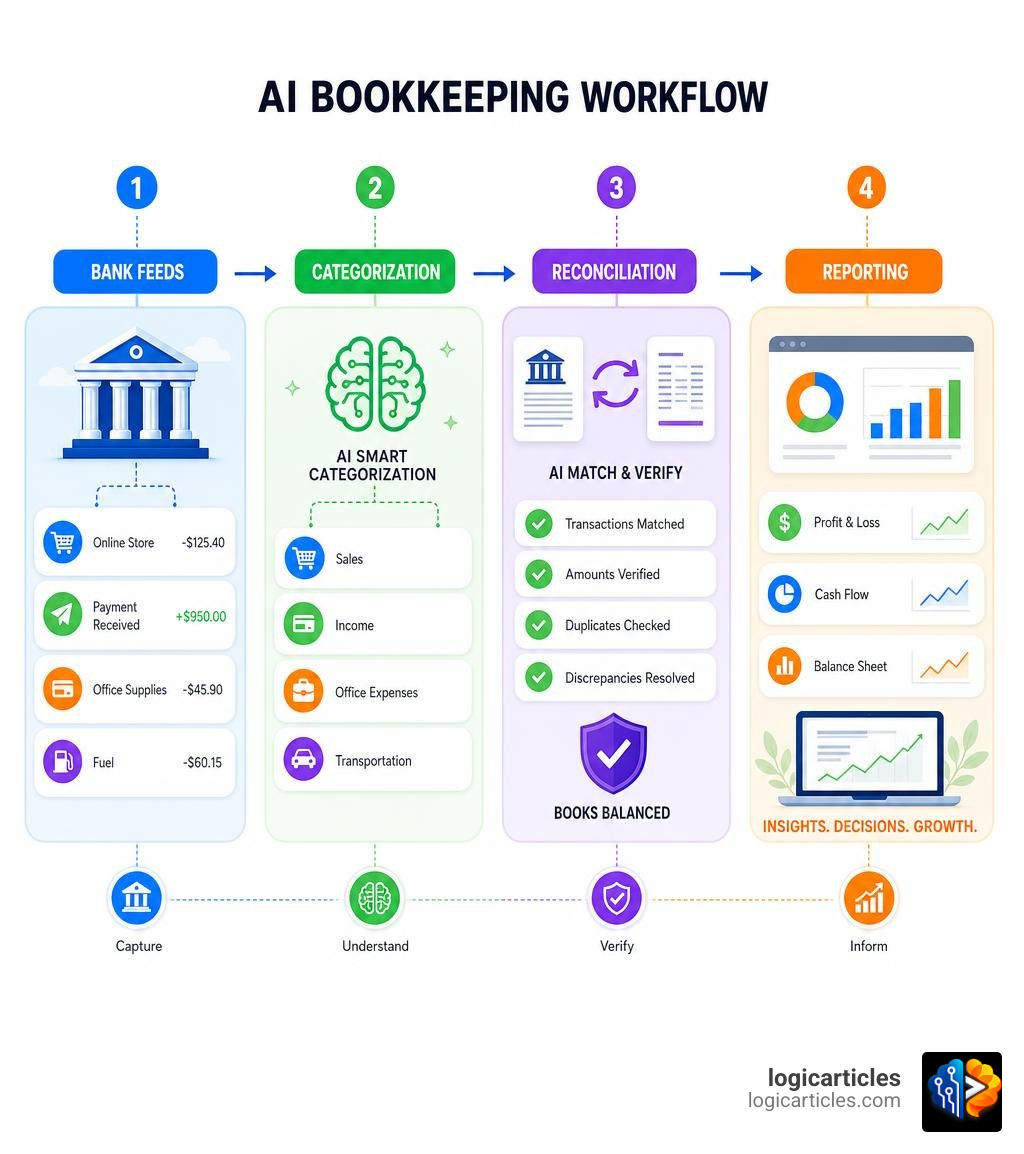
When searching for the perfect platform, it is easy to get distracted by flashy marketing buzzwords. However, true AI accounting software should offer concrete, functional capabilities that save you time and eliminate human error. As you evaluate your options, keep these core features in mind:
1. Automated Invoice Processing and OCR Technology
Traditional optical character recognition (OCR) was template-based. If a vendor changed their invoice layout by even a millimeter, the system broke. Modern AI uses dynamic, template-free document parsing. It reads bills, invoices, and receipts like a human would, instantly extracting line-by-line data with near-perfect precision. This matches beautifully with modern workflow platforms; indeed, organizing these processes is as crucial as finding the best task management software in 2026 tested to keep your operations running smoothly.
2. Intelligent Transaction Categorization
Instead of manually assigning a ledger account to every single bank transaction, AI scans historical data, learns your business patterns, and categorizes transactions automatically. The best tools will auto-approve high-confidence matches while flagging uncertain ones for a quick human review.
3. Real-Time, Continuous Reconciliation
Rather than waiting until the end of the month to match bank statements to your general ledger, the system should run continuous, statement-tied reconciliations. This eliminates the dreaded “month-end crunch” and provides an accurate financial picture at any given second.
4. Anomaly and Fraud Detection
According to industry data, roughly 39% of finance functions already use AI specifically for anomaly and error detection. The software should actively monitor your books for fee drifts, duplicate vendor payments, or unusual transaction amounts, stopping costly mistakes before they impact your financial statements.
5. Data Integrity and Validation
With 96% of finance leaders expressing concerns about data integrity—such as formatting errors and inconsistencies—your AI tool must have built-in validation checks. It should ensure that every debit has a matching credit, guaranteeing that your balance sheet mathematically balances.

Which AI Tool Is Best for Accounting for Small Businesses?
To answer this question, we must first understand the fundamental shift happening in accounting technology. The market is currently split into two main approaches: AI-enabled platforms and AI-native platforms.
- AI-Enabled Platforms: These are legacy accounting systems (like QuickBooks Online and Xero) built on traditional, manual-first relational databases that have added AI features on top of their existing infrastructure.
- AI-Native Platforms: These are systems built from the ground up around artificial intelligence, often utilizing an Agentic General Ledger (AGL). Instead of relying on manual rules, they use autonomous AI agents to continuously book, reconcile, and verify transactions in real time.
For a deeper look at general AI capabilities across different industries, check out our guide on AI tools you should know in 2026.
To help you visualize how these platforms compare, let’s look at the core differences:
| Feature | AI-Enabled (e.g., QuickBooks, Xero) | AI-Native (e.g., Digits, EveryCent) |
|---|---|---|
| Core Architecture | Relational Database | Agentic General Ledger (AGL) |
| Reconciliation | Manual matching with AI suggestions | Continuous, real-time auto-matching |
| Rule Maintenance | Requires manual setup and updates | Self-learning AI models |
| Reporting Speed | Delayed (requires manual month-end close) | Instant, daily financial snapshots |
| Interface | Complex menus and navigation | Conversational natural language queries |
If you want to dive deeper into how different modern systems compare, you can explore the Digits – Compare Accounting Platforms resource to see how these architectures stack up in practice.
Evaluating Which AI Tool Is Best for Accounting for Small Businesses based on Business Size
No two small businesses are identical. A solo graphic designer has vastly different financial needs than a venture-backed tech startup or a multi-location franchise.
Freelancers and Solopreneurs
If you run a service-based solopreneurship, your primary needs are simple invoicing, basic expense tracking, and painless tax prep. Platforms like FreshBooks or Zoho Books are ideal here. They use light AI automation to categorize bank feeds and read receipts, keeping costs low while saving you from spreadsheet purgatory.
Growing Startups
Startups need speed, real-time burn rate calculations, and investor-ready reports. Standard cloud software often falls short here because of reporting delays. AI-native platforms like Digits or Rillet automate the continuous close, allowing founders to see exact financial positions daily. If you are building a new venture, pairing these with the best startup growth tools for 2026 can give you a massive competitive edge.
Multi-Entity and Niche Businesses
If you manage multiple entities, deal with international currencies, or operate in highly specialized industries, you need robust platforms like Xero or Sage Intacct. These systems handle complex consolidations and integrate with thousands of third-party apps.
For those in highly specific sectors, general software might not cut it. You may want to look into specialized systems, such as:
- Real estate investment accounting software
- Best family office accounting software
- Best nonprofit financial management software
- Investment accounting software
- Insurance investment accounting software
How to Choose Which AI Tool Is Best for Accounting for Small Businesses
Choosing a platform is a long-term commitment. To avoid the headache of migrating systems down the road, evaluate your options against these four critical pillars:
- Budget and Scale: Look closely at the pricing models. Some platforms charge flat monthly rates, while others charge per-page fees for document processing or scale up drastically based on transaction volume. If you want a platform that offers rapid, automated bookkeeping at a predictable scale, tools like AI Bookkeeping Software | GAAP-Compliant Financials in 4 Minutes — Accountaxed show how modern software can compress 40 hours of monthly work into minutes.
- Integrations: Your accounting software must talk to your bank, payment processors (Stripe, PayPal), payroll systems, and point-of-sale (POS) tools. QuickBooks Online remains the king of connectivity with over 650 integrations, while Accounting Software for Your Small Business | Xero US offers over 1,000 integrations. You can also explore specialized AI helpers like the QuickBooks AI features to see how legacy platforms are evolving.
- Scalability: Can the tool handle multi-state payroll, sales tax nexus tracking, or multi-currency transactions as you grow?
- Compliance and Security: Ensure the software is SOC 2 compliant, uses AES-256 encryption, and offers bank-level security.
How AI Automation Transforms Small Business Workflows
Implementing AI is not just about replacing paper receipts with digital scans; it is about completely transforming how financial data flows through your business.
Historically, bookkeeping was reactive. You handed a box of receipts to an accountant at the end of the year, or spent your weekends reconciling transactions from three weeks prior. AI turns accounting into a proactive, real-time asset.

By automating repetitive administrative tasks, business owners can expect:
- Massive Time Savings: AI platforms can deliver 80% faster bookkeeping and 90% less manual data entry.
- Drastic Error Reduction: Automated matching and double-entry validation can reduce accounting errors by up to 90%.
- Deeper Financial Insights: Instead of looking at historical P&L statements, AI-driven predictive analytics can forecast cash flow trends and spot early-payment discount opportunities.
- Simplified Tax Compliance: Real-time categorization ensures that you never miss a tax deduction, potentially reducing overall tax liability by up to 18%.
To get the most out of these insights, we recommend pairing your accounting platform with advanced AI data visualization tools to turn raw financial ledgers into beautiful, easy-to-understand executive dashboards.
AI-Native Bookkeeping and Continuous Reconciliation
The magic of AI-native bookkeeping lies in its ability to run a “continuous close.” In traditional accounting, closing the books at the end of the month is a multi-step hurdle of matching invoices, chasing down missing receipts, and adjusting journal entries.
With an AI-first approach, bank feeds stream in continuously. Autonomous agents immediately analyze, categorize, and reconcile every transaction against a double-entry ledger. For instance, platforms like EveryCent — AI-First Accounting for Modern Businesses allow business owners to manage their entire financial back-office through conversational commands, turning complex month-end closes into a brief 10-minute review.
Document Processing and Bank Statement Conversion
One of the biggest bottlenecks in small business accounting is converting unstructured data (like PDF bank statements, physical receipts, and scanned invoices) into structured financial records.
Modern AI tools solve this by using advanced machine learning models trained on millions of financial documents. They can digest a single multi-page PDF containing checking, savings, and credit card transactions, automatically separate them, and map them to the correct accounts.
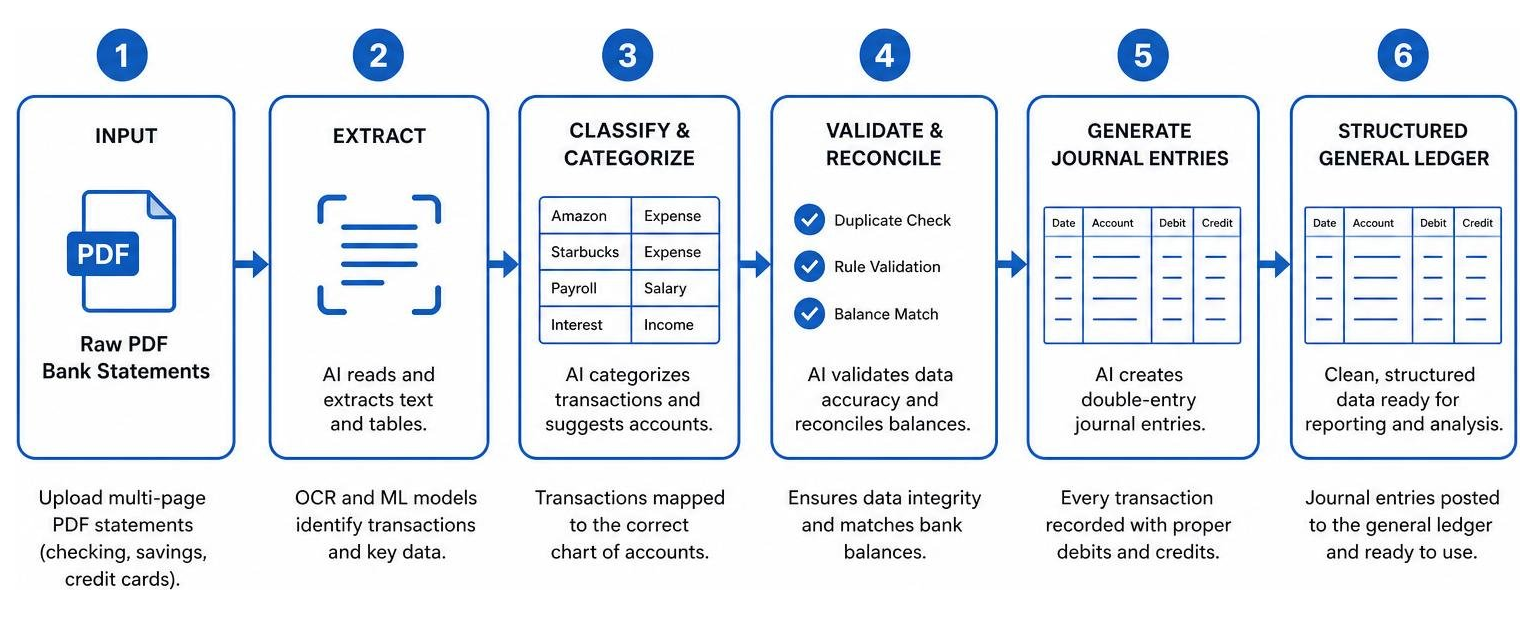
For businesses and CPA firms that want to add this level of automation directly to their existing setups, tools like Zera AI: Bookkeeping Automation with 99.6% Accuracy | Zera Books | Zera Books allow users to run high-precision document conversion and push the finished batches directly into QuickBooks or Xero as native records — meaning you get the power of AI without the pain of migrating your entire system.
Frequently Asked Questions About AI Accounting
Can AI completely replace human accountants for small businesses?
No. AI is designed to replace the routine, repetitive tasks of data entry, categorization, and basic reconciliation. However, human accountants are still essential. They serve as the critical “trust layer,” handling complex tax strategies, regulatory compliance, and high-level financial advisory. AI shifts the accountant’s role from a number-cruncher to a strategic business advisor.
What is the difference between AI-enabled and AI-native accounting software?
AI-enabled software is built on traditional relational databases and has added AI helper features (like receipt scanning) on top. AI-native software is built from scratch around machine learning models and an Agentic General Ledger, allowing it to perform continuous, autonomous bookkeeping in real time.
How does AI accounting software ensure data security and compliance?
Top-tier AI accounting platforms protect sensitive financial data by using AES-256 encryption, SOC 2 Type II certified server infrastructures, and zero-knowledge architectures. Many platforms also offer role-based access controls and detailed audit logs to track exactly who changed what and when.
Conclusion
The era of spending weekends wrestling with spreadsheets and manual bank reconciliations is officially over. By adopting the right AI accounting tool, you can put your bookkeeping on autopilot, drastically reduce manual errors, and gain real-time visibility into your cash flow and financial health.
Whether you choose an AI-enabled giant like QuickBooks or Xero, or an AI-native platform like Digits or EveryCent, the key is to choose a tool that aligns with your business size, budget, and growth plans.
For business owners looking to step up their financial management, pairing automated bookkeeping with the best CFO software tools for small business can help you turn your clean books into powerful, long-term strategic growth.
Ready to explore how else artificial intelligence can streamline your operations? Explore more AI tools in our comprehensive directory to find the perfect stack for your small business.