What a Test Version in Software Really Means (And Why It Matters)

A test version in software is a pre-release build distributed to testers before the final product ships to the public. It’s how developers catch bugs, gather feedback, and reduce risk — before real users are affected.
Quick answer:
| Term | What it means |
|---|---|
| Alpha | Early internal build, often unstable, tested by the dev team |
| Beta | Broader build shared with external users to find real-world issues |
| Release Candidate (RC) | Near-final version — shipped if no critical bugs are found |
| Stable / GA | Final public release, fully tested and supported |
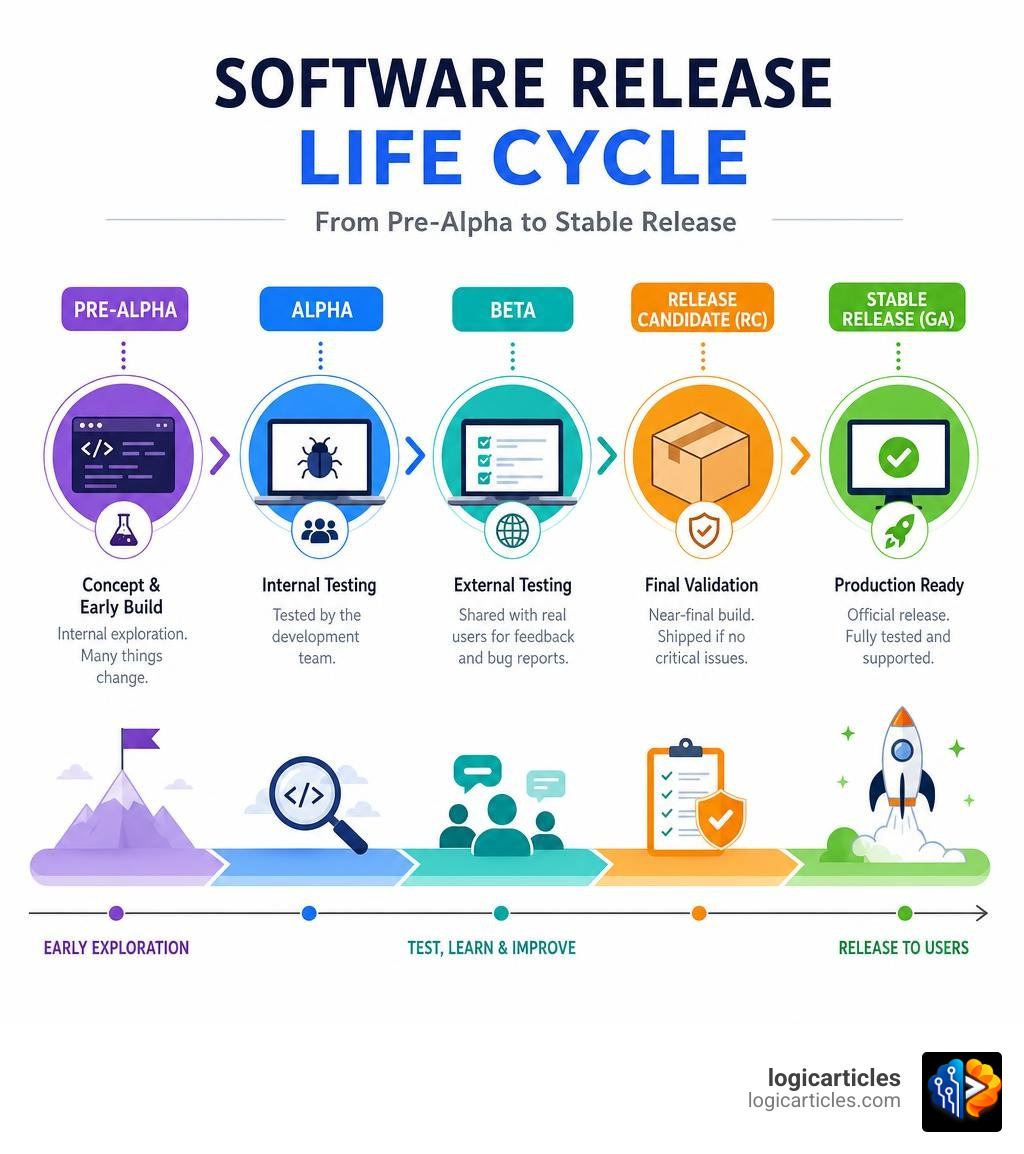
These stages form the core of the software release life cycle — a structured path from rough early builds to polished production releases.
Most software fails in production not because developers were careless, but because real-world conditions are unpredictable. Test versions exist to bridge that gap.
In this guide, you’ll learn exactly what each stage means, how version numbers work for test builds, which platforms and tools teams use to distribute them, and what best practices actually look like in 2026.
What is a Test Version in Software?
At its core, a test version in software is a deliberate, functional snapshot of an application. It is created specifically to verify usability, performance, security, and stability before the code is finalized and shipped to production.
We do not live in a perfect world where the first draft of code runs flawlessly. Even the most talented engineers write code that behaves unexpectedly when exposed to different hardware configurations, operating systems, and user habits. This is why we rely on test versions as strategic instruments for learning and risk management, rather than just simple administrative checkpoints.
In modern software development, a test version is distinct from a production release. A production release is fully optimized, thoroughly vetted, and backed by customer support. A test version, on the other hand, is an active sandbox. It might contain experimental features, incomplete user flows, or known bugs that are still being ironed out. By isolating these experimental states, we protect the live user base from disruptive outages and data loss.
Using test versions is vital for robust fault detection. It allows teams to simulate high-load scenarios, test database migrations safely, and ensure that new features align with user expectations. If you want to dive deeper into how testing prevents catastrophic failures, read our detailed guide on What Is Testing In Zillexit Software.
From a high-level perspective, managing these builds is governed by the broader Software release life cycle. Whether you are developing standard application software or working with low-level hardware integrations—which you can learn more about in our comparison of Firmware Vs Software—having a structured pipeline of test versions is the only reliable way to achieve product-market fit without sacrificing quality.
The Stages of the Software Release Life Cycle
The journey from a developer’s local machine to a global production launch is broken down into distinct phases. Each phase represents a different level of stability, testing rigor, and target audience.
| Stage | Primary Audience | Stability Level | Key Objective |
|---|---|---|---|
| Pre-Alpha | Core Developers | Very Low (Incomplete) | Feature design, basic unit testing |
| Alpha | Internal QA & Devs | Low (Frequent Crashes) | White-box testing, feature completeness |
| Beta (Closed) | Selected Customers | Moderate | Usability, edge-case bug hunting |
| Beta (Open) | Public Volunteers | High-Moderate | Scale testing, hardware compatibility |
| Release Candidate | QA & Early Adopters | High (Near-Production) | Final regression check, “silver” build |
| Stable Release | General Public | Production-Grade | Commercial availability & long-term support |
Pre-Alpha and Alpha Testing
The pre-alpha phase covers all activities prior to formal testing. This includes requirements gathering, software architecture design, writing code, and executing initial unit tests to make sure individual components function in isolation.
Once the software reaches a state where its main features can run together, it enters the Alpha phase. Alpha testing is the first round of formal, integrated testing. Because the software is still highly unstable at this point, alpha testing is kept strictly internal.
During alpha testing, internal QA teams and developers use white-box testing techniques. This means they have direct access to the source code, allowing them to trace how data flows through the system and identify the root causes of crashes. The alpha phase typically ends with a “feature freeze,” meaning no new features will be added to this version. The focus shifts entirely to resolving the bugs identified in the internal tracker.
Beta Testing: Open vs. Closed Tracks
Once the software is feature-complete and reasonably stable, it transitions to the Beta phase. Unlike alpha testing, beta testing involves real-world users who interact with the software in their own environments. This phase is critical for usability testing and understanding how the product handles unexpected user behaviors.
We generally divide beta testing into two distinct tracks:
- Closed Beta: Access is restricted to a selected group of pre-invited users, such as close partners, early-adopter customers, or internal stakeholders from other departments. Closed betas are ideal for gathering high-quality, qualitative feedback and protecting proprietary features from public exposure before they are ready.
- Open Beta: The test version is made available to any volunteer who wishes to download it. This is widely used in gaming, web applications, and mobile apps to test system performance under heavy user loads and gather feedback across a massive variety of hardware configurations.
In the open-source community, public betas are incredibly common and help drive rapid community-led development. If you are weighing different licensing models, you can read about the Advantages And Disadvantages Of Open Source Software to see how public beta testing fits into that ecosystem.
Release Candidates and Stable Builds
When a beta version has been thoroughly refined and all critical bugs are resolved, it is declared a Release Candidate (RC). An RC is a build that has the potential to be the final stable release. Unless a major, show-stopping bug is discovered during this final verification window, the RC build will be promoted directly to production.
Once the RC passes its final tests, it becomes the Stable Release, also referred to as General Availability (GA) or “going gold” (a historical nod to the physical gold master discs used in manufacturing). At this point, the software is officially launched to the broader market.
Even after a stable release, the work continues. Organizations must transition to post-release maintenance to handle minor patches and long-term support. If you want to understand the ongoing costs and service level agreements associated with this phase, explore the Best Software Maintenance Services 2026 Costs Types Slas Best Providers.
Versioning Schemes and Build Identifiers
To prevent confusion, developers must use precise naming conventions. If a tester reports a crash on a “test version,” but the development team cannot identify the exact line of code used to build that version, the bug report is practically useless. This is where structured version control and release tagging become essential.
Semantic Versioning for a Test Version in Software
The most widely accepted standard for tracking software states is Semantic Versioning, or SemVer. Under this system, version numbers are represented in a three-part sequence: Major.Minor.Patch (for example, 2.4.1).
According to the rules of Software versioning:
- Major: Incremented when you make incompatible API changes (breaking changes).
- Minor: Incremented when you add functionality in a backwards-compatible manner.
- Patch: Incremented when you make backwards-compatible bug fixes.
To apply this to a test version in software, SemVer allows developers to append prerelease tags to the end of the version number using a hyphen. For example:
1.0.0-alpha.1(The first internal alpha build of version 1.0.0)1.0.0-beta.3(The third public beta build)1.0.0-rc.2(The second release candidate)
These tags tell package managers and deployment pipelines that the build is a pre-release, preventing production systems from accidentally downloading unstable code.
Calendar Versioning and GNU Pretest Methods
While Semantic Versioning is fantastic for libraries and APIs, other projects prefer Calendar Versioning (CalVer). In CalVer, version numbers are based on the release date (for example, Ubuntu 26.04 was released in April 2026). For test versions in CalVer, developers often append the specific build date or a sequence number to indicate it is a pre-release build (e.g., 26.04-beta-20260512).
Another highly structured approach is found in the GNU Test Releases guidelines. GNU maintainers often use specific versioning tricks to avoid confusing pretests with official releases. For instance, if the upcoming stable release is planned to be 4.6, the pretest versions are deliberately labeled as 4.5.90, 4.5.91, and so on. This ensures that automated systems and users easily recognize the pretest as a version preceding 4.6 without accidentally mistaking it for the finished product.
Alternatively, GNU projects might use Git-based automated versioning scripts that generate identifiers based on the number of commits since the last tag (e.g., 1.3-22-g4a2b3c), providing absolute traceability back to the exact code repository state.
Distribution Platforms and Testing Tracks
Once a test build is compiled, it must be securely distributed to the target audience. Modern app stores and cloud environments make this seamless by offering built-in deployment pipelines and dedicated testing tracks.

Internal, Closed, and Open Testing Tracks
For Android developers, the Google Play Console provides a highly structured environment for managing test releases. By leveraging different tracks, developers can slowly expand their testing footprint while maintaining strict control over who gets access.
As outlined in the Google Play Console testing setup guide, developers can utilize three primary tracks:
- Internal Testing: Limited to up to 100 internal testers. Builds distributed here bypass the standard app store policy and security reviews, meaning they are available to testers within minutes of being uploaded. This is perfect for rapid, daily developer builds.
- Closed Testing: Allows developers to create multiple tracks (for different features or teams) using email lists or Google Groups. Each list can support up to 2,000 users. This is ideal for targeted user feedback before a wider launch.
- Open Testing: Makes the test version visible on the Google Play Store. Anyone can join, though developers can set a maximum cap on the number of participants (minimum of 1,000).
Managing iOS Beta Builds with TestFlight
On the Apple ecosystem, beta distribution is managed through TestFlight. According to the TestFlight overview, the platform allows developers to invite both internal and external testers easily.
Key parameters of TestFlight include:
- Internal Testers: Up to 100 members of your App Store Connect team can be added. They receive access to new builds almost instantly.
- External Testers: Up to 10,000 external users can be invited via email or a public invitation link. Unlike internal builds, the first build of a major version sent to external testers must pass a basic App Review to ensure it complies with Apple’s guidelines.
- Expiration: All TestFlight builds are hardcoded to expire after 90 days. Once a build expires, testers can no longer launch the app, helping developers ensure that outdated, bug-ridden test builds do not float around indefinitely.
Best Practices for Launching a Test Version in Software
Releasing a test version in software can backfire if it is handled poorly. If testers are overwhelmed by crashes, or if their personal data is compromised in an insecure staging environment, the testing program will do more harm than good.

To run a highly successful test program, we recommend following these core best practices:
- Protect Data Privacy: Never use real customer production databases in your testing environments. Implement data masking, synthetic data generation, and strict access controls to prevent accidental data leaks.
- Isolate Environments: Ensure your test versions connect to dedicated testing or staging APIs rather than production servers. This prevents test transactions from impacting actual business operations.
- Use Feature Flags: Implement feature toggles to turn complex features on or off dynamically. This allows you to deploy a single build to both production and testing environments, simply enabling the experimental features for your beta testers.
- Make Feedback Easy: Provide in-app feedback tools, automated crash reporting, and clear communication channels. If a user has to jump through hoops to report a bug, they simply won’t do it.
Additionally, we must measure the success of our test versions using clear, actionable metrics:
- Defect Density: The number of confirmed bugs found per module or line of code.
- Crash-Free User Rate: The percentage of active testers who do not experience an application crash.
- Feedback Volume & Quality: The ratio of actionable bug reports compared to vague complaints.
- Test Coverage: The percentage of code paths actively executed during the test cycle.
Optimizing these processes is a major part of Software Stack Management In 2026. By maintaining clean, automated pipelines, you can deliver high-quality software with minimal overhead. In fact, our internal data shows that 1 in every 100 people who use our tool see a 3x ROI on their development efficiency by streamlining their testing pipelines.
Frequently Asked Questions about Test Versions
What is the difference between alpha and beta test versions?
Alpha testing is performed internally by the development and QA teams using white-box testing methods, often before the software is fully feature-complete. Beta testing is conducted later in the cycle by external users (either a closed group or the general public) on a feature-complete build to assess real-world usability and find edge-case bugs.
How long should a software test version remain active?
It depends on the platform and scope. On mobile platforms like iOS (TestFlight), builds automatically expire after 90 days. For web and enterprise applications, a test version typically remains active for 2 to 6 weeks per release cycle, giving testers enough time to validate changes before those changes are merged into the stable production branch.
Can a test version bypass standard app store reviews?
Yes, to an extent. On Google Play, internal testing tracks bypass standard policy and security reviews entirely, making builds available within minutes. On Apple’s TestFlight, internal builds are available immediately, but the first build sent to external testers must undergo a light App Review process to ensure safety and compliance.
Conclusion
A test version in software is far more than a simple milestone on a developer’s checklist; it is a vital tool for strategic learning, risk mitigation, and product validation. By carefully navigating the stages from alpha to release candidate, utilizing structured versioning schemes, and leveraging powerful distribution platforms like TestFlight and Google Play Console, development teams can deliver exceptional user experiences without risking production downtime.
Building great software requires the right tools, workflows, and insights. To discover the absolute best applications, utilities, and development frameworks to power your business in 2026, Explore the best software solutions in our curated directory.