The Best CMMS Software for 2026: A Quick-Start Guide

If you’re looking for the best CMMS software in 2026, here’s a fast answer before we dive deeper:
Top CMMS platforms at a glance:
| Platform | Best For | Starting Price |
|---|---|---|
| Limble CMMS | Overall ease of use | Custom pricing |
| MaintainX | Frontline/mobile teams | $16/user/month |
| Fiix | SMBs with dispersed assets | $45/user/month |
| eMaint | Configurable workflows | $69/user/month |
| UpKeep | Simple work order tracking | $20/user/month |
| IBM Maximo | Large enterprise/complex assets | Custom pricing |
| Fexa | Multi-site retail/facilities | Custom pricing |
Maintenance teams are drowning in spreadsheets, paper work orders, and reactive repairs. Equipment breaks down unexpectedly. Costs spiral. Compliance deadlines get missed.
That’s exactly the problem a CMMS — Computerized Maintenance Management System — is built to solve.
The numbers back it up. Organizations using CMMS software report a 28.3% increase in maintenance productivity, a 20.1% reduction in downtime, and a 17.8% drop in MRO inventory costs. Equipment lasts 10–15% longer, too.
But here’s the uncomfortable truth: roughly 80% of CMMS implementations fail to meet expectations. Choosing the right platform is only half the battle. Getting it implemented and adopted is the other half.
This guide walks you through both.
What is a CMMS and How Does It Work?
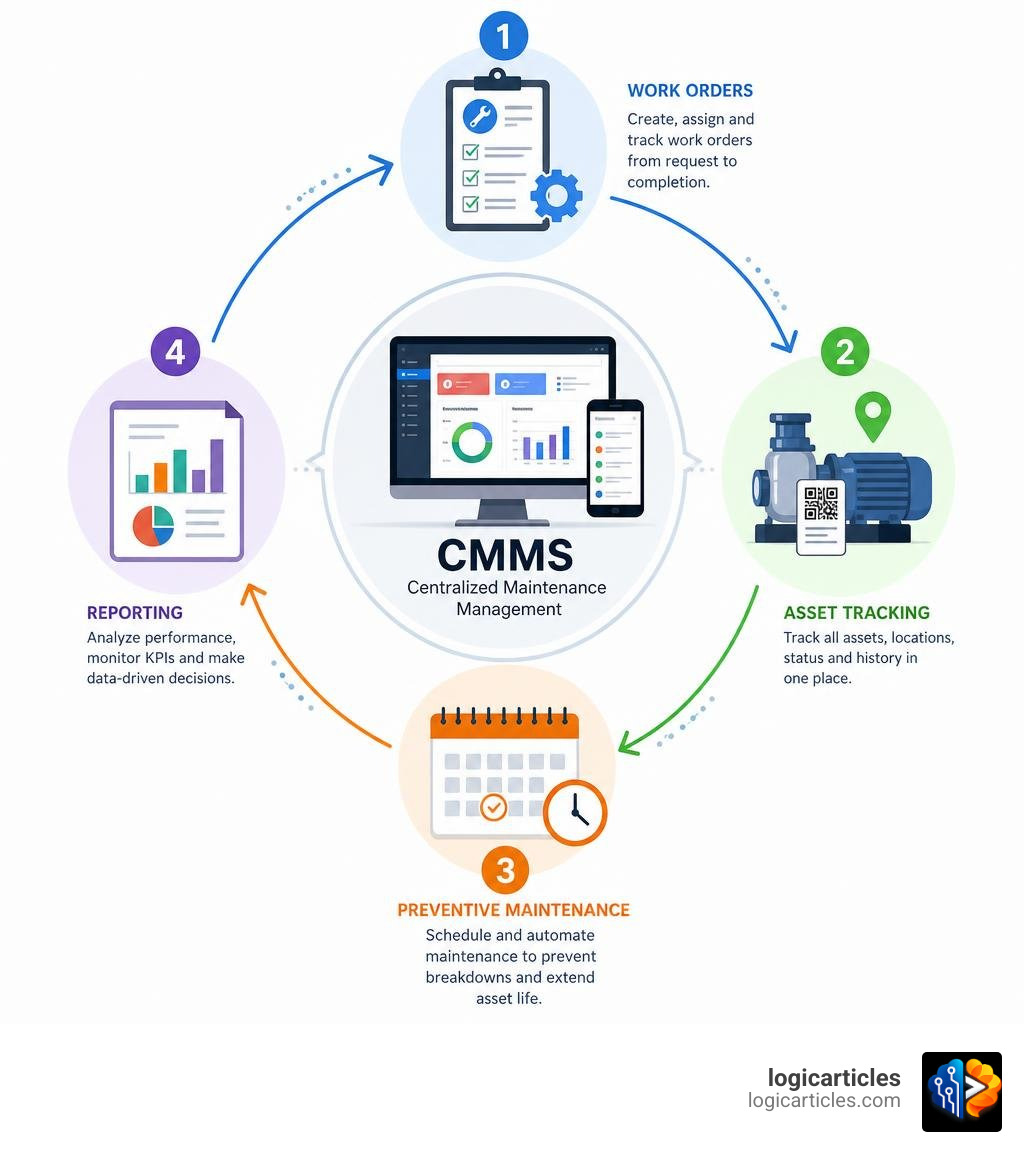
At its core, a Computerized Maintenance Management System (CMMS) is a centralized digital hub designed to schedule, track, and optimize every aspect of an organization’s maintenance operations. Instead of burying your team under stacks of clipboards or hunting down old email requests, a CMMS keeps your entire physical infrastructure organized in one secure cloud-based database.
So, how does a CMMS actually work on a day-to-day basis? It functions through four interconnected components:
- The Centralized Database: This is the brain of the system. It houses detailed records of every physical asset you own—serial numbers, warranty details, manuals, and complete maintenance histories.
- Operator & Technician Interfaces: Frontline workers use mobile or desktop apps to view, update, and close work orders. In 2026, this is almost exclusively mobile-first, allowing field technicians to complete tasks on the go.
- Administrative Settings & Rules: Maintenance managers use these controls to set up automated triggers. For instance, you can program the system to automatically generate a work order to change a machine’s oil every 500 operating hours or on the first day of every month.
- Reporting Dashboards: This is where raw data is converted into actionable intelligence. Dashboards track critical metrics like Mean Time to Repair (MTTR) and Mean Time Between Failures (MTBF), giving leadership the insights needed to make smart capital planning decisions.
By automating work order workflows, a CMMS operates much like specialized task management systems. If you’ve ever explored the Best Task Management Software In 2026 Tested, you know how crucial centralized assignment is for everyday operations.
Similarly, because modern maintenance relies heavily on field-based teams, the best CMMS software incorporates advanced mobile capabilities. These mobile features closely mirror the communication tools found in high-performing Mobile Workforce Management Software Features Benefits Ai 2026, enabling real-time status updates, instant photo uploads, and direct technician-to-manager chat.
Key Features and Benefits of the Best CMMS Software
Implementing the best bold CMMS software isn’t just about moving from paper to digital; it’s about fundamentally changing how your business manages risk and resources.

When you deploy a modern, high-quality CMMS, your organization will experience several core operational benefits:
- Boost Maintenance Productivity by 28.3%: A CMMS eliminates administrative waste. Technicians no longer waste time walking back to the office to get their next assignment; instead, they receive push notifications on their phones with clear instructions, step-by-step checklists, and required spare parts lists.
- Reduce Costly Downtime by 20.1%: By shifting your operations from reactive (“run-to-failure”) to proactive preventive maintenance, you can catch minor issues before they cause catastrophic equipment failures.
- Slash MRO Inventory Costs by 17.8%: Maintenance, Repair, and Operations (MRO) inventory can easily become a financial black hole. A CMMS tracks spare parts usage in real-time, sets automatic reorder thresholds, and prevents you from over-purchasing expensive parts that end up sitting on shelves gathering dust.
- Extend Equipment Life by 10% to 15%: Regular, documented maintenance ensures your valuable physical assets operate under optimal conditions, deferring expensive capital replacement costs.
To achieve these benefits, the best CMMS software platforms rely on several essential features:
- Configurability: Your software should adapt to your existing business logic, not the other way around. Look for platforms that allow you to customize fields, forms, and workflows without requiring custom coding.
- Comprehensive Integrations: A great CMMS doesn’t live on an island. It must integrate seamlessly with your ERP, accounting systems, and IoT sensors.
- User-Friendly Mobile App: If your technicians find the app hard to use, they won’t log their data. Mobile-first designs with offline functionality and simple photo attachment features are non-negotiable.
- Contractor Management: If you rely on external third-party vendors for specialized repairs, your CMMS should allow you to assign tasks and track compliance easily. For deep dives into managing external help, check out our guide on the Best Contractor Management Software.
- Scheduling and Calendars: A visual, drag-and-drop calendar view is essential for balance-loading your team’s weekly schedule. This is highly useful for specialized field operations, similar to the scheduling tools detailed in our review of the Best Software For Lawn Care Business.
Evaluating and Implementing Your Maintenance Solution
Choosing the best CMMS software is only half the battle. To ensure your investment doesn’t end up as shelfware, you must understand how to evaluate vendors and plan a successful rollout.
How to Evaluate and Choose the Best CMMS Software
When evaluating CMMS vendors, we recommend following a structured process rather than relying on standard sales demonstrations.
- Articulate Your Goals: Are you trying to reduce downtime, achieve regulatory compliance, or simply organize your work orders? Define your key performance indicators (KPIs) upfront.
- Request Scripted Demos: Don’t let sales reps show you a polished, pre-packaged slideshow. Give them a realistic scenario from your own facility—such as a broken conveyor belt or a recurring HVAC filter change—and ask them to show you exactly how their system handles it in real-time.
- Prioritize Frontline Adoption: Get your lead technicians involved in the evaluation phase. If they find the mobile interface intuitive, your adoption rate will skyrocket.
- Confirm Integration Capabilities: Ensure the platform can link with your existing technology stack via open RESTful APIs or pre-built connectors.
To help you understand the market landscape, it’s also helpful to look at how traditional CMMS solutions stack up against Enterprise Asset Management (EAM) platforms:
| Feature Focus | Specialized CMMS | Comprehensive EAM |
|---|---|---|
| Primary Goal | Streamlining day-to-day maintenance and work orders | Complete asset lifecycle management and financial tracking |
| Target Audience | Maintenance managers, technicians, and facility teams | Operations executives, procurement officers, and accountants |
| Asset Tracking | Focuses on active maintenance history and parts | Tracks assets from initial procurement to end-of-life disposal |
| Financial Depth | Basic cost tracking per work order | Deep depreciation tracking, capital planning, and audit tools |
Why Implementation Fails for Even the Best CMMS Software
It is a startling industry statistic that approximately 80% of plant maintenance management system implementations fail to meet their original expectations. But why is this failure rate so high, and how can your organization avoid it?
The primary culprit is a lack of organizational readiness and poor change management. Many executive teams treat a CMMS as a “magic wand” strategy—believing that simply buying the software will automatically fix broken operational processes. It won’t.
Furthermore, data collection is a massive bottleneck. Research shows that more than 1 in 4 organizations spent 100 to 200 hours simply collecting asset data before they could even begin their CMMS implementation. If you don’t dedicate the necessary human resources to clean, map, and upload your asset data, you will end up with “garbage in, garbage out.”
Timeframes are also frequently underestimated. Nearly 3 out of 10 organizations took 1 to 3 years to fully implement their CMMS systems. When implementation drags on without clear milestones, team enthusiasm wanes, leading to a situation where 90% of plant maintenance managers are not using their CMMS at maximum capability.
To avoid these pitfalls, secure strong executive buy-in, invest heavily in training early and often, and choose a configurable system that doesn’t require complex, expensive external developers to make basic modifications.
The Top CMMS Platforms for 2026
To help you find the right fit for your organization, we’ve reviewed the top-rated CMMS and EAM platforms leading the market in 2026.

1. IBM Maximo Application Suite
For massive enterprises managing complex, highly regulated asset portfolios, the IBM Maximo Application Suite remains the industry gold standard. Maximo unifies maintenance, inspections, and reliability workflows into a single AI-powered platform. It is particularly well-suited for specialized industries like energy, utilities, manufacturing, and transportation.
While incredibly powerful, Maximo is highly complex and typically requires a dedicated IT team or external integration partners to set up. It uses a flexible, credit-based licensing system called “AppPoints,” allowing enterprises to scale their usage across different modules as needed.
2. IFS Ultimo Enterprise Asset Management Platform
The IFS Ultimo Enterprise Asset Management Platform strikes an exceptional balance between powerful EAM capabilities and user-friendly CMMS simplicity. Highly popular across manufacturing, logistics, and healthcare sectors, Ultimo is designed to bridge the gap between production data and maintenance execution.
Through integrations with industrial software like AVEVA, Ultimo transforms real-time sensor data into actionable maintenance tasks. It is offered in tiered packages (Professional, Premium, and Enterprise) to support midsized companies up to global, multi-site enterprises.
3. Shepherd CMMS
If your organization runs on NetSuite, Shepherd CMMS is a game-changer. Shepherd is a 100% NetSuite-native enterprise asset management solution, meaning it lives entirely inside your existing ERP. This architecture completely eliminates the need for expensive, buggy third-party integrations.
With Shepherd, your service technicians have your ERP in their back pocket. It features robust safety and compliance tools (including JSA and PPE checks), real-time timekeeping, and seamless field service billing. Because it is completely integrated, any update a technician makes in the field is instantly visible to your finance and inventory teams.
4. MPulse Software
With over two decades of experience and trusted by thousands of customers globally, Home V2 | MPulse Software is a highly reliable, industry-recognized leader. MPulse is known for its highly visual, adaptive “Any Device” interface, making it incredibly easy for technicians to use on phones, tablets, or desktops.
Key highlights of MPulse include its interactive drag-and-drop calendar scheduling, robust parts inventory management, and graphical reporting dashboards. It also features “DataLink,” an integration tool that allows you to easily connect your maintenance data to external ERP systems or building automation sensors.
5. NEXGEN CMMS
For organizations looking for a strategy-led, future-first approach, Best CMMS Software | NEXGEN is a premier choice. NEXGEN stands out by combining traditional CMMS features with advanced asset management planning. It features four built-in strategic modules: life cycle planning, funding forecasting, risk management, and capital planning prioritization.
NEXGEN is highly popular in municipal, utility, and facilities sectors, helping organizations transform operational risks into structured, predictable maintenance plans. Its ability to integrate seamlessly with GIS mapping, IoT sensors, and financial software makes it a powerful tool for managing smart infrastructure.
6. Fexa CMMS
For multi-site retail, commercial, and facilities management brands, Fexa CMMS | Flexible Facilities Management Software is a highly adaptable, modern solution. Fexa is built specifically for organizations managing anywhere from 50 to over 5,000 locations.
Unlike rigid legacy systems, Fexa features an agile workflow engine and embedded AI that adapts to your unique business logic. It allows you to automate complex dispatching rules, manage vendor compliance, and process unlimited invoices with zero transaction fees. If your team needs a highly flexible platform that can adapt rapidly to changing operational needs, Fexa is an outstanding option.
Frequently Asked Questions about CMMS
What is the difference between CMMS and EAM?
While both systems manage physical assets, they differ in scope and scale. A CMMS focuses primarily on day-to-day maintenance operations, work order scheduling, and tracking spare parts inventory.
An EAM (Enterprise Asset Management) system covers the entire asset lifecycle, from initial procurement and installation to financial depreciation, risk analysis, and end-of-life disposal. EAM platforms are typically used by large, asset-heavy enterprises that require deep financial integration and long-term capital planning.
How do you calculate the ROI of a CMMS?
To calculate the return on investment (ROI) of your CMMS, you must track the reduction in unnecessary operational costs against the total cost of ownership of the software. The formula is:
$$\text{ROI} = \frac{\text{Financial Savings} – \text{CMMS Cost}}{\text{CMMS Cost}} \times 100$$
To find your financial savings, calculate your historical costs in these areas and compare them to your post-implementation metrics:
- Downtime Losses: Calculate the hourly cost of lost production multiplied by your reduction in unplanned downtime.
- Labor Efficiency: Multiply the hours saved by your technicians due to automated scheduling by their hourly rate.
- Inventory Savings: Track the reduction in carrying costs and emergency shipping fees for spare parts.
- Asset Longevity: Calculate the deferred cost of capital equipment replacements due to extended asset lifespans.
Can small businesses benefit from CMMS software?
Absolutely. While enterprise organizations use CMMS to manage thousands of assets across multiple continents, small to medium-sized businesses (SMBs) use CMMS to escape the chaos of spreadsheets and sticky notes.
For a small business, a simple, low-cost CMMS helps automate preventive maintenance schedules, ensures compliance audits are easy to pass, and organizes work requests so nothing falls through the cracks. Many modern platforms offer affordable, entry-level plans designed specifically to scale alongside growing businesses.
Conclusion
In 2026, implementing the best CMMS software is no longer a luxury reserved for massive industrial plants—it is a foundational requirement for any organization looking to run an efficient, cost-effective maintenance program. By moving away from reactive “firefighting” and embracing a structured, proactive digital maintenance strategy, you can protect your physical assets, empower your frontline workforce, and significantly reduce operational overhead.
Whether you need a simple, mobile-first work order tracker like MaintainX, a NetSuite-native solution like Shepherd, or an enterprise-grade powerhouse like IBM Maximo, the key to success lies in choosing a system that matches your team’s operational readiness.
Ready to optimize your business workflows and drive digital transformation? Explore more productivity solutions in our extensive resource library to keep your operations running smoothly.